
1. 개요
AWS Organizations 환경에서 sts:AssumeRoot는 Management Account 또는 Delegated Admin 계정에서 멤버 계정의 Root 수준 임시 세션을 획득하여, 사전 정의된 Task Policy 범위 내에서 특권 작업(Privileged Action)을 수행할 수 있는 기능입니다.
이를 통해 멤버 계정별로 Root 자격증명(비밀번호, 액세스 키, MFA)을 개별 관리하지 않고도, 중앙에서 Root 수준의 긴급 조치를 수행할 수 있습니다.
2. AssumeRoot가 필요한 케이스
2.1 S3 버킷 정책 잠금 해제
| 항목 | 내용 |
| 상황 | 잘못된 S3 버킷 정책 적용으로 모든 Principal의 접근이 차단됨 (본인 포함 Deny) |
| 증상 | 버킷 소유자 포함 어떤 IAM 자격증명으로도 버킷 정책 수정/삭제 불가 |
| Task Policy | S3UnlockBucketPolicy |
| 수행 작업 | 잠긴 S3 버킷 정책 삭제 |
예시 시나리오: 버킷 정책에 "Effect": "Deny", "Principal": "*" 를 잘못 적용하여, 관리자 포함 전체 접근이 차단된 경우. 일반 IAM 권한으로는 해당 정책을 수정할 수 없으며, Root 세션으로만 정책 삭제 가능
2.2 SQS 큐 정책 잠금 해제
| 항목 | 내용 |
| 상황 | 잘못된 SQS 큐 리소스 정책 적용으로 큐 접근 및 정책 수정 불가 |
| 증상 | 메시지 송수신 및 큐 정책 변경 불가로 서비스 중단 |
| Task Policy | SQSUnlockQueuePolicy |
| 수행 작업 | 잠긴 SQS 큐 리소스 정책 삭제 |
예시 시나리오: SQS 큐 정책에서 모든 Principal에 대해 Deny를 적용하여, 연동된 Lambda/EC2 등 워크로드가 메시지를 처리하지 못하고 서비스 장애가 발생한 경우
2.3 멤버 계정 Root 자격증명 삭제
| 항목 | 내용 |
| 상황 | 멤버 계정의 Root 자격증명(비밀번호, 액세스 키, MFA)이 유출되었거나, 보안 정책상 Root 자격증명을 제거해야 하는 경우 |
| 증상 | 멤버 계정 Root 로그인 가능 상태가 보안 위험으로 식별됨 |
| Task Policy | IAMDeleteRootUserCredentials |
| 수행 작업 | 멤버 계정의 Root 콘솔 비밀번호, 액세스 키, 서명 인증서, MFA 디바이스 삭제 |
예시 시나리오: Organizations 환경에서 멤버 계정의 Root 자격증명을 중앙에서 일괄 제거하여, Root 직접 로그인을 원천 차단하고 중앙 집중식 루트 액세스만 허용하는 경우
2.4 멤버 계정 Root 비밀번호 복구
| 항목 | 내용 |
| 상황 | 멤버 계정에 Root로 직접 로그인이 필요하나, 비밀번호가 설정되어 있지 않거나 분실된 경우 |
| 증상 | Root 이메일을 통한 비밀번호 재설정이 불가하거나 시간이 오래 소요됨 |
| Task Policy | IAMCreateRootUserPassword |
| 수행 작업 | 멤버 계정의 Root 로그인 프로필(비밀번호) 생성 |
예시 시나리오: 특정 멤버 계정에서 Root 수준의 콘솔 접근이 필요하나(예: 특정 서비스의 Root-only 설정 변경), Root 비밀번호가 설정되어 있지 않은 경우 임시로 비밀번호를 생성하여 접근
2.5 Root 자격증명 현황 감사
| 항목 | 내용 |
| 상황 | 멤버 계정의 Root 자격증명 상태(비밀번호 존재 여부, 액세스 키 활성 여부, MFA 등록 여부)를 중앙에서 확인해야 하는 경우 |
| 증상 | 보안 감사 또는 컴플라이언스 점검 시 각 계정별 Root 자격증명 현황 파악 필요 |
| Task Policy | IAMAuditRootUserCredentials |
| 수행 작업 | 멤버 계정의 Root 자격증명 현황 조회 |
예시 시나리오: 분기별 보안 감사에서 전체 멤버 계정의 Root 자격증명이 제거되었는지 일괄 확인. 자격증명이 남아있는 계정에 대해 IAMDeleteRootUserCredentials로 후속 조치
2.6 케이스 요약
| Task Policy | 사용 케이스 |
| S3UnlockBucketPolicy | S3 버킷 정책 잠금으로 인한 데이터 접근 불가 |
| SQSUnlockQueuePolicy | SQS 큐 정책 잠금으로 인한 메시지 처리 중단 |
| IAMDeleteRootUserCredentials | Root 자격증명 유출 대응 또는 보안 정책 적용 |
| IAMCreateRootUserPassword | Root 콘솔 접근 필요 시 비밀번호 복구 |
| IAMAuditRootUserCredentials | Root 자격증명 현황 감사/점검 |
3. 사전 구성
3.1 Root access management 활성화
Management Account에서 Root Access Management를 활성화합니다.
- 경로: Control Tower 계정의 IAM > Access Management > Root access management > Enable
활성화 시 다음 두 가지 기능이 사용 가능합니다:
- Root credentials management: 멤버 계정의 Root 자격증명을 중앙에서 관리(삭제/생성/감사)
- Root sessions: 멤버 계정에 대한 Root 수준 임시 세션 획득(Take privileged action)

3.2 Delegated Admin 등록 (선택)
Management Account 외에 특정 계정(예: Audit)에서도 AssumeRoot를 수행할 수 있도록 Delegated Admin을 등록합니다. 관리자 계정 외에도, 이 회원 계정은 다른 회원 계정에 대한 중앙 집중식 루트 액세스 권한을 갖게 됩니다.

Enable 이후, Management 계정에서 Delegated Admin 등록 확인: 계정(예: Audit)이 정상적으로 등록되었는지 확인
aws organizations list-delegated-administrators --service-principal iam.amazonaws.com
- 참고: Delegated Admin 등록 여부는 의사결정 사항. 등록하지 않는 경우 Management Account에서만 AssumeRoot 수행 가능.
기존은 아래와 같이 호출하는 IAM 자격증명에 sts:AssumeRoot 권한이 없었으나, 위임된 계정에서 접근 가능해집니다.
Access denied to : You don't have permission to perform this action.You don't have permissions to access this resource.
3.3 Permission Set 생성
AssumeRoot를 수행할 담당자에게 할당할 Permission Set을 생성합니다.
Audit 계정에서 사용하는 IAM 역할(Permission Set)에 sts:AssumeRoot 권한이 있는지 확인
- Management 계정 콘솔 > IAM Identity Center > Permission Sets
Audit 계정에 할당된 Permission Set 선택 (해당 계정에 할당된 퍼미션셋은 AWS accounts의 structure에서 확인)
3.3.1 Create permission set
| 항목 | 값 |
| Permission set type | Custom permission set |
| Name | BreakGlassAssumeRoot |
| Description | Break Glass - sts:AssumeRoot for emergency privileged access |
| Session duration | 1 hour (최소한으로 설정) |
Step 1. Specify permission set details
Permission set type: Custom permission set
Step 2. Specify policies and permissions boundary
Inline policy
{
	"Version": "2012-10-17",
	"Statement": [
		{
			"Sid": "AllowAssumeRoot",
			"Effect": "Allow",
			"Action": "sts:AssumeRoot",
			"Resource": "*"
		},
		{
			"Sid": "AllowListAccounts",
			"Effect": "Allow",
			"Action": [
				"organizations:ListDelegatedAdministrators",
				"organizations:ListAWSServiceAccessForOrganization",
				"organizations:DescribeOrganization",
				"organizations:ListRoots",
				"organizations:ListAccountsForParent",
				"organizations:ListOrganizationalUnitsForParent",
				"ec2:DescribeRegions",
				"sso:DescribeRegisteredRegions",
				"sso:ListInstances",
				"iam:ListSTSRegionalEndpointsStatus",
				"iam:GetOutboundWebIdentityFederationInfo",
				"iam:GetAccountSummary",
				"iam:ListAccountAliases",
				"iam:ListOrganizationsFeatures",
				"account:GetAccountInformation"
			],
			"Resource": "*"
		}
	]
}
- AllowListAccounts Statement는 콘솔에서 Root access management 화면의 조직 구조 조회 및 Take privileged action 대상 계정을 확인하기 위해 필요합니다. 이 권한이 없으면 콘솔에서 계정 목록 및 OU 구조를 로드할 수 없습니다.
Step 3. Specify permission set details
- Permission set name: BreakGlassAssumeRoot
- Description: Break Glass - sts:AssumeRoot for emergency privileged access
- Session duration: 1 hour (최소한으로 설정)
3.3.2 Take privileged action 권한 추가 할당
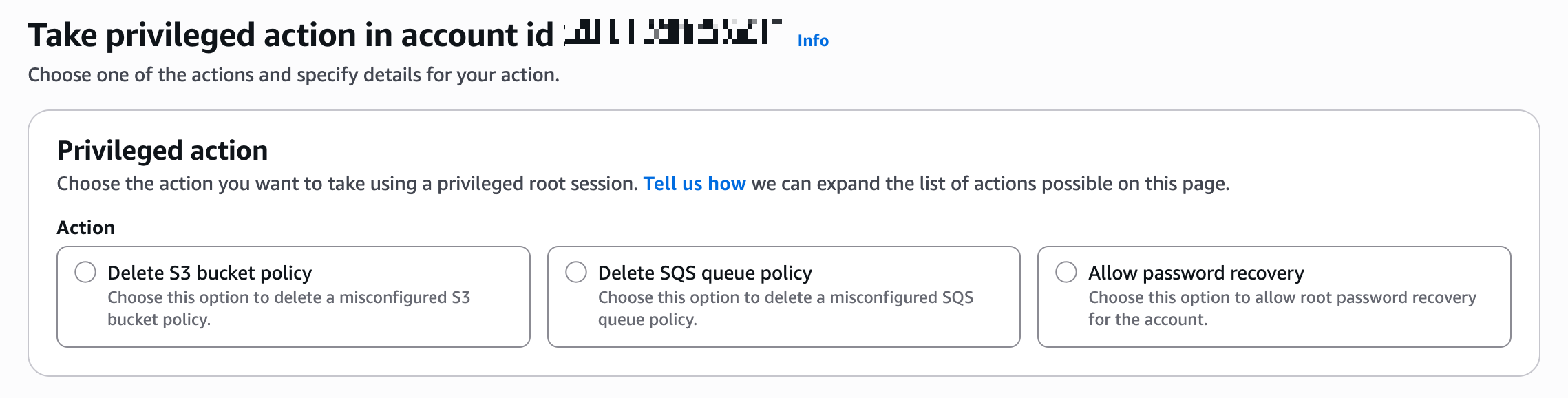
Delete S3 bucket policy
Delete SQS queue policy
Allow password recovery
임시 루트 세션의 범위를 지정할 수 있습니다.
- policy/root-task/IAMDeleteRootUserCredentials
루트 세션은 멤버 루트 자격 증명(콘솔 암호, 액세스 키, 서명 인증서 및 MFA 장치)을 삭제할 수 있도록 범위가 제한됩니다. - policy/root-task/IAMCreateRootUserPassword
루트 세션은 멤버 루트 로그인 프로필 생성을 허용하도록 범위가 지정됩니다. - policy/root-task/IAMAuditRootUserCredentials
루트 세션은 루트 자격 증명을 검토하도록 범위가 지정됩니다. - policy/root-task/S3UnlockBucketPolicy
루트 세션은 S3 버킷 정책을 삭제할 수 있도록 범위가 지정됩니다. - policy/root-task/SQSUnlockQueuePolicy
루트 세션은 SQS 큐 리소스 정책을 삭제할 수 있도록 범위가 지정됩니다.
3.3.3 Permission Set 계정 할당
생성한 Permission Set을 대상 계정(Management Account 또는 Delegated Admin 계정)에 할당합니다.
- 경로: IAM Identity Center → AWS accounts → 대상 계정 선택 → Assign users or groups
| 단계 | 내용 |
| Step 1. Users and groups | Break Glass 담당자 사용자 또는 그룹 선택 |
| Step 2. Permission sets | BreakGlassAssumeRoot 선택 |
| Step 3. Review and submit | 확인 후 Submit |
Step 1 - Users and groups: Break Glass 담당자 사용자 또는 그룹 선택
- Audit 계정에 로그인하는 IAM Identity Center 사용자/그룹이 실제로 sts:AssumeRoot API를 호출할 수 있도록 IAM 권한을 부여하는 것 (Audit 계정에 로그인하는 사람에게 AssumeRoot 실행 권한 부여)
Step 2 - Permission sets: BreakGlassAssumeRoot 선택
Step 3 - Review and submit: 내용 확인 후 Submit
4. 사용 절차
4.1 콘솔에서 Take Privileged Action 수행
1. Access Portal URL에 접속하여 SSO 로그인
- Access Portal URL: IAM Identity Center > Dashboard > Settings summary > AWS access portal URL (형식: https://d-xxxxxxxxxx.awsapps.com/start)
2. 대상 계정에서 BreakGlassAssumeRoot Permission Set으로 Management Console 접근
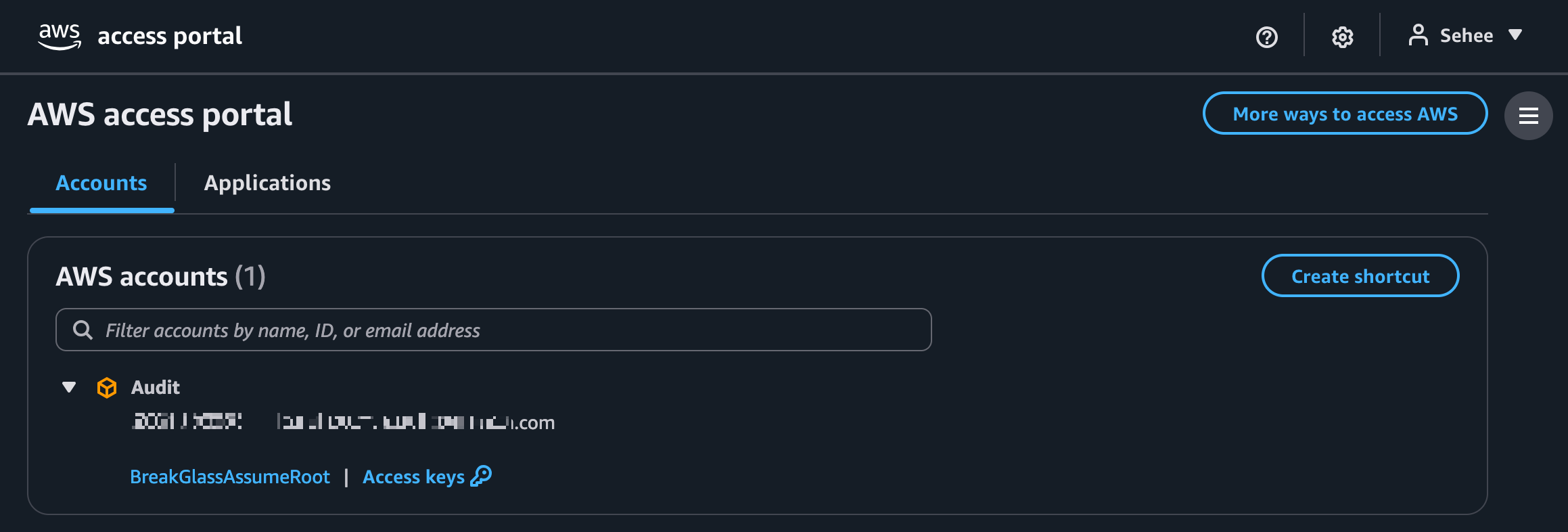
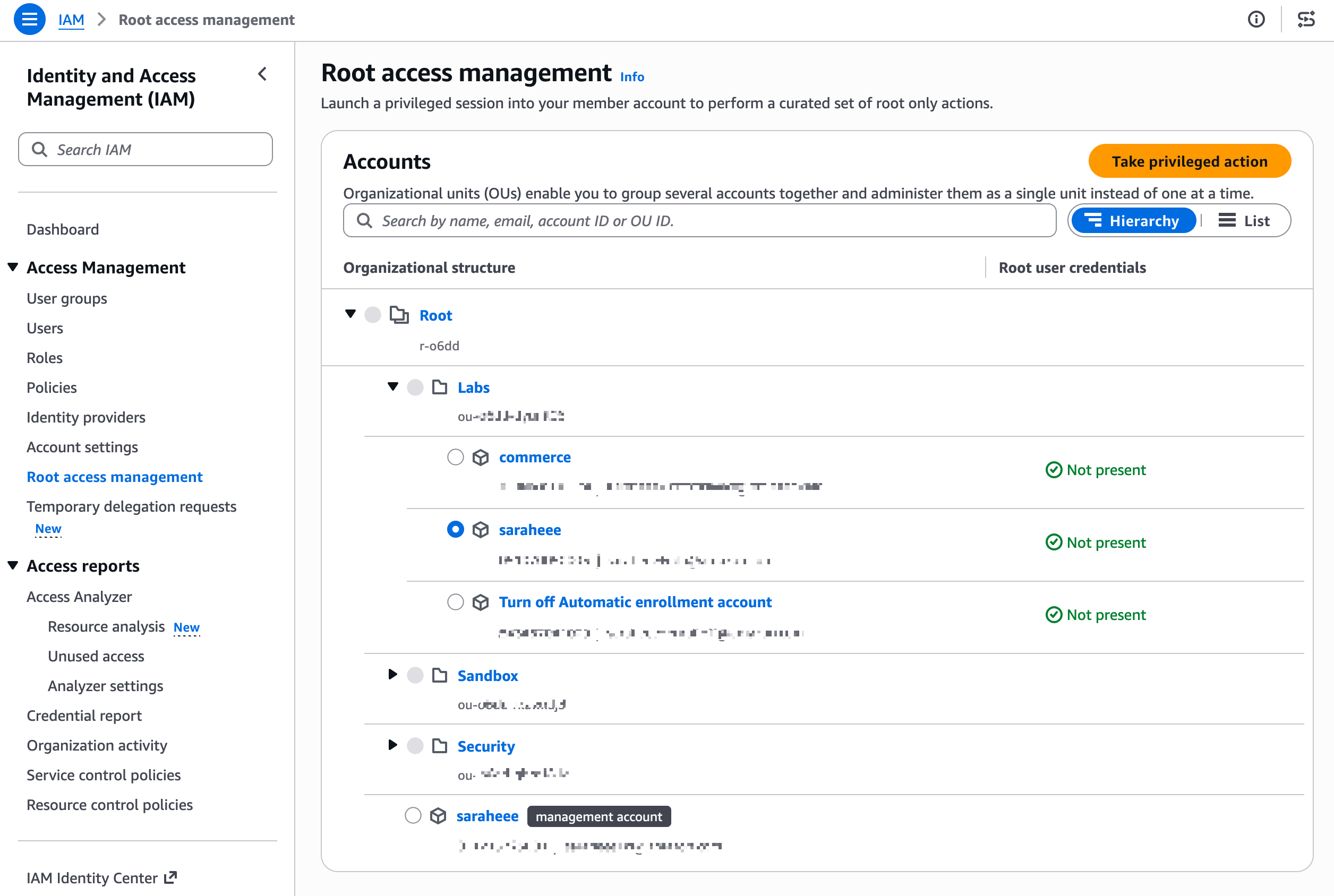
3. IAM > Access Management > Root access management > Organizational structure에서 대상 멤버 계정 선택
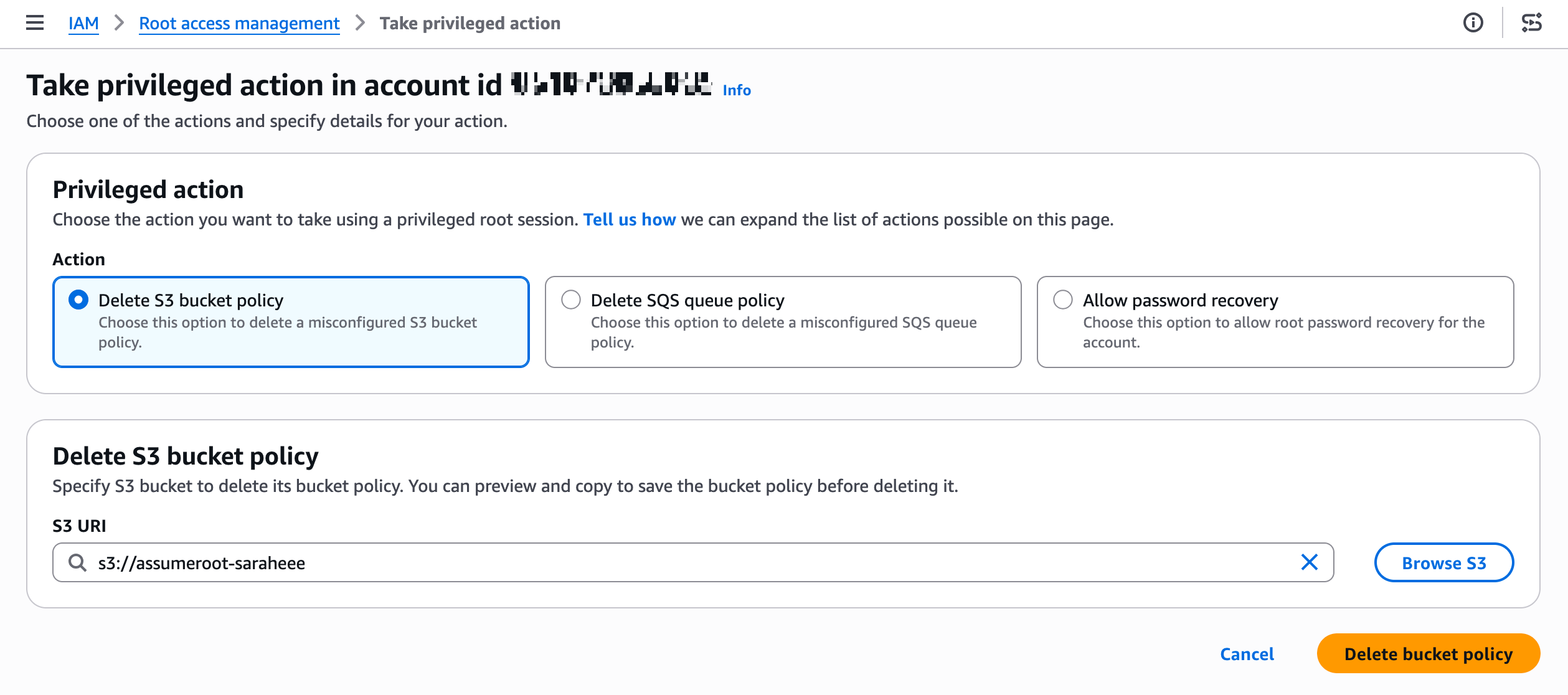
4. Take privileged action 클릭 후 수행할 작업 선택:
- Delete S3 bucket policy
- Delete SQS queue policy
- Allow password recovery
4.2 CLI에서 AssumeRoot 수행 (참고)
콘솔 대신 CLI로 수행하는 경우의 절차입니다:
# 1. AssumeRoot 호출하여 임시 자격증명 획득
aws sts assume-root \\
  --target-principal <멤버-계정-ID> \\
  --task-policy-arn arn:aws:iam::aws:policy/root-task/S3UnlockBucketPolicy \\
  --duration-seconds 900

# 2. 발급받은 임시 자격증명 설정
export AWS_ACCESS_KEY_ID="발급받은값"
export AWS_SECRET_ACCESS_KEY="발급받은값"
export AWS_SESSION_TOKEN="발급받은값"

# 3. Root 세션으로 작업 수행 (예: S3 버킷 정책 삭제)
aws s3api delete-bucket-policy --bucket <버킷명>

# 4. 임시 자격증명 해제
unset AWS_ACCESS_KEY_ID AWS_SECRET_ACCESS_KEY AWS_SESSION_TOKEN
5. 테스트 시나리오
5.1 S3 버킷 정책 잠금 해제 테스트
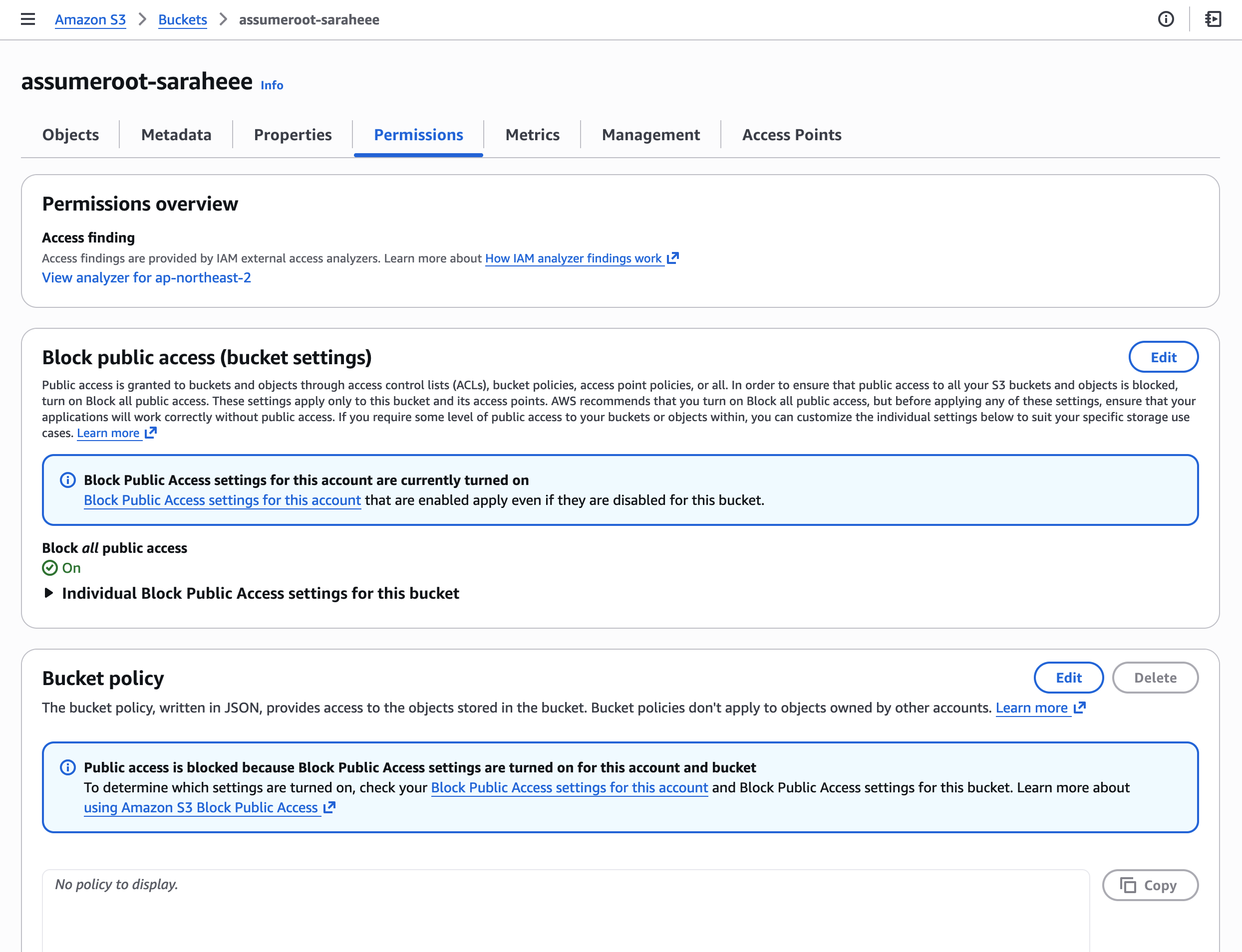
Step 1. S3 버킷 생성/조회 (멤버 계정)
멤버 계정에서 테스트용 S3 버킷을 생성합니다.
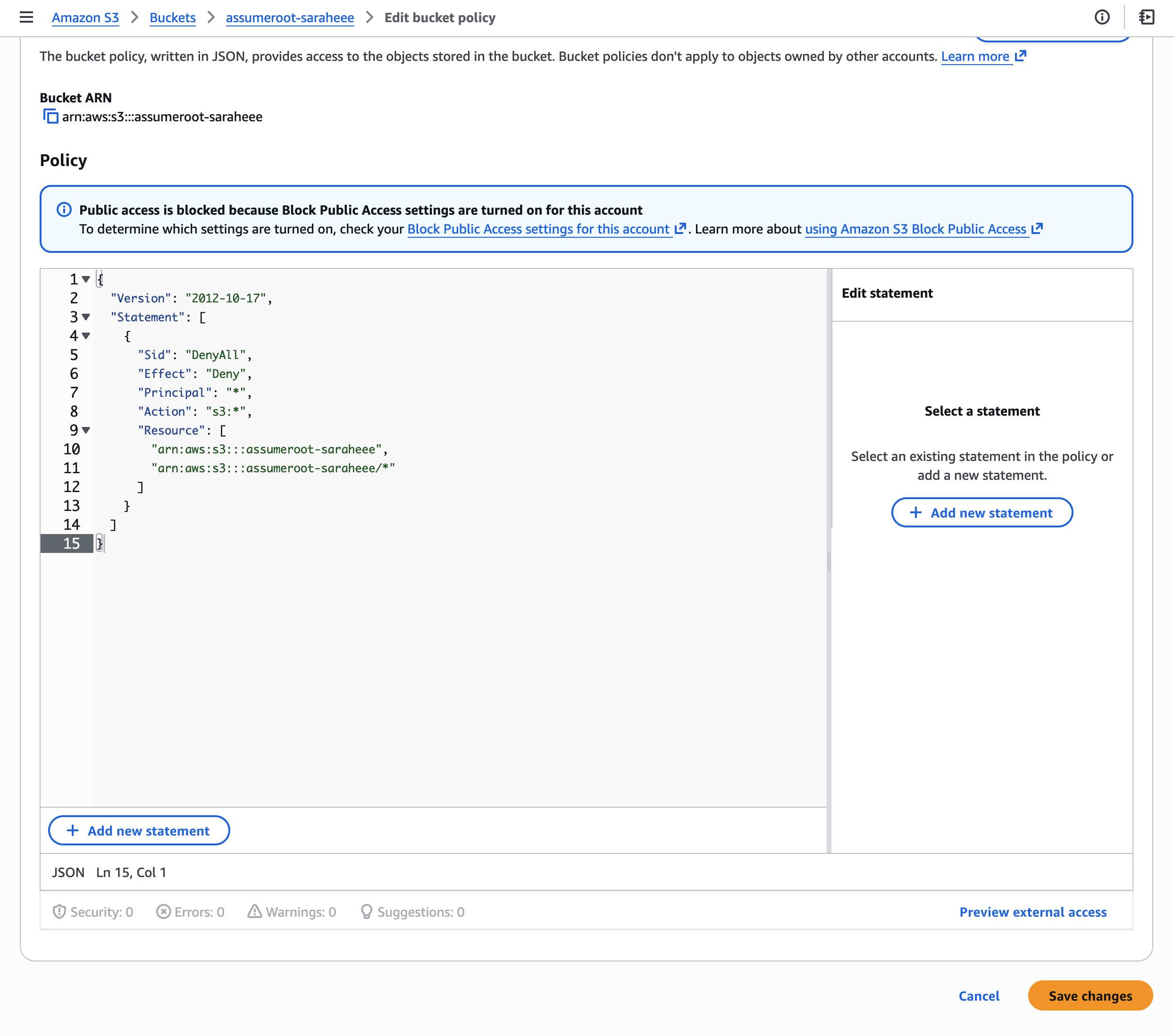
Step 2. 잠금 버킷 정책 적용 (멤버 계정)
모든 Principal의 접근을 차단하는 Deny 정책을 적용합니다:
{
  "Version": "2012-10-17",
  "Statement": [
    {
      "Sid": "DenyAll",
      "Effect": "Deny",
      "Principal": "*",
      "Action": "s3:*",
      "Resource": [
        "arn:aws:s3:::assumeroot-saraheee",
        "arn:aws:s3:::assumeroot-saraheee/*"
      ]
    }
  ]
}
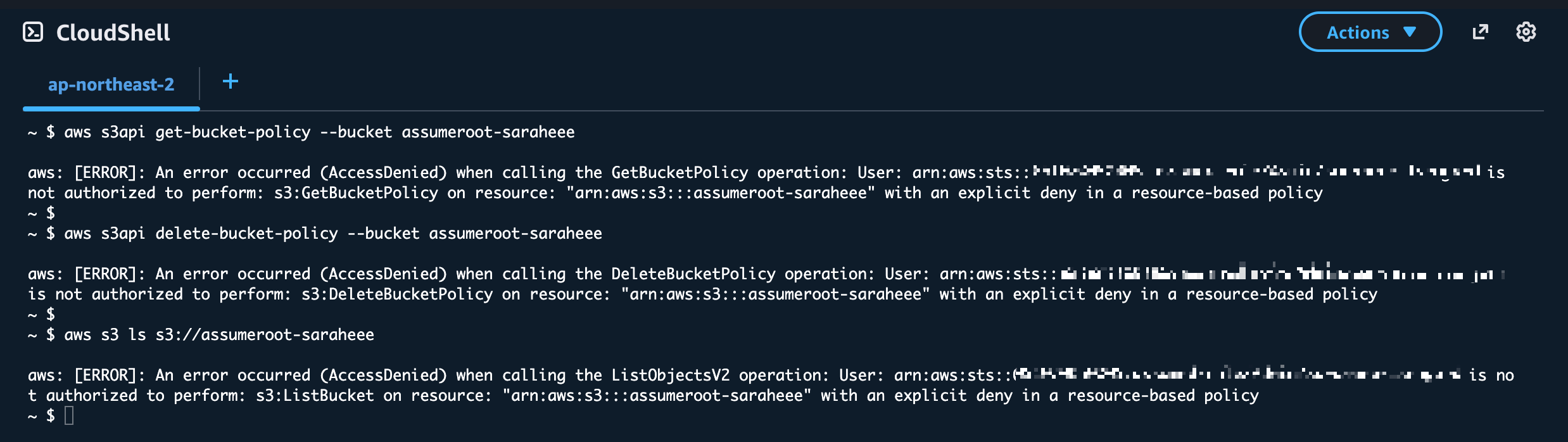
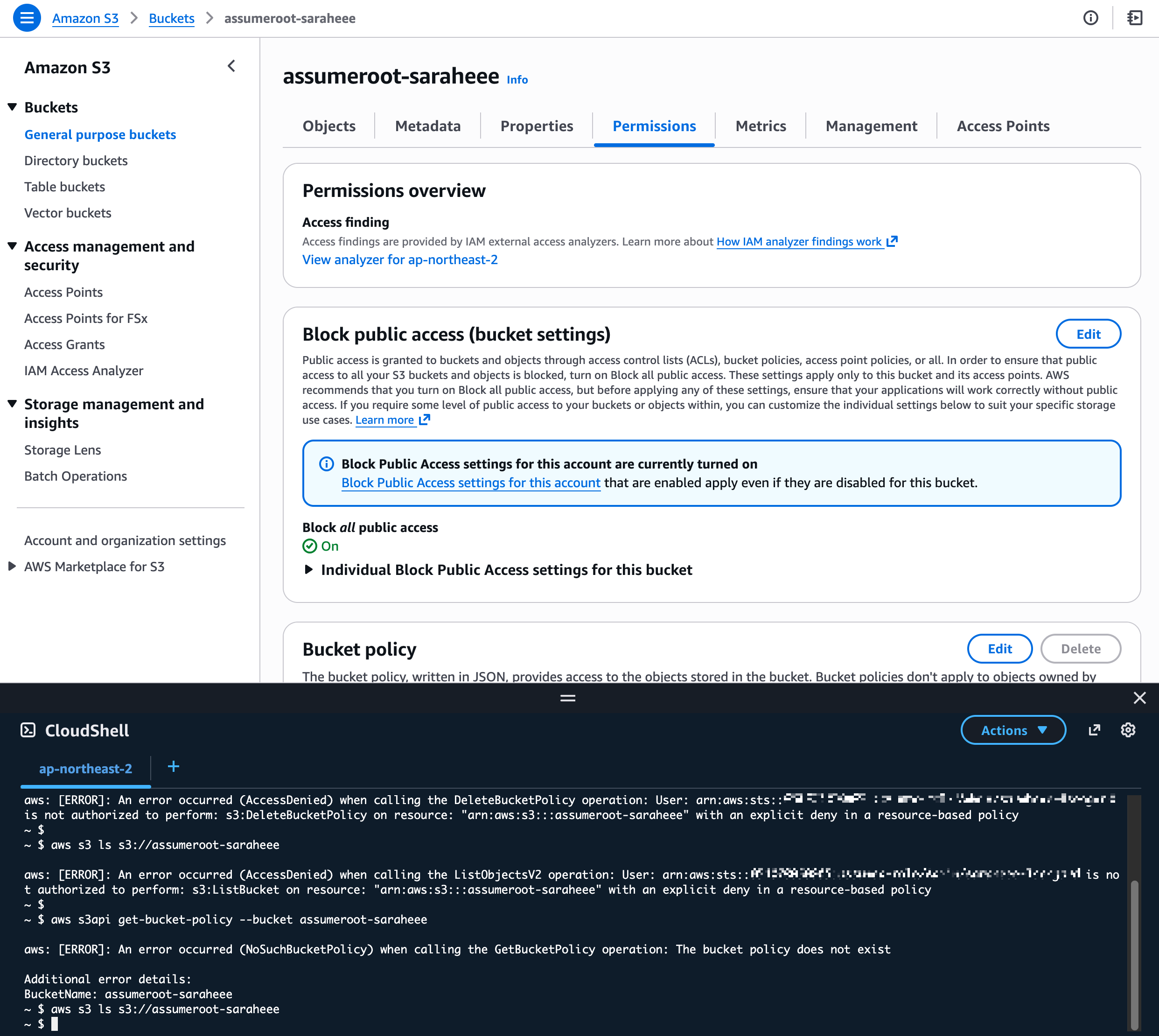
Step 3. 잠금 확인 (멤버 계정)
버킷 소유자 포함 모든 IAM 자격증명으로 접근이 차단되었는지 확인합니다:
# 버킷 정책 조회 시도 → Access Denied
aws s3api get-bucket-policy --bucket assumeroot-saraheee

# 버킷 정책 삭제 시도 → Access Denied
aws s3api delete-bucket-policy --bucket assumeroot-saraheee

# 오브젝트 목록 조회 시도 → Access Denied
aws s3 ls s3://assumeroot-saraheee

Step 4. Task Privileged Action 수행 (관리/위임 계정)
관리 계정(또는 Delegated Admin 계정)의 콘솔에서 Root access management로 이동하여 Take privileged action을 수행합니다.
CLI 사용 시에는 sts:AssumeRoot API를 직접 호출합니다. (4.2절 참고)
Step 5. S3 버킷 정책 삭제 (Root 세션)
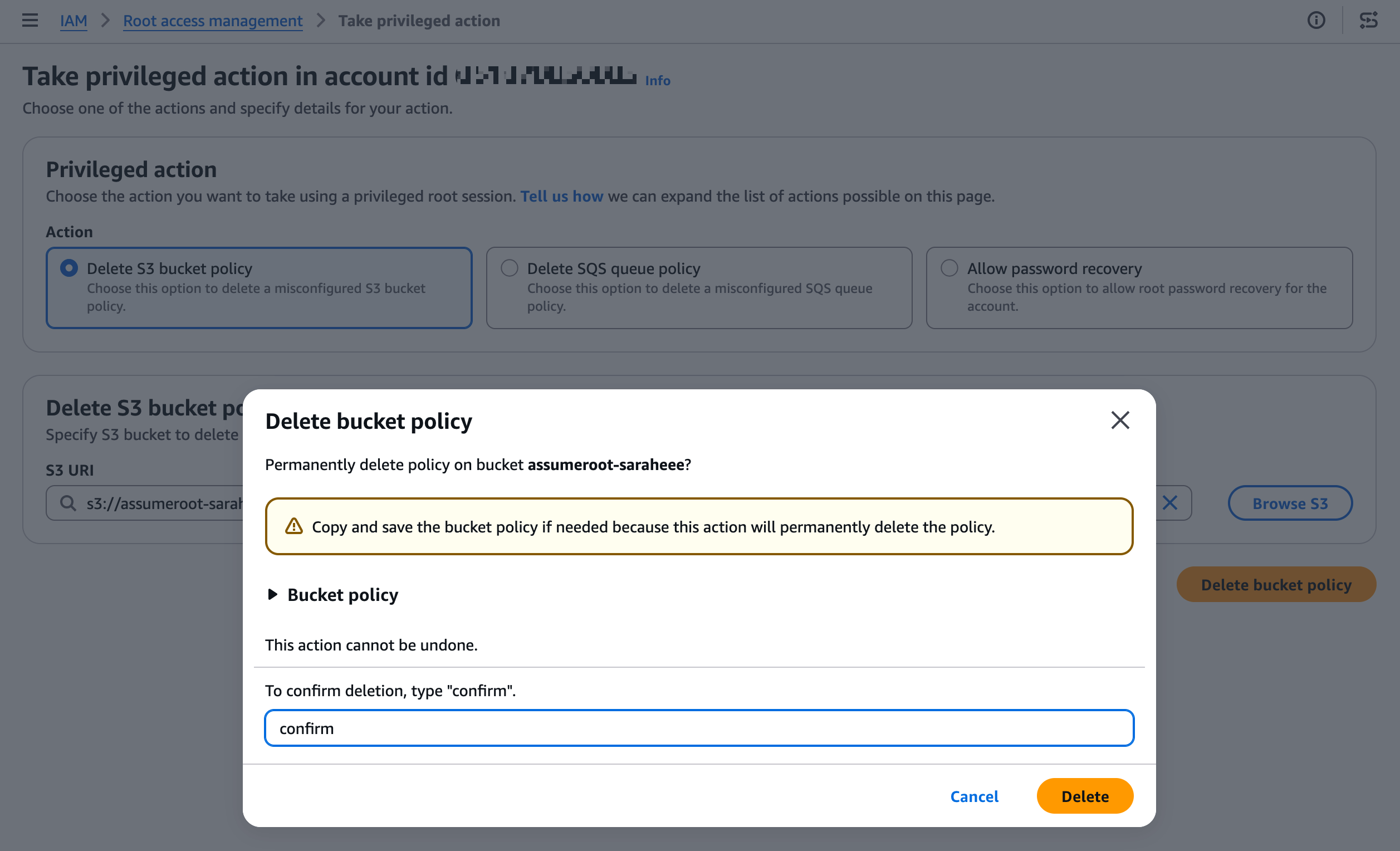
Delete S3 bucket policy 작업을 선택하고, 잠긴 버킷을 지정하여 정책을 삭제합니다.

Step 6. 정상 접근 복구 확인 (멤버 계정)
버킷 정책 삭제 후, 멤버 계정에서 다시 정상 접근이 가능한지 확인합니다.
5.2 SQS 큐 정책 잠금 해제 테스트
Step 1. SQS 큐 생성 (멤버 계정)
멤버 계정에서 테스트용 SQS 큐를 생성합니다.

Step 2. 잠금 큐 정책 적용 (멤버 계정)
모든 Principal의 접근을 차단하는 Deny 정책을 적용합니다:
{
  "Version": "2012-10-17",
  "Statement": [
    {
      "Sid": "DenyAll",
      "Effect": "Deny",
      "Principal": "*",
      "Action": "SQS:*",
      "Resource": "arn:aws:sqs:ap-northeast-2:xxxxxxxxxxxx:assumeroot-saraheee"
    }
  ]
}
Step 3. 잠금 확인 (멤버 계정)
메시지 송수신 및 큐 정책 변경이 차단되었는지 확인합니다:
- 참고: 수 분 소요
# 메시지 전송 시도
aws sqs send-message  --queue-url <https://sqs.ap-northeast-2.amazonaws.com/xxxxxxxxxxxx/assumeroot-saraheee> --message-body "test"

# 큐 속성 조회 시도
aws sqs get-queue-attributes --queue-url <https://sqs.ap-northeast-2.amazonaws.com/xxxxxxxxxxxx/assumeroot-saraheee> --attribute-names All

# 큐 정책 변경 시도 (빈 정책으로 삭제 시도)
aws sqs set-queue-attributes --queue-url <https://sqs.ap-northeast-2.amazonaws.com/xxxxxxxxxxxx/assumeroot-saraheee> --attributes '{"Policy": ""}'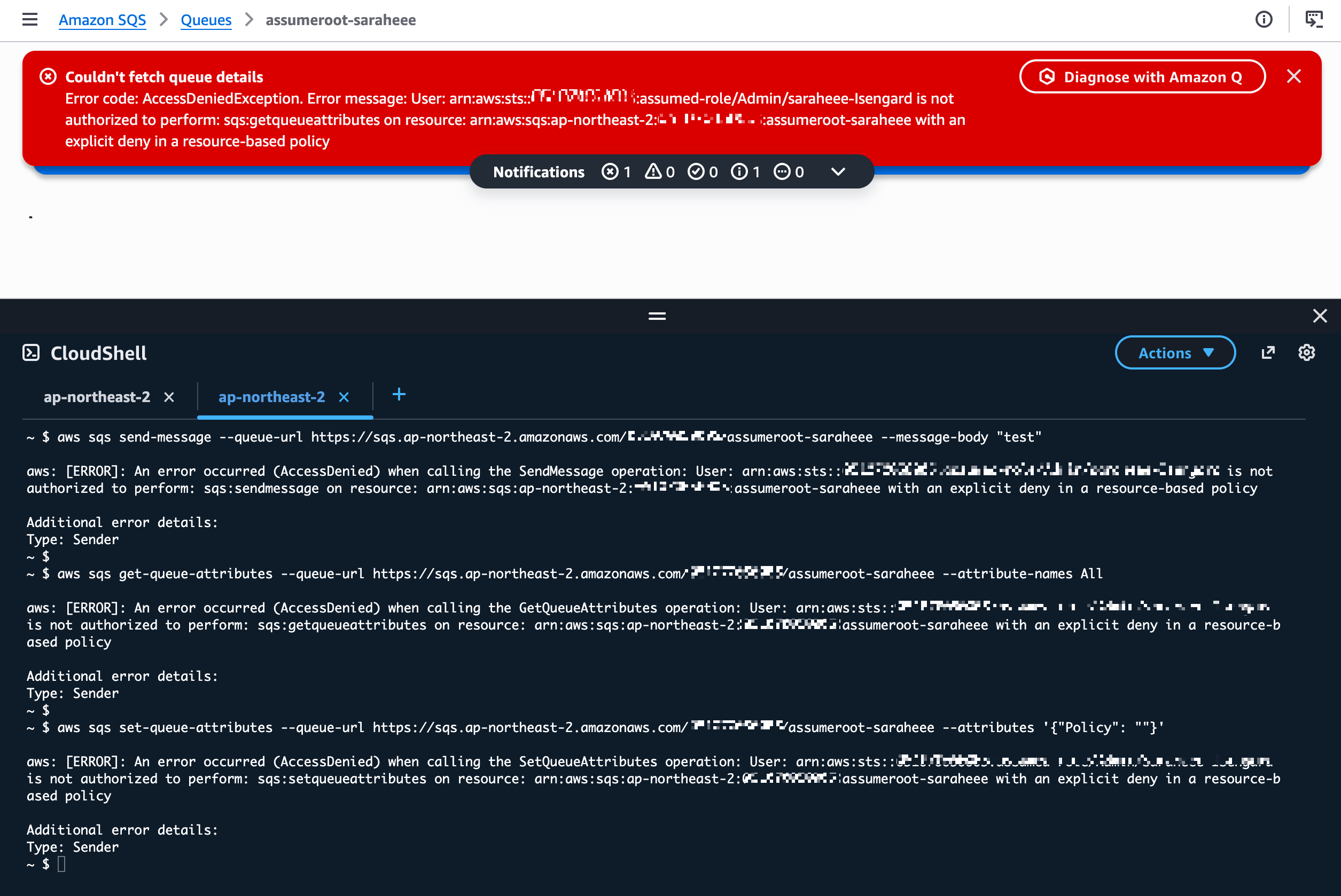
Step 4. Take Privileged Action 수행 (관리/위임 계정)
관리 계정(또는 Delegated Admin 계정)의 콘솔에서 Root access management로 이동하여 Take privileged action을 수행합니다.
CLI 사용 시에는 sts:AssumeRoot API를 직접 호출합니다. (4.2절 참고)
Step 5. SQS 큐 정책 삭제 (Root 세션)
Delete SQS queue policy 작업을 선택하고, 잠긴 큐의 ARN을 지정하여 정책을 삭제합니다:
- SQS Queue ARN: arn:aws:sqs:ap-northeast-2:xxxxxxxxxxxx:assumeroot-saraheee

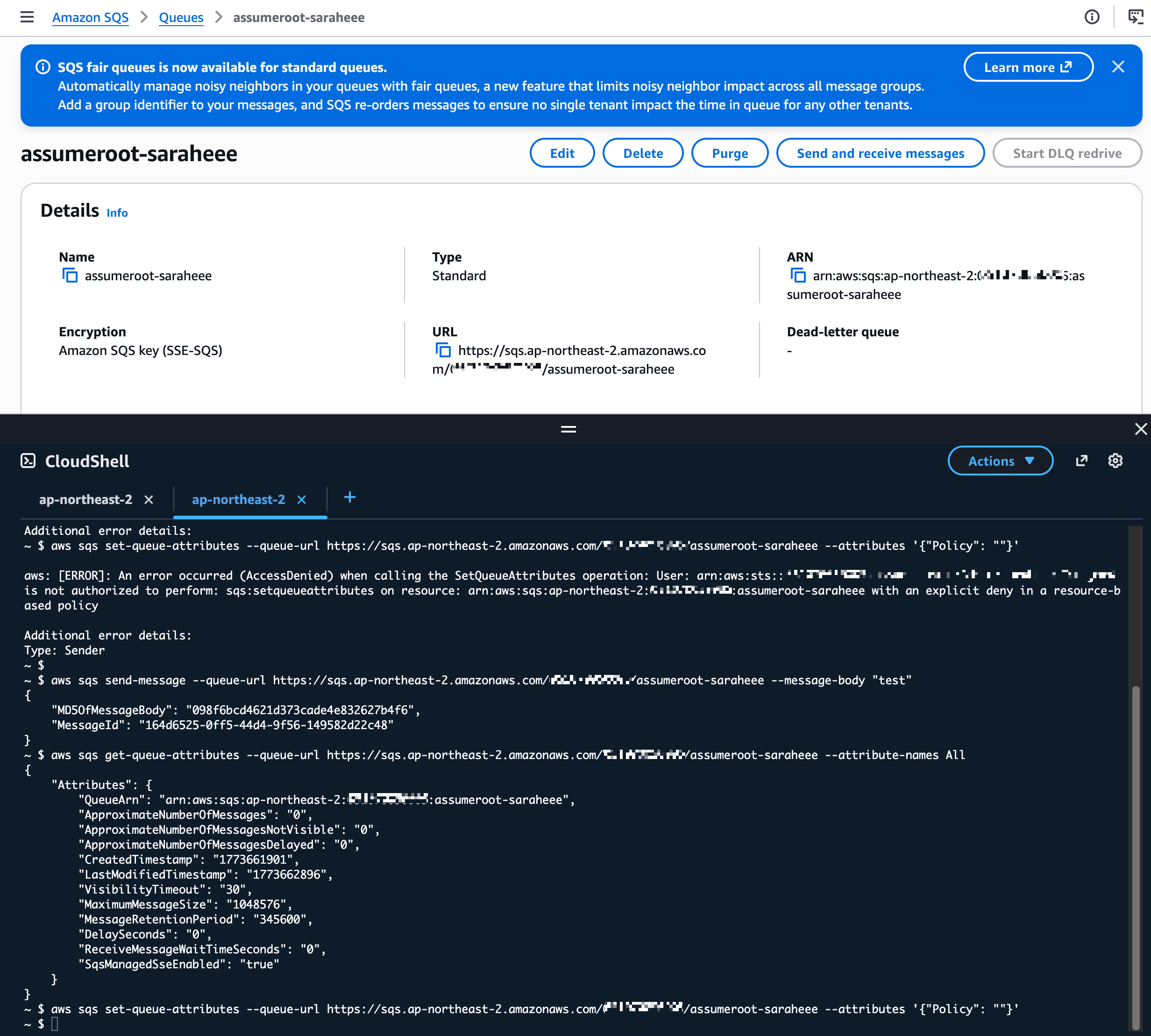
Step 6. 복구 확인 (멤버 계정)
큐 정책 삭제 후, 멤버 계정에서 다시 정상 접근이 가능한지 확인합니다:
6. Task Policy 상세
| Task Policy ARN | 허용 작업 | 대상 리소스 |
| arn:aws:iam::aws:policy/root-task/S3UnlockBucketPolicy | S3 버킷 정책 삭제 | 대상 멤버 계정의 S3 버킷 |
| arn:aws:iam::aws:policy/root-task/SQSUnlockQueuePolicy | SQS 큐 리소스 정책 삭제 | 대상 멤버 계정의 SQS 큐 |
| arn:aws:iam::aws:policy/root-task/IAMDeleteRootUserCredentials | Root 비밀번호, 액세스 키, 서명 인증서, MFA 삭제 | 대상 멤버 계정의 Root 자격증명 |
| arn:aws:iam::aws:policy/root-task/IAMCreateRootUserPassword | Root 로그인 프로필(비밀번호) 생성 | 대상 멤버 계정의 Root 로그인 프로필 |
| arn:aws:iam::aws:policy/root-task/IAMAuditRootUserCredentials | Root 자격증명 현황 조회 | 대상 멤버 계정의 Root 자격증명 |
Appendix
구성 시 발생 가능한 권한 부족 오류 및 해결
(참고) 권한 부족 1.

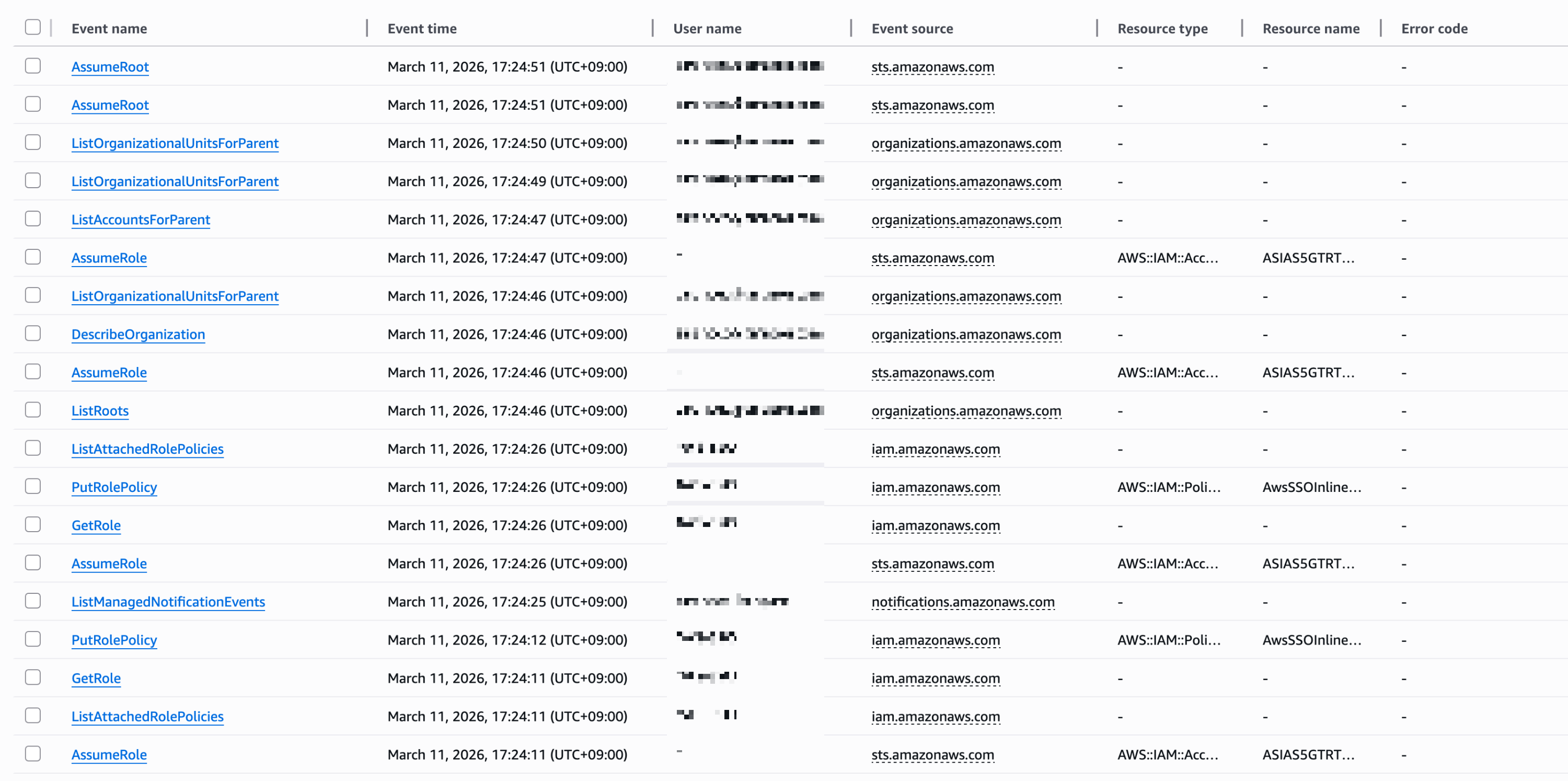
CloudTrail Event history


- organizations:ListDelegatedAdministrators
- organizations:ListAWSServiceAccessForOrganization
- sso:DescribeRegisteredRegions
- organizations:DescribeOrganization
- ec2:DescribeRegions
로그 에러
"errorMessage": "User: arn:aws:sts::xxxxxxxxxxxx:assumed-role/AWSReservedSSO_BreakGlassAssumeRoot_xxxxxxxxxxxxxxxx/saraheee@email.com is not authorized to perform: organizations:DescribeOrganization on resource: * because no identity-based policy allows the organizations:DescribeOrganization action",(참고) 권한 부족 2.

We couldn't load the root of the organization.
You don't have permissions to see this resource, because the management account has not granted you the permissions to view accounts.
CloudTrail Event history

로그 에러
"errorMessage": "User: arn:aws:sts::xxxxxxxxxxxx:assumed-role/AWSReservedSSO_BreakGlassAssumeRoot_xxxxxxxxxxxxxxxx/saraheee@email.com is not authorized to perform: iam:GetOutboundWebIdentityFederationInfo on resource: * because no identity-based policy allows the iam:GetOutboundWebIdentityFederationInfo action",- organizations:DescribeOrganization
- organizations:ListRoots
- sso:ListInstances
- iam:ListSTSRegionalEndpointsStatus
- iam:GetOutboundWebIdentityFederationInfo
(참고) 권한 부족 3.
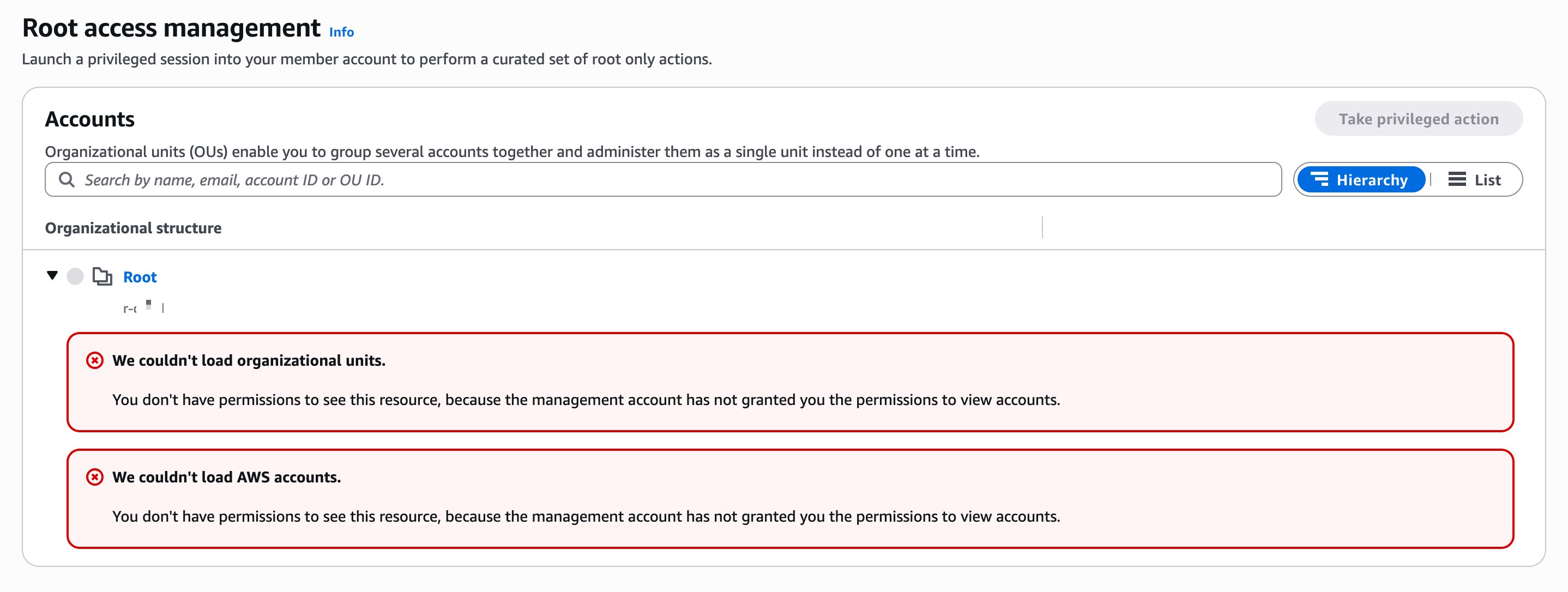
We couldn't load organizational units.
You don't have permissions to see this resource, because the management account has not granted you the permissions to view accounts.
CloudTrail Event history

- iam:GetAccountSummary
- iam:ListAccountAliases
- account:GetAccountInformation
- iam:ListOrganizationsFeatures
- organizations:ListAccountsForParent
- organizations:ListOrganizationalUnitsForParent
조회 완료
'Networking > AWS' 카테고리의 다른 글
| Control Tower account (0) | 2026.04.07 |
|---|---|
| Enable AWS Control Tower (0) | 2026.02.10 |
| [AWS] CloudFormation Workshop#01 - template and stack (0) | 2025.11.20 |
| AWS certificate (0) | 2025.11.03 |
| [AWS] Route53 S2S VPN (0) | 2025.10.29 |