728x90
반응형

VPC 엔드포인트 사용의 대체 방법은 관리형 인스턴스에서 아웃바운드 인터넷 액세스를 허용하는 것이다. 이 경우 관리형 인스턴스는 다음 엔드포인트에 대한 HTTPS(포트 443) 아웃바운드 트래픽도 허용해야 한다.

  • ssm.region.amazonaws.com

SSM API 통신 (컨트롤 플레인)

SSM Agent가 SSM 서비스에 자기 자신을 등록(Register) 하고, 파라미터 조회, 명령 결과 보고 등 API 호출

  • ssmmessages.region.amazonaws.com

Session Manager 데이터 채널 (WebSocket)

Session Manager로 셸 접속할 때의 실시간 양방향 통신 (키보드 입력 → EC2, EC2 출력 → 콘솔 화면)

  • ec2messages.region.amazonaws.com

Run Command / State Manager 메시지 채널 (Polling)

SSM Agent가 SSM 서비스를 주기적으로 폴링하여 "실행할 명령이 있나?" 확인하고 결과를 반환


728x90
728x90

'Networking > AWS' 카테고리의 다른 글

Control Tower account  (0) 2026.04.07
[Control Tower] sts:AssumeRoot (BreakGlassAssumeRoot)  (0) 2026.03.16
Enable AWS Control Tower  (0) 2026.02.10
[AWS] CloudFormation Workshop#01 - template and stack  (0) 2025.11.20
AWS certificate  (0) 2025.11.03
728x90
반응형
  • user+management@example.com - for your management account
  • user+logs@example.com - for your log archive account
  • user+audit@example.com - for your audit account
  • user+sandbox@example.com - for your sandbox account, created via the Account factory

AWS CLI v2 with IAM Identity Center

From your terminal, run the following command to sign-in to IAM Identity Center.

aws configure sso


Profile name [AWSAdministratorAccess-0112xxxxxxxx]: ManagementAccount

aws sts get-caller-identity --query 'Account' --output text --profile ManagementAccount


Control catalog

SCP (Service Control Policy), RCP (Resource Control Policy)

SCP: 모든 IAM 주체(사용자, 역할)에게 영향

RCP: 리소스 레벨 (지원 리소스: S3 버킷, Lambda 함수)


Account Factory에서 Default VPC 설정 수행 시 

Control Tower 관리 CloudFormation Stack 확인

- Account Baseline, Security Baseline이 기본으로 설정됨, CT 관리 계정에서 CloudFormation StackSet으로 관리됨


References:

AWS Control Tower Guide, https://catalog.workshops.aws/control-tower/en-US/prerequisites/email-addresses


AWS Control Tower Workshop

AWS Control Tower Workshop Studio

catalog.workshops.aws


728x90
728x90

'Networking > AWS' 카테고리의 다른 글

SSM 통신을 위한 VPC endpoint  (0) 2026.04.10
[Control Tower] sts:AssumeRoot (BreakGlassAssumeRoot)  (0) 2026.03.16
Enable AWS Control Tower  (0) 2026.02.10
[AWS] CloudFormation Workshop#01 - template and stack  (0) 2025.11.20
AWS certificate  (0) 2025.11.03
728x90
반응형

1. 개요

AWS Organizations 환경에서 sts:AssumeRoot는 Management Account 또는 Delegated Admin 계정에서 멤버 계정의 Root 수준 임시 세션을 획득하여, 사전 정의된 Task Policy 범위 내에서 특권 작업(Privileged Action)을 수행할 수 있는 기능입니다.

이를 통해 멤버 계정별로 Root 자격증명(비밀번호, 액세스 키, MFA)을 개별 관리하지 않고도, 중앙에서 Root 수준의 긴급 조치를 수행할 수 있습니다.

2. AssumeRoot가 필요한 케이스

2.1 S3 버킷 정책 잠금 해제

항목 내용
상황 잘못된 S3 버킷 정책 적용으로 모든 Principal의 접근이 차단됨 (본인 포함 Deny)
증상 버킷 소유자 포함 어떤 IAM 자격증명으로도 버킷 정책 수정/삭제 불가
Task Policy S3UnlockBucketPolicy
수행 작업 잠긴 S3 버킷 정책 삭제

예시 시나리오: 버킷 정책에 "Effect": "Deny", "Principal": "*" 를 잘못 적용하여, 관리자 포함 전체 접근이 차단된 경우. 일반 IAM 권한으로는 해당 정책을 수정할 수 없으며, Root 세션으로만 정책 삭제 가능

2.2 SQS 큐 정책 잠금 해제

항목 내용
상황 잘못된 SQS 큐 리소스 정책 적용으로 큐 접근 및 정책 수정 불가
증상 메시지 송수신 및 큐 정책 변경 불가로 서비스 중단
Task Policy SQSUnlockQueuePolicy
수행 작업 잠긴 SQS 큐 리소스 정책 삭제

예시 시나리오: SQS 큐 정책에서 모든 Principal에 대해 Deny를 적용하여, 연동된 Lambda/EC2 등 워크로드가 메시지를 처리하지 못하고 서비스 장애가 발생한 경우

2.3 멤버 계정 Root 자격증명 삭제

항목 내용
상황 멤버 계정의 Root 자격증명(비밀번호, 액세스 키, MFA)이 유출되었거나, 보안 정책상 Root 자격증명을 제거해야 하는 경우
증상 멤버 계정 Root 로그인 가능 상태가 보안 위험으로 식별됨
Task Policy IAMDeleteRootUserCredentials
수행 작업 멤버 계정의 Root 콘솔 비밀번호, 액세스 키, 서명 인증서, MFA 디바이스 삭제

예시 시나리오: Organizations 환경에서 멤버 계정의 Root 자격증명을 중앙에서 일괄 제거하여, Root 직접 로그인을 원천 차단하고 중앙 집중식 루트 액세스만 허용하는 경우

2.4 멤버 계정 Root 비밀번호 복구

항목 내용
상황 멤버 계정에 Root로 직접 로그인이 필요하나, 비밀번호가 설정되어 있지 않거나 분실된 경우
증상 Root 이메일을 통한 비밀번호 재설정이 불가하거나 시간이 오래 소요됨
Task Policy IAMCreateRootUserPassword
수행 작업 멤버 계정의 Root 로그인 프로필(비밀번호) 생성

예시 시나리오: 특정 멤버 계정에서 Root 수준의 콘솔 접근이 필요하나(예: 특정 서비스의 Root-only 설정 변경), Root 비밀번호가 설정되어 있지 않은 경우 임시로 비밀번호를 생성하여 접근

2.5 Root 자격증명 현황 감사

항목 내용
상황 멤버 계정의 Root 자격증명 상태(비밀번호 존재 여부, 액세스 키 활성 여부, MFA 등록 여부)를 중앙에서 확인해야 하는 경우
증상 보안 감사 또는 컴플라이언스 점검 시 각 계정별 Root 자격증명 현황 파악 필요
Task Policy IAMAuditRootUserCredentials
수행 작업 멤버 계정의 Root 자격증명 현황 조회

예시 시나리오: 분기별 보안 감사에서 전체 멤버 계정의 Root 자격증명이 제거되었는지 일괄 확인. 자격증명이 남아있는 계정에 대해 IAMDeleteRootUserCredentials로 후속 조치

2.6 케이스 요약

Task Policy 사용 케이스
S3UnlockBucketPolicy S3 버킷 정책 잠금으로 인한 데이터 접근 불가
SQSUnlockQueuePolicy SQS 큐 정책 잠금으로 인한 메시지 처리 중단
IAMDeleteRootUserCredentials Root 자격증명 유출 대응 또는 보안 정책 적용
IAMCreateRootUserPassword Root 콘솔 접근 필요 시 비밀번호 복구
IAMAuditRootUserCredentials Root 자격증명 현황 감사/점검

3. 사전 구성

3.1 Root access management 활성화

Management Account에서 Root Access Management를 활성화합니다.

  • 경로: Control Tower 계정의 IAM > Access Management > Root access management > Enable

활성화 시 다음 두 가지 기능이 사용 가능합니다:

  • Root credentials management: 멤버 계정의 Root 자격증명을 중앙에서 관리(삭제/생성/감사)
  • Root sessions: 멤버 계정에 대한 Root 수준 임시 세션 획득(Take privileged action)

3.2 Delegated Admin 등록 (선택)

Management Account 외에 특정 계정(예: Audit)에서도 AssumeRoot를 수행할 수 있도록 Delegated Admin을 등록합니다. 관리자 계정 외에도, 이 회원 계정은 다른 회원 계정에 대한 중앙 집중식 루트 액세스 권한을 갖게 됩니다.

Enable 이후, Management 계정에서 Delegated Admin 등록 확인: 계정(예: Audit)이 정상적으로 등록되었는지 확인

aws organizations list-delegated-administrators --service-principal iam.amazonaws.com
  • 참고: Delegated Admin 등록 여부는 의사결정 사항. 등록하지 않는 경우 Management Account에서만 AssumeRoot 수행 가능.

기존은 아래와 같이 호출하는 IAM 자격증명에 sts:AssumeRoot 권한이 없었으나, 위임된 계정에서 접근 가능해집니다.

Access denied to : You don't have permission to perform this action.You don't have permissions to access this resource.

3.3 Permission Set 생성

AssumeRoot를 수행할 담당자에게 할당할 Permission Set을 생성합니다.

Audit 계정에서 사용하는 IAM 역할(Permission Set)에 sts:AssumeRoot 권한이 있는지 확인

  • Management 계정 콘솔 > IAM Identity Center > Permission Sets

Audit 계정에 할당된 Permission Set 선택 (해당 계정에 할당된 퍼미션셋은 AWS accounts의 structure에서 확인)

3.3.1 Create permission set

항목
Permission set type Custom permission set
Name BreakGlassAssumeRoot
Description Break Glass - sts:AssumeRoot for emergency privileged access
Session duration 1 hour (최소한으로 설정)

Step 1. Specify permission set details

Permission set type: Custom permission set

Step 2. Specify policies and permissions boundary

Inline policy

{
	"Version": "2012-10-17",
	"Statement": [
		{
			"Sid": "AllowAssumeRoot",
			"Effect": "Allow",
			"Action": "sts:AssumeRoot",
			"Resource": "*"
		},
		{
			"Sid": "AllowListAccounts",
			"Effect": "Allow",
			"Action": [
				"organizations:ListDelegatedAdministrators",
				"organizations:ListAWSServiceAccessForOrganization",
				"organizations:DescribeOrganization",
				"organizations:ListRoots",
				"organizations:ListAccountsForParent",
				"organizations:ListOrganizationalUnitsForParent",
				"ec2:DescribeRegions",
				"sso:DescribeRegisteredRegions",
				"sso:ListInstances",
				"iam:ListSTSRegionalEndpointsStatus",
				"iam:GetOutboundWebIdentityFederationInfo",
				"iam:GetAccountSummary",
				"iam:ListAccountAliases",
				"iam:ListOrganizationsFeatures",
				"account:GetAccountInformation"
			],
			"Resource": "*"
		}
	]
}
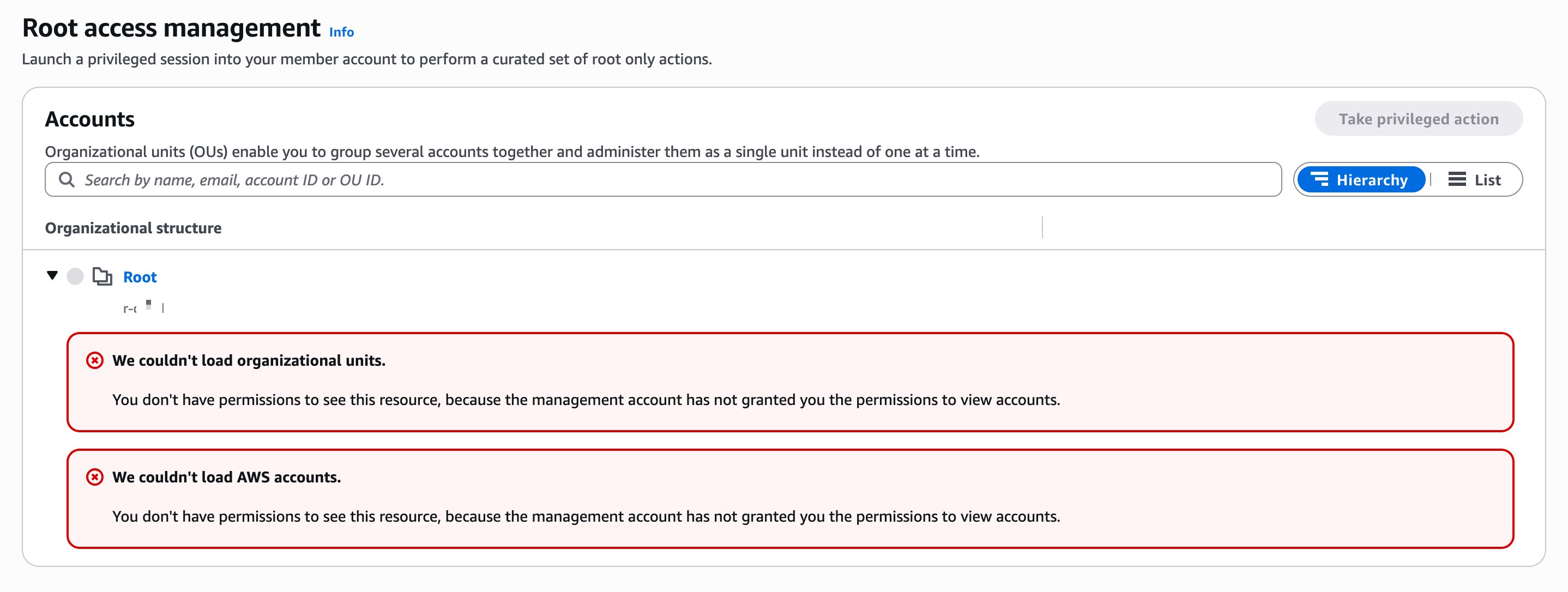
  • AllowListAccounts Statement는 콘솔에서 Root access management 화면의 조직 구조 조회 및 Take privileged action 대상 계정을 확인하기 위해 필요합니다. 이 권한이 없으면 콘솔에서 계정 목록 및 OU 구조를 로드할 수 없습니다.

Step 3. Specify permission set details

  • Permission set name: BreakGlassAssumeRoot
  • Description: Break Glass - sts:AssumeRoot for emergency privileged access
  • Session duration: 1 hour (최소한으로 설정)

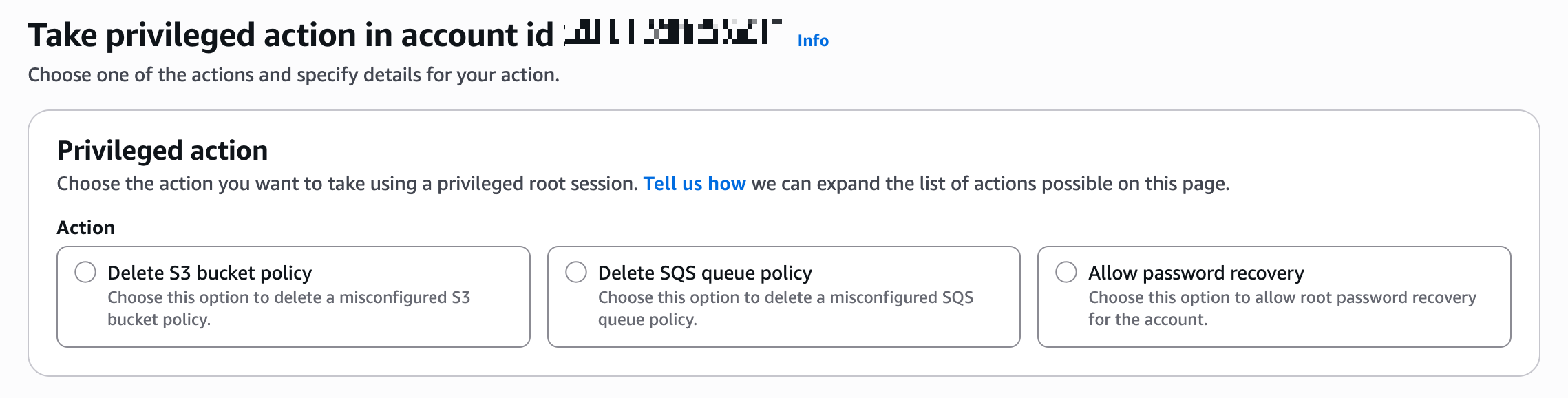
3.3.2 Take privileged action 권한 추가 할당

Delete S3 bucket policy

Delete SQS queue policy

Allow password recovery

임시 루트 세션의 범위를 지정할 수 있습니다.

  • policy/root-task/IAMDeleteRootUserCredentials
    루트 세션은 멤버 루트 자격 증명(콘솔 암호, 액세스 키, 서명 인증서 및 MFA 장치)을 삭제할 수 있도록 범위가 제한됩니다.
  • policy/root-task/IAMCreateRootUserPassword
    루트 세션은 멤버 루트 로그인 프로필 생성을 허용하도록 범위가 지정됩니다.
  • policy/root-task/IAMAuditRootUserCredentials
    루트 세션은 루트 자격 증명을 검토하도록 범위가 지정됩니다.
  • policy/root-task/S3UnlockBucketPolicy
    루트 세션은 S3 버킷 정책을 삭제할 수 있도록 범위가 지정됩니다.
  • policy/root-task/SQSUnlockQueuePolicy
    루트 세션은 SQS 큐 리소스 정책을 삭제할 수 있도록 범위가 지정됩니다.

3.3.3 Permission Set 계정 할당

생성한 Permission Set을 대상 계정(Management Account 또는 Delegated Admin 계정)에 할당합니다.

  • 경로: IAM Identity Center → AWS accounts → 대상 계정 선택 → Assign users or groups
단계 내용
Step 1. Users and groups Break Glass 담당자 사용자 또는 그룹 선택
Step 2. Permission sets BreakGlassAssumeRoot 선택
Step 3. Review and submit 확인 후 Submit


Step 1 - Users and groups: Break Glass 담당자 사용자 또는 그룹 선택

  • Audit 계정에 로그인하는 IAM Identity Center 사용자/그룹이 실제로 sts:AssumeRoot API를 호출할 수 있도록 IAM 권한을 부여하는 것 (Audit 계정에 로그인하는 사람에게 AssumeRoot 실행 권한 부여)

Step 2 - Permission sets: BreakGlassAssumeRoot 선택

Step 3 - Review and submit: 내용 확인 후 Submit

4. 사용 절차

4.1 콘솔에서 Take Privileged Action 수행

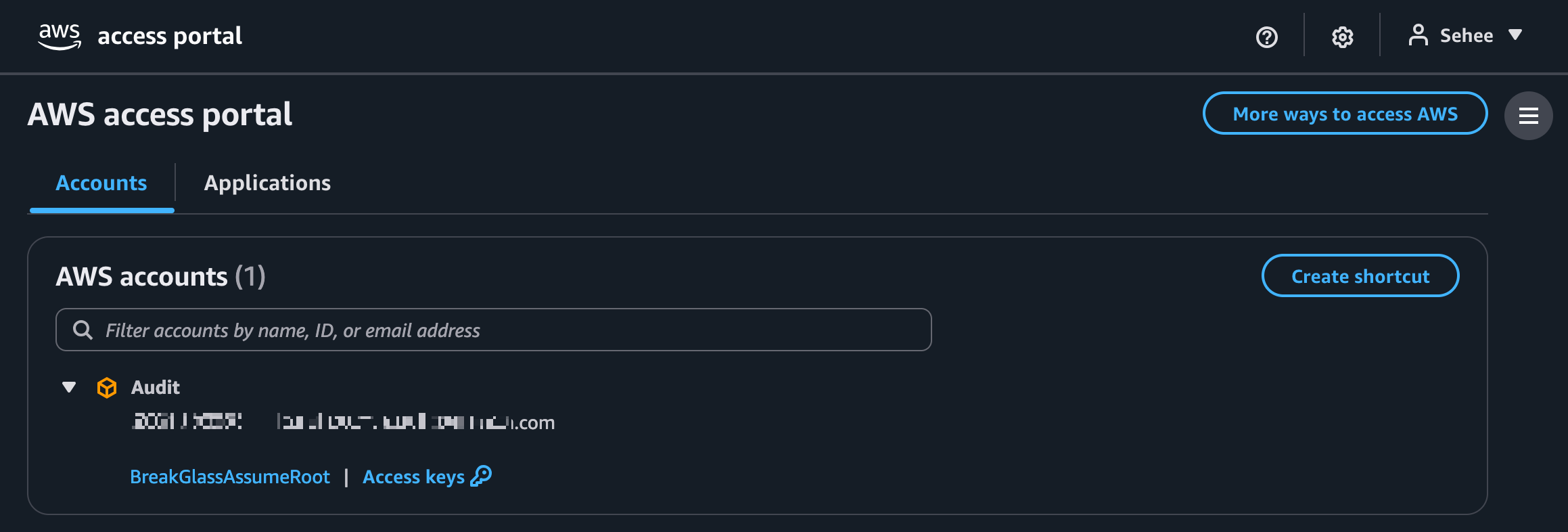
1. Access Portal URL에 접속하여 SSO 로그인

- Access Portal URL: IAM Identity Center > Dashboard > Settings summary > AWS access portal URL (형식: https://d-xxxxxxxxxx.awsapps.com/start)

2. 대상 계정에서 BreakGlassAssumeRoot Permission Set으로 Management Console 접근

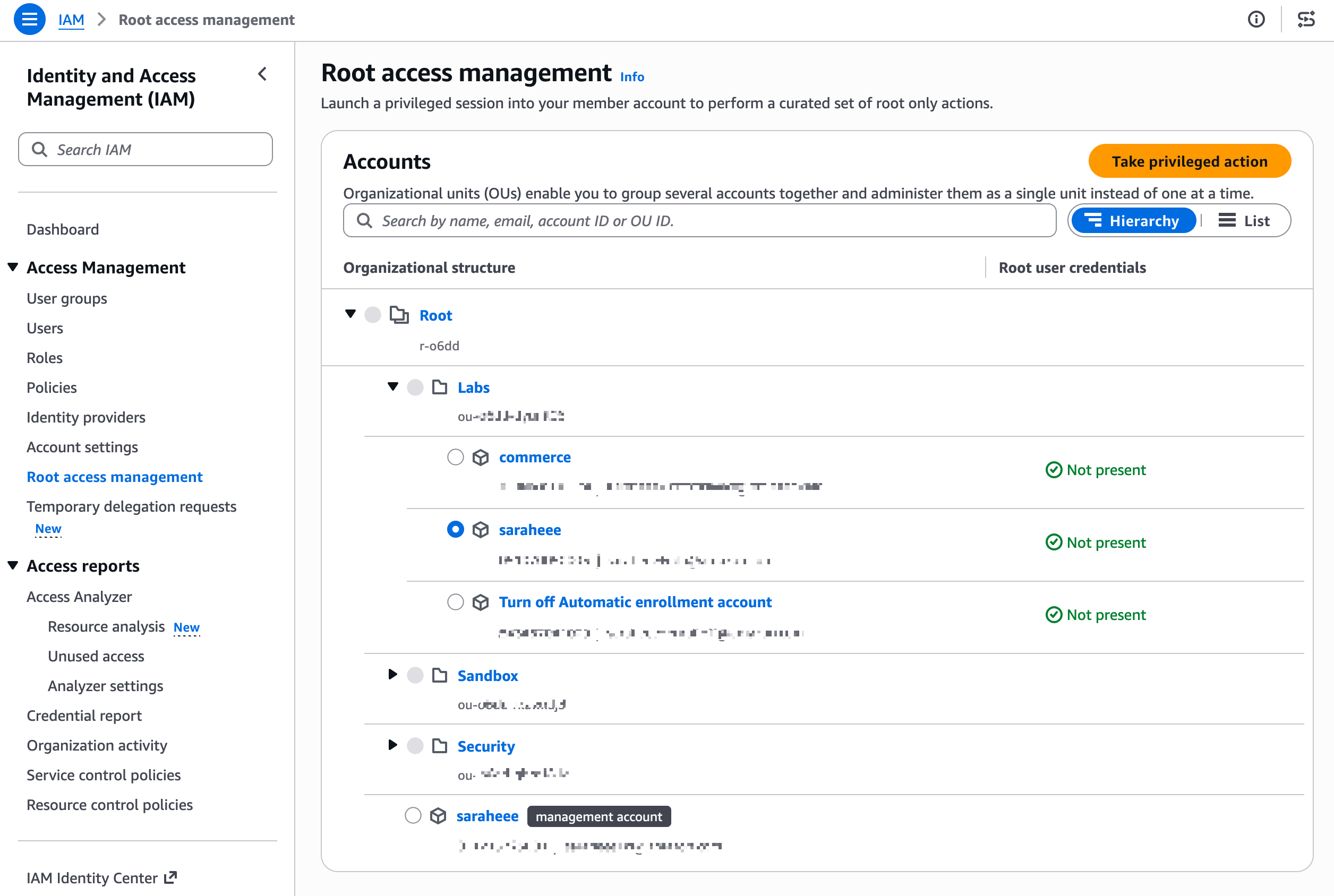
3. IAM > Access Management > Root access management > Organizational structure에서 대상 멤버 계정 선택

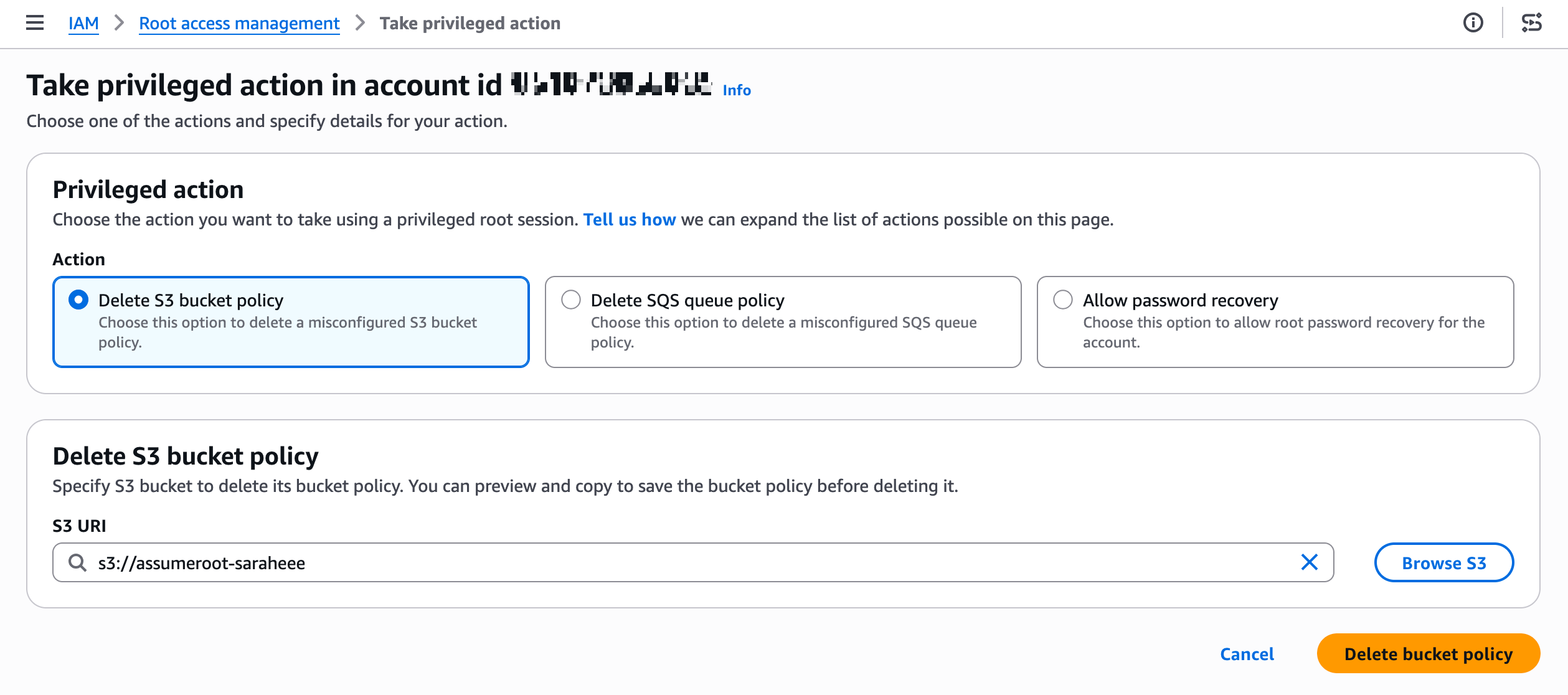
4. Take privileged action 클릭 후 수행할 작업 선택:

  • Delete S3 bucket policy
  • Delete SQS queue policy
  • Allow password recovery

4.2 CLI에서 AssumeRoot 수행 (참고)

콘솔 대신 CLI로 수행하는 경우의 절차입니다:

# 1. AssumeRoot 호출하여 임시 자격증명 획득
aws sts assume-root \\
  --target-principal <멤버-계정-ID> \\
  --task-policy-arn arn:aws:iam::aws:policy/root-task/S3UnlockBucketPolicy \\
  --duration-seconds 900

# 2. 발급받은 임시 자격증명 설정
export AWS_ACCESS_KEY_ID="발급받은값"
export AWS_SECRET_ACCESS_KEY="발급받은값"
export AWS_SESSION_TOKEN="발급받은값"

# 3. Root 세션으로 작업 수행 (예: S3 버킷 정책 삭제)
aws s3api delete-bucket-policy --bucket <버킷명>

# 4. 임시 자격증명 해제
unset AWS_ACCESS_KEY_ID AWS_SECRET_ACCESS_KEY AWS_SESSION_TOKEN

5. 테스트 시나리오

5.1 S3 버킷 정책 잠금 해제 테스트

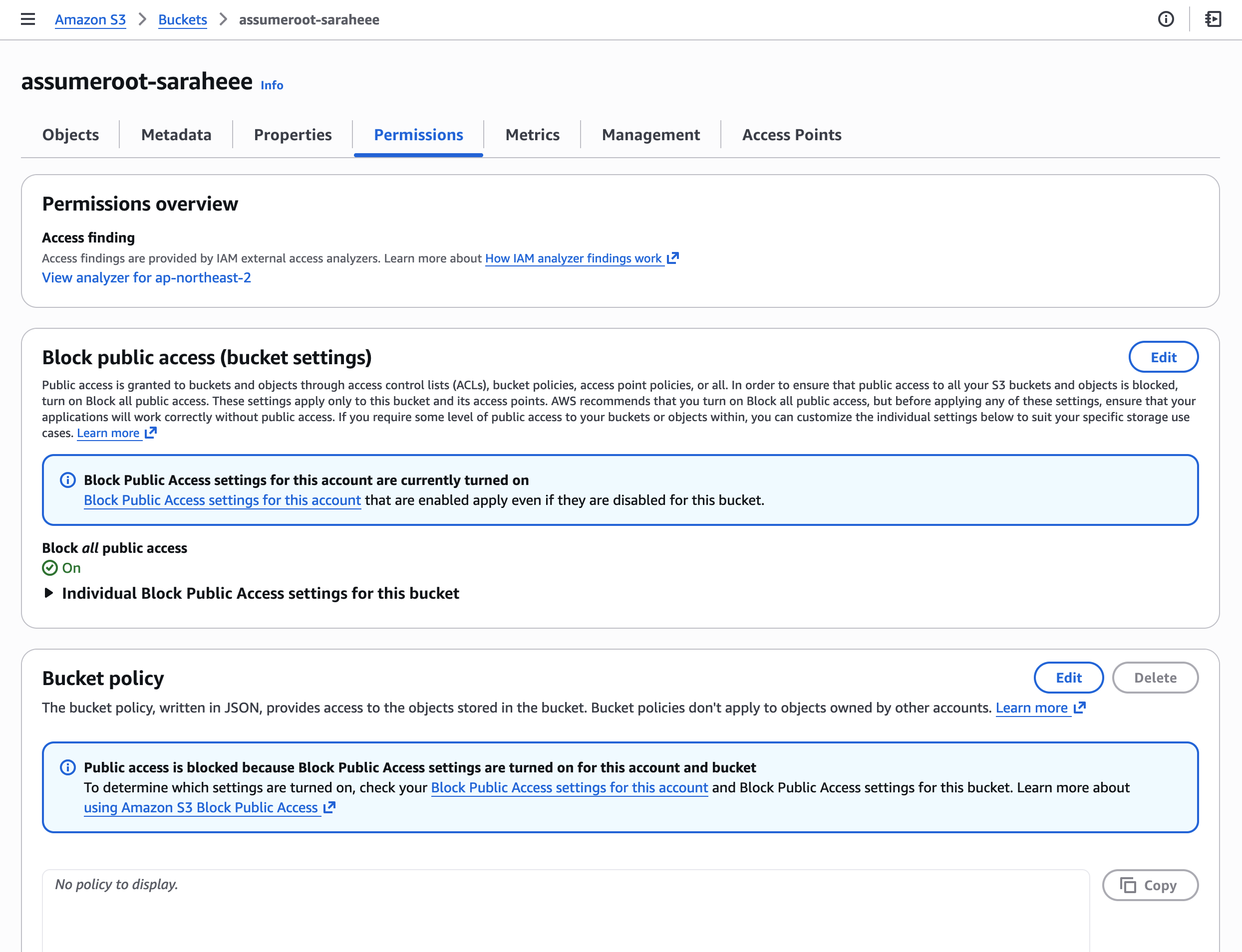
Step 1. S3 버킷 생성/조회 (멤버 계정)

멤버 계정에서 테스트용 S3 버킷을 생성합니다.

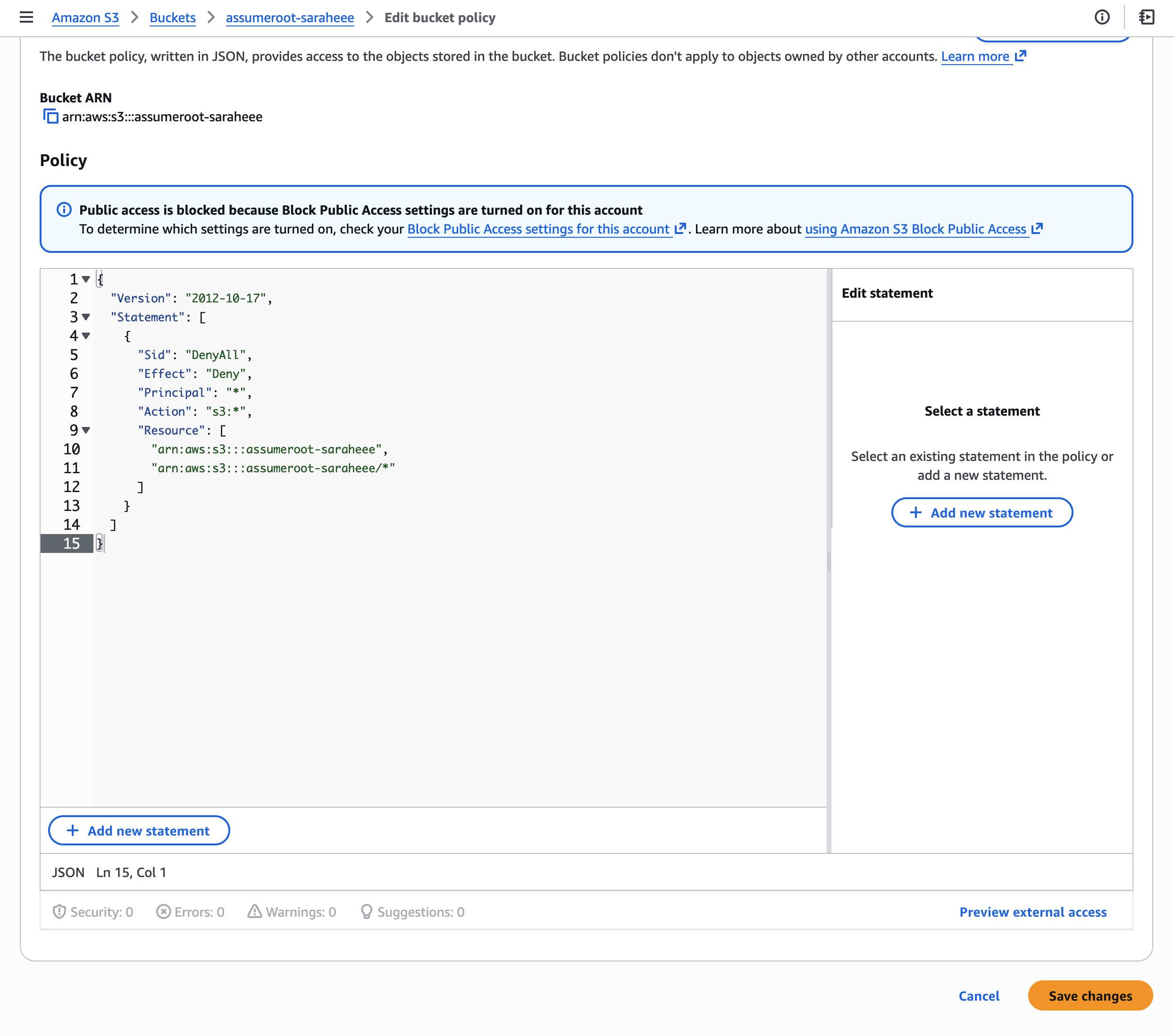
Step 2. 잠금 버킷 정책 적용 (멤버 계정)

모든 Principal의 접근을 차단하는 Deny 정책을 적용합니다:

{
  "Version": "2012-10-17",
  "Statement": [
    {
      "Sid": "DenyAll",
      "Effect": "Deny",
      "Principal": "*",
      "Action": "s3:*",
      "Resource": [
        "arn:aws:s3:::assumeroot-saraheee",
        "arn:aws:s3:::assumeroot-saraheee/*"
      ]
    }
  ]
}

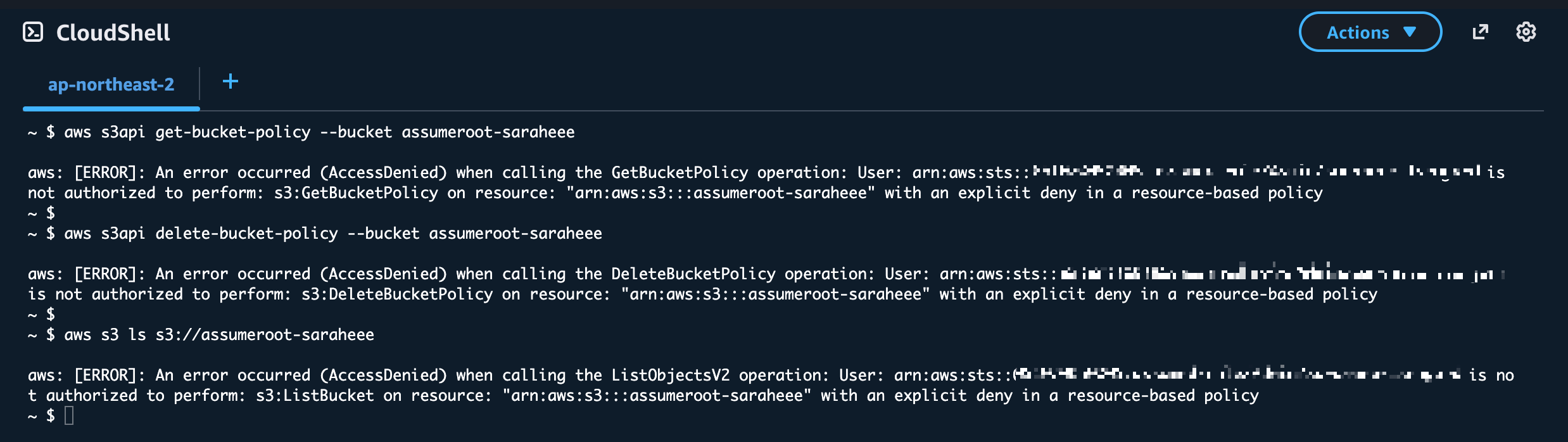
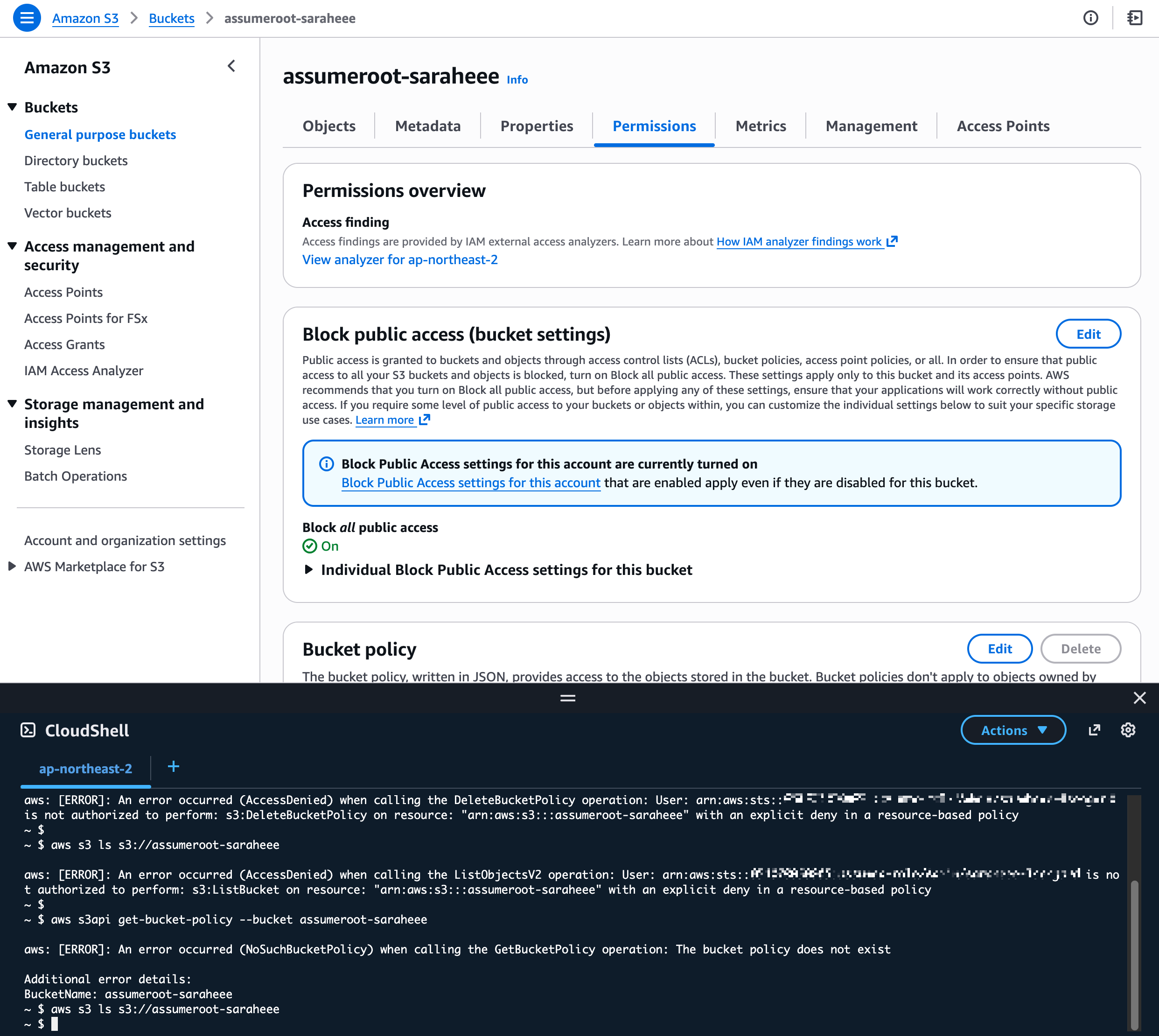
Step 3. 잠금 확인 (멤버 계정)

버킷 소유자 포함 모든 IAM 자격증명으로 접근이 차단되었는지 확인합니다:

# 버킷 정책 조회 시도 → Access Denied
aws s3api get-bucket-policy --bucket assumeroot-saraheee

# 버킷 정책 삭제 시도 → Access Denied
aws s3api delete-bucket-policy --bucket assumeroot-saraheee

# 오브젝트 목록 조회 시도 → Access Denied
aws s3 ls s3://assumeroot-saraheee


Step 4. Task Privileged Action 수행 (관리/위임 계정)

관리 계정(또는 Delegated Admin 계정)의 콘솔에서 Root access management로 이동하여 Take privileged action을 수행합니다.

CLI 사용 시에는 sts:AssumeRoot API를 직접 호출합니다. (4.2절 참고)

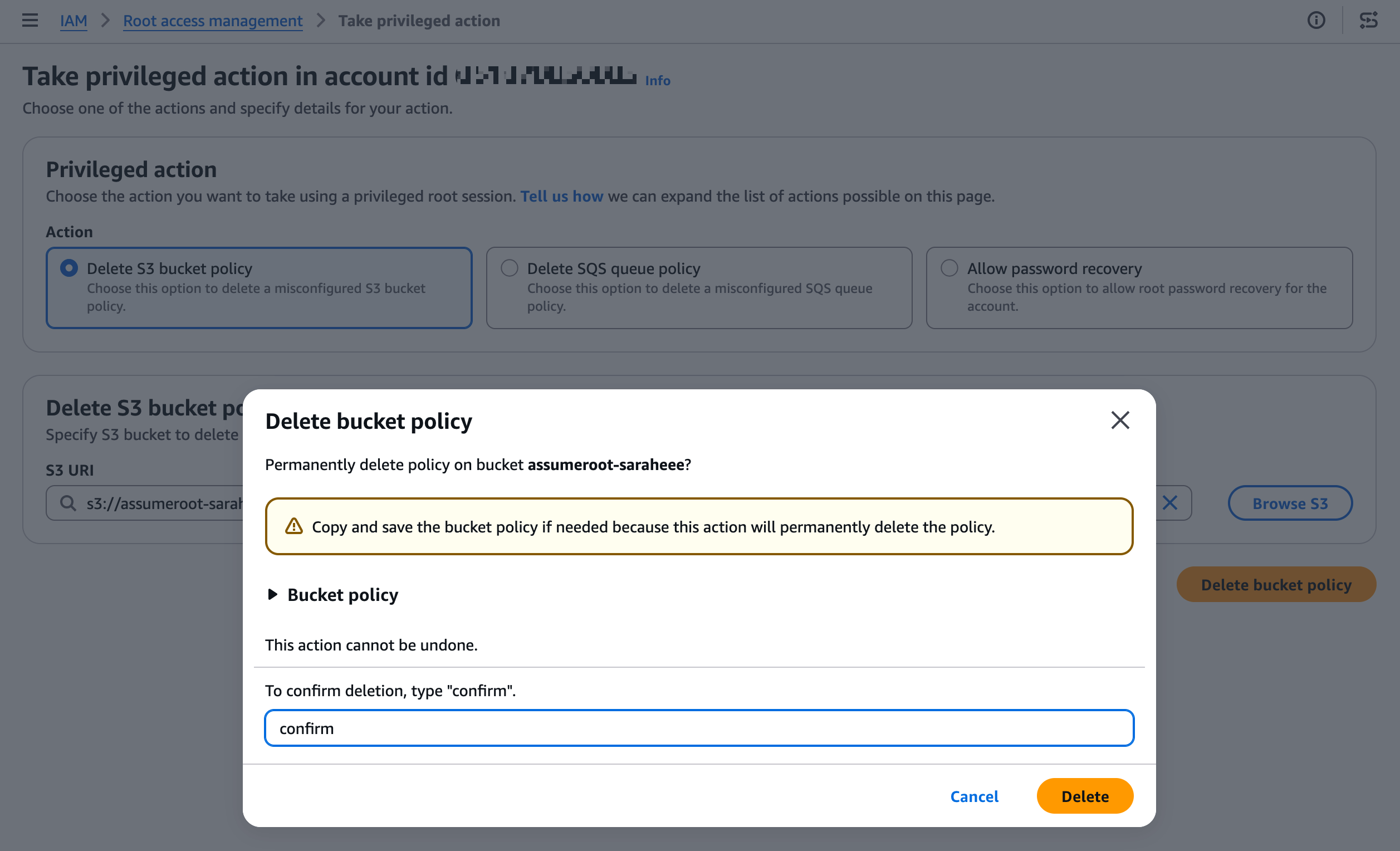
Step 5. S3 버킷 정책 삭제 (Root 세션)

Delete S3 bucket policy 작업을 선택하고, 잠긴 버킷을 지정하여 정책을 삭제합니다.

Step 6. 정상 접근 복구 확인 (멤버 계정)

버킷 정책 삭제 후, 멤버 계정에서 다시 정상 접근이 가능한지 확인합니다.

5.2 SQS 큐 정책 잠금 해제 테스트

Step 1. SQS 큐 생성 (멤버 계정)

멤버 계정에서 테스트용 SQS 큐를 생성합니다.

Step 2. 잠금 큐 정책 적용 (멤버 계정)

모든 Principal의 접근을 차단하는 Deny 정책을 적용합니다:

{
  "Version": "2012-10-17",
  "Statement": [
    {
      "Sid": "DenyAll",
      "Effect": "Deny",
      "Principal": "*",
      "Action": "SQS:*",
      "Resource": "arn:aws:sqs:ap-northeast-2:xxxxxxxxxxxx:assumeroot-saraheee"
    }
  ]
}

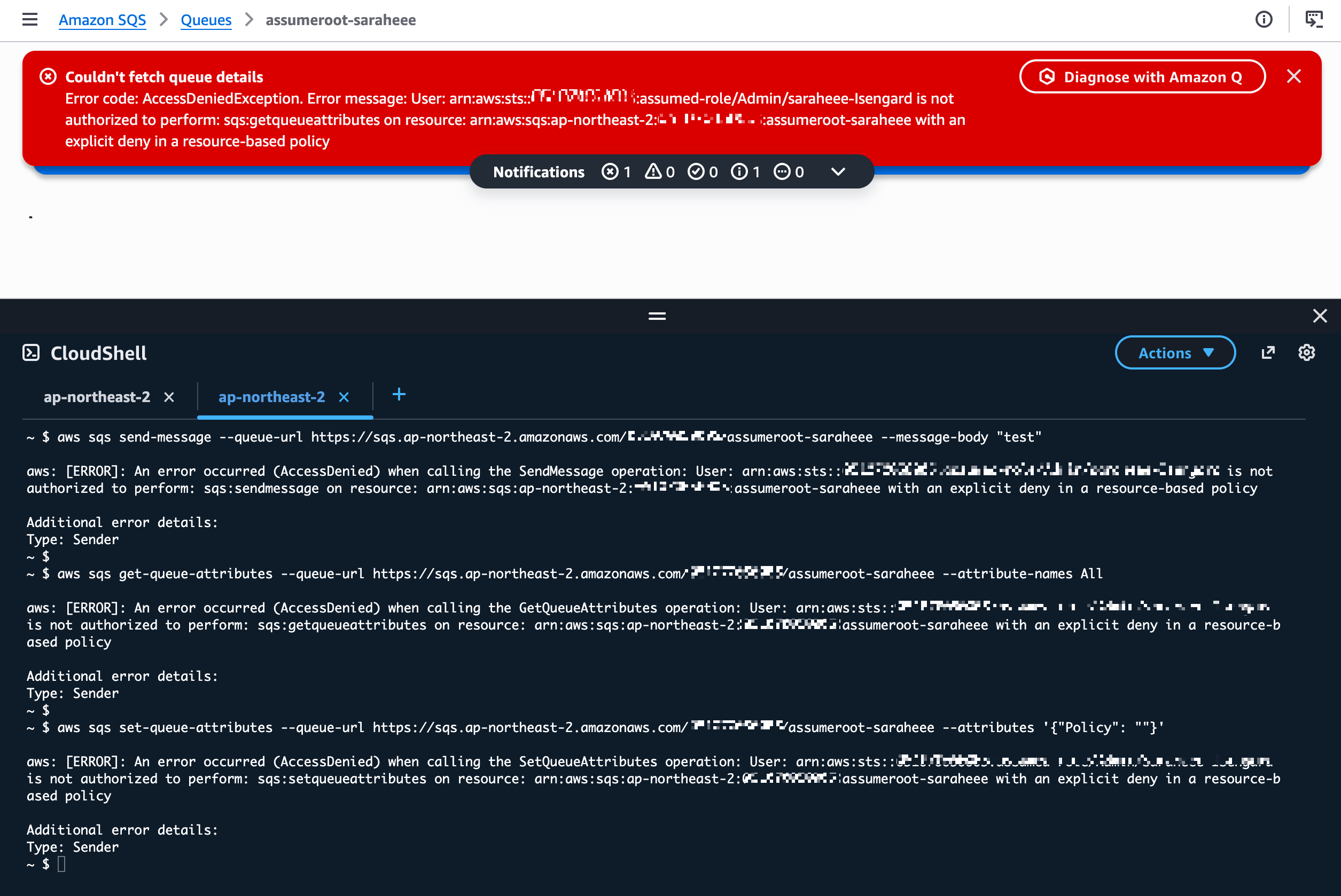
Step 3. 잠금 확인 (멤버 계정)

메시지 송수신 및 큐 정책 변경이 차단되었는지 확인합니다:

  • 참고: 수 분 소요
# 메시지 전송 시도
aws sqs send-message  --queue-url <https://sqs.ap-northeast-2.amazonaws.com/xxxxxxxxxxxx/assumeroot-saraheee> --message-body "test"

# 큐 속성 조회 시도
aws sqs get-queue-attributes --queue-url <https://sqs.ap-northeast-2.amazonaws.com/xxxxxxxxxxxx/assumeroot-saraheee> --attribute-names All

# 큐 정책 변경 시도 (빈 정책으로 삭제 시도)
aws sqs set-queue-attributes --queue-url <https://sqs.ap-northeast-2.amazonaws.com/xxxxxxxxxxxx/assumeroot-saraheee> --attributes '{"Policy": ""}'

Step 4. Take Privileged Action 수행 (관리/위임 계정)

관리 계정(또는 Delegated Admin 계정)의 콘솔에서 Root access management로 이동하여 Take privileged action을 수행합니다.

CLI 사용 시에는 sts:AssumeRoot API를 직접 호출합니다. (4.2절 참고)

Step 5. SQS 큐 정책 삭제 (Root 세션)

Delete SQS queue policy 작업을 선택하고, 잠긴 큐의 ARN을 지정하여 정책을 삭제합니다:

  • SQS Queue ARN: arn:aws:sqs:ap-northeast-2:xxxxxxxxxxxx:assumeroot-saraheee

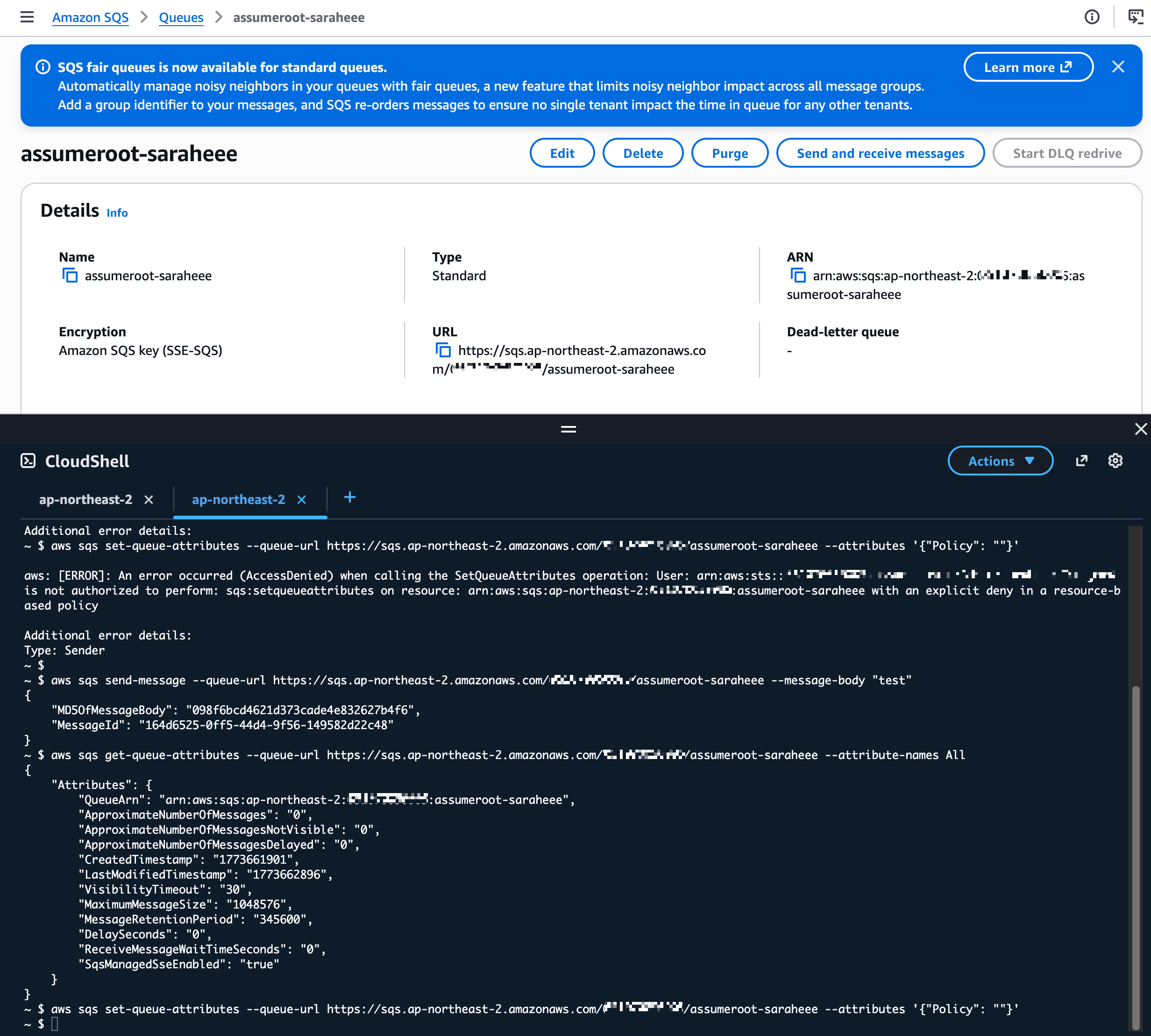
Step 6. 복구 확인 (멤버 계정)

큐 정책 삭제 후, 멤버 계정에서 다시 정상 접근이 가능한지 확인합니다:

6. Task Policy 상세

Task Policy ARN 허용 작업 대상 리소스
arn:aws:iam::aws:policy/root-task/S3UnlockBucketPolicy S3 버킷 정책 삭제 대상 멤버 계정의 S3 버킷
arn:aws:iam::aws:policy/root-task/SQSUnlockQueuePolicy SQS 큐 리소스 정책 삭제 대상 멤버 계정의 SQS 큐
arn:aws:iam::aws:policy/root-task/IAMDeleteRootUserCredentials Root 비밀번호, 액세스 키, 서명 인증서, MFA 삭제 대상 멤버 계정의 Root 자격증명
arn:aws:iam::aws:policy/root-task/IAMCreateRootUserPassword Root 로그인 프로필(비밀번호) 생성 대상 멤버 계정의 Root 로그인 프로필
arn:aws:iam::aws:policy/root-task/IAMAuditRootUserCredentials Root 자격증명 현황 조회 대상 멤버 계정의 Root 자격증명


Appendix

구성 시 발생 가능한 권한 부족 오류 및 해결

(참고) 권한 부족 1.

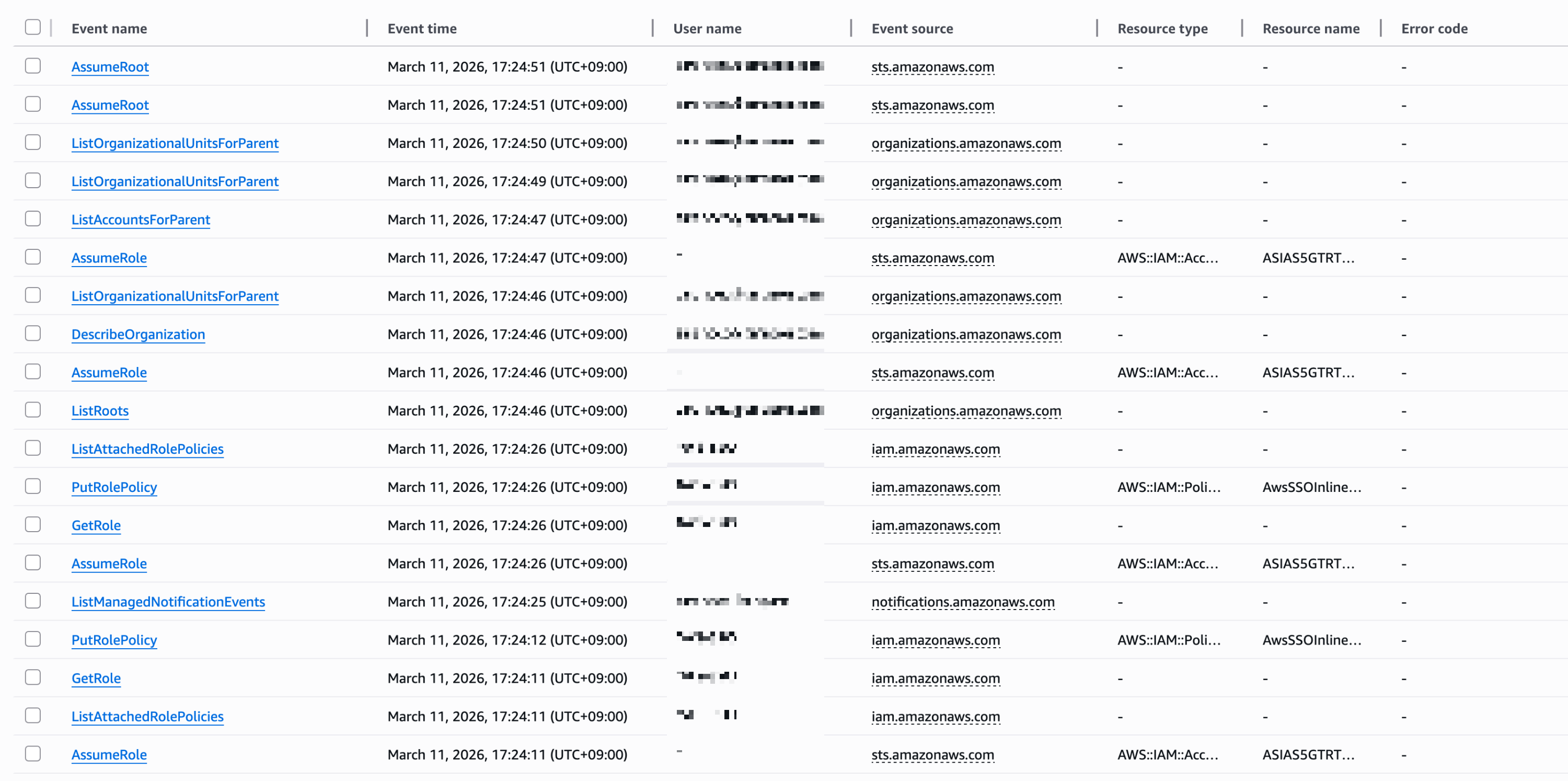
CloudTrail Event history

  • organizations:ListDelegatedAdministrators
  • organizations:ListAWSServiceAccessForOrganization
  • sso:DescribeRegisteredRegions
  • organizations:DescribeOrganization
  • ec2:DescribeRegions

로그 에러

"errorMessage": "User: arn:aws:sts::xxxxxxxxxxxx:assumed-role/AWSReservedSSO_BreakGlassAssumeRoot_xxxxxxxxxxxxxxxx/saraheee@email.com is not authorized to perform: organizations:DescribeOrganization on resource: * because no identity-based policy allows the organizations:DescribeOrganization action",

(참고) 권한 부족 2.

We couldn't load the root of the organization.

You don't have permissions to see this resource, because the management account has not granted you the permissions to view accounts.

CloudTrail Event history


로그 에러

"errorMessage": "User: arn:aws:sts::xxxxxxxxxxxx:assumed-role/AWSReservedSSO_BreakGlassAssumeRoot_xxxxxxxxxxxxxxxx/saraheee@email.com is not authorized to perform: iam:GetOutboundWebIdentityFederationInfo on resource: * because no identity-based policy allows the iam:GetOutboundWebIdentityFederationInfo action",
  • organizations:DescribeOrganization
  • organizations:ListRoots
  • sso:ListInstances
  • iam:ListSTSRegionalEndpointsStatus
  • iam:GetOutboundWebIdentityFederationInfo

(참고) 권한 부족 3.

We couldn't load organizational units.

You don't have permissions to see this resource, because the management account has not granted you the permissions to view accounts.

CloudTrail Event history

  • iam:GetAccountSummary
  • iam:ListAccountAliases
  • account:GetAccountInformation
  • iam:ListOrganizationsFeatures
  • organizations:ListAccountsForParent
  • organizations:ListOrganizationalUnitsForParent

조회 완료


728x90
728x90

'Networking > AWS' 카테고리의 다른 글

SSM 통신을 위한 VPC endpoint  (0) 2026.04.10
Control Tower account  (0) 2026.04.07
Enable AWS Control Tower  (0) 2026.02.10
[AWS] CloudFormation Workshop#01 - template and stack  (0) 2025.11.20
AWS certificate  (0) 2025.11.03
728x90
반응형

관리 계정 생성

1. 공유 계정 이메일 주소 생성

관리 계정 (Account) 이메일 주소

saraheee+ctmgmt@gmail.com

  • saraheee: 기존에 보유하고 있는 이메일 주소
  • +ctmgmt: 확장 이메일 주소
  • +logs: log archive account
  • +audit: audit account
  • +aft: aft account

2. 계정 생성

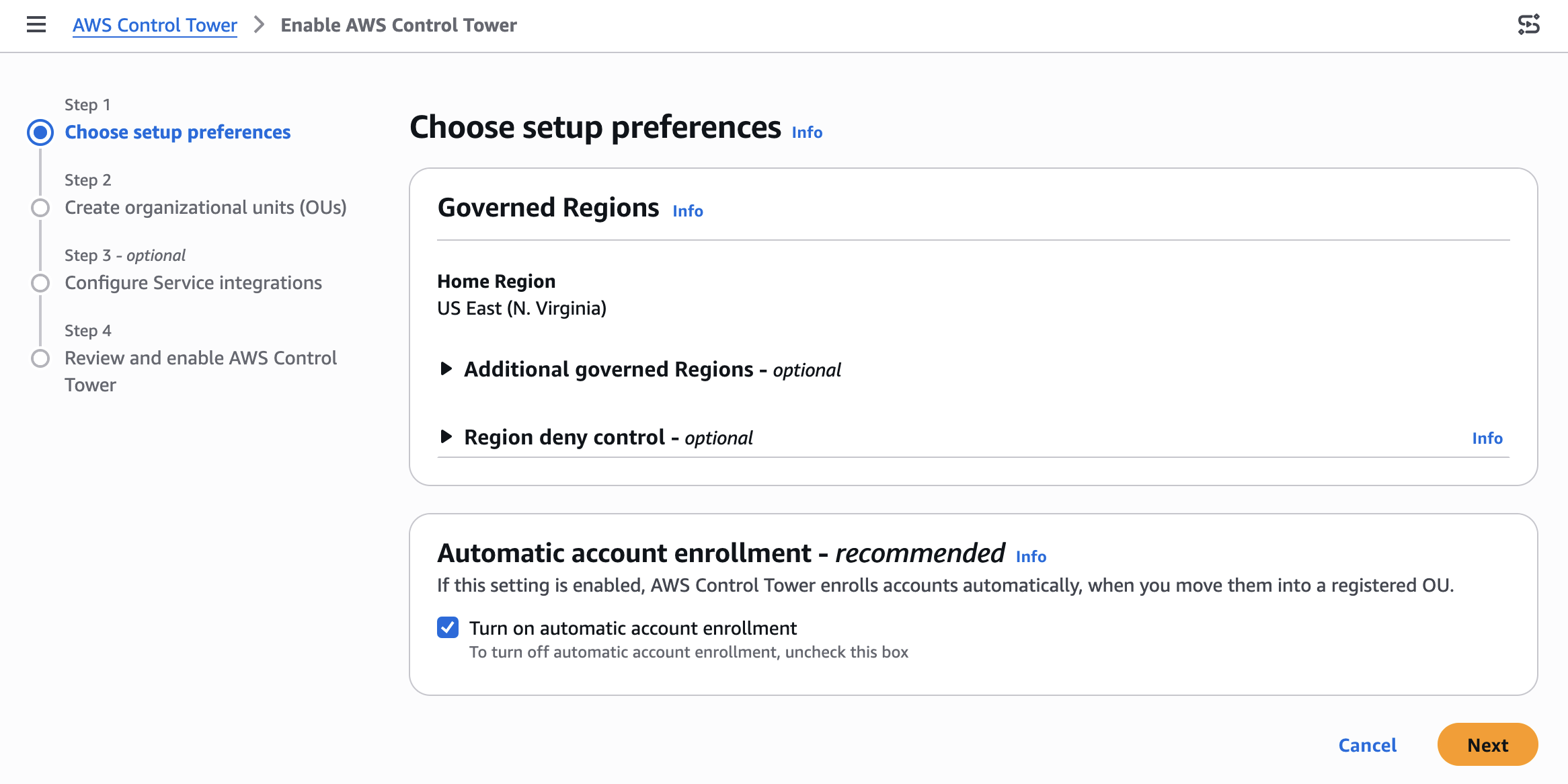
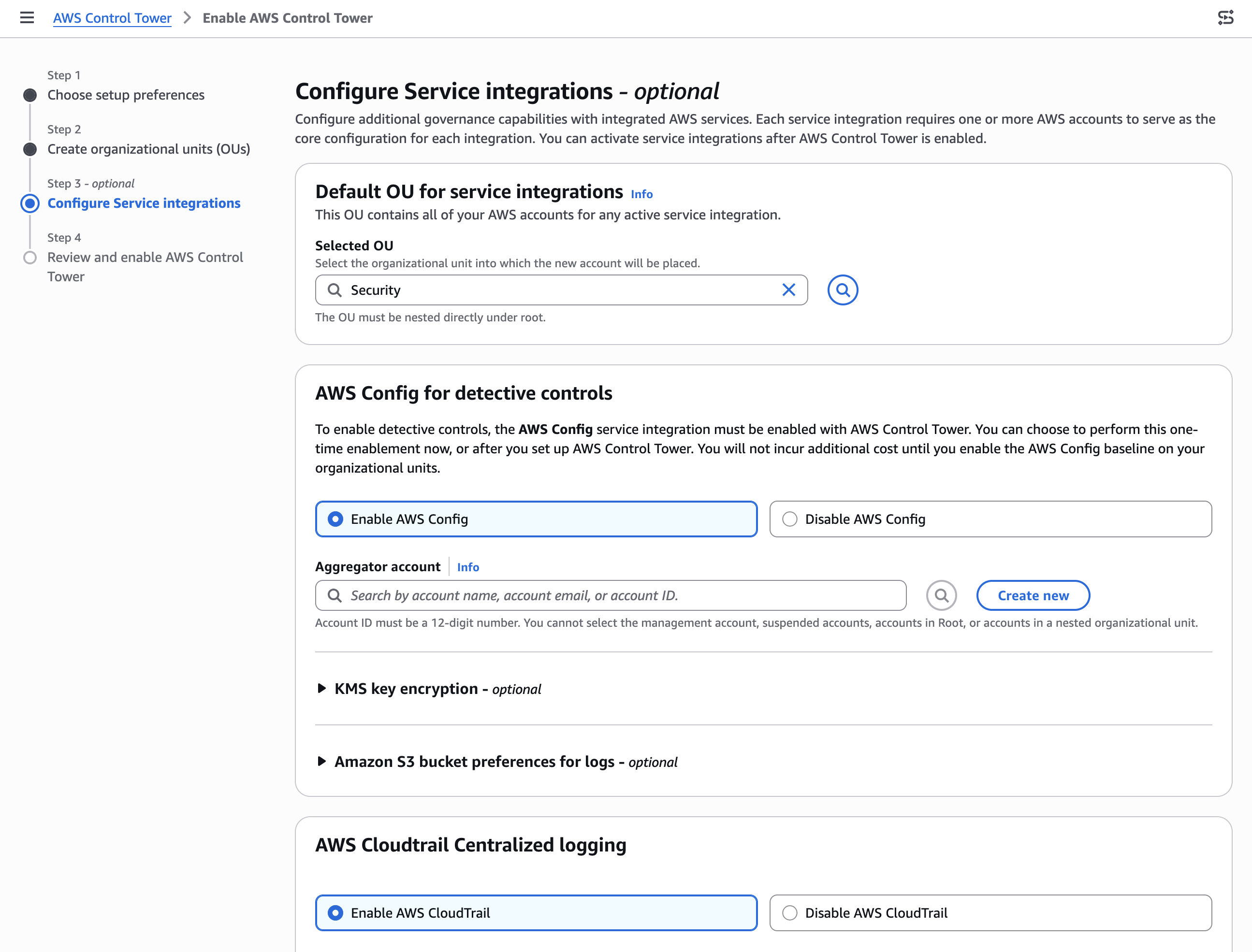
  • Step 1: Choose setup preferences

AWS Control Tower console > 리전 선택 > Enable AWS Control Tower

Home Region

랜딩 존이 배포될 지역 (차후 설정 변경 불가)

- IAM Identity Center 및 통합 로깅을 위한 S3 버킷과 같은 주요 리소스가 이 지역에 배포됨

예: Asia Pacific (Seoul): ap-northeast-2

Select additional Regions for governance

거버넌스를 위한 추가 리전

예: US East (N. Virginia): us-east-1

Region deny control

랜딩 존에 대한 지역 제어 거부 설정 (차후 설정 변경 가능)

제어 적용(Enabled) 시, Control Tower에서 관리되지 않은 리전(Home Region/additional Regions for governance 외 리전)에 리소스가 있는 경우 해당 리전의 리소스에 접근할 수 없음

Automatic account enrollment (Turn on 권장)

계정이 등록된 OU로 이동할 때 AWS Control Tower에 자동으로 등록 (버전 3.1 이상의 랜딩 존에서 지원)

랜딩 존 설정 페이지 혹은 Control Tower의 CreateLandingZone/UpdateLandingZone API를 호출 시 계정을 자동으로 등록할 수 있음

계정을 OU로 이동시킬 때 Control Tower가 거버넌스 관리 대상으로 등록

  • 해당 설정 Turn off 시 계정 레벨에서 생성되는 리소스인 Detective/Proactive Controls (AWS Config Rules, CloudFormation 리소스 배포 등)은 계정을 다른 OU로 이동해도 자동으로 업데이트되지 않음
  • 계정을 OU 간 이동할 때마다 Detective/Proactive 컨트롤이 새로운 OU 설정에 맞게 재배포되도록 수동으로 OU Re-register 작업을 수행해야 했음
  • OU 계층 구조에 따라 자동으로 적용되는 Preventive Controls (SCP, RCP)는 영향 없음

자동 등록을 사용하여 계정 이동 및 등록 - https://docs.aws.amazon.com/ko_kr/controltower/latest/userguide/account-auto-enrollment.html

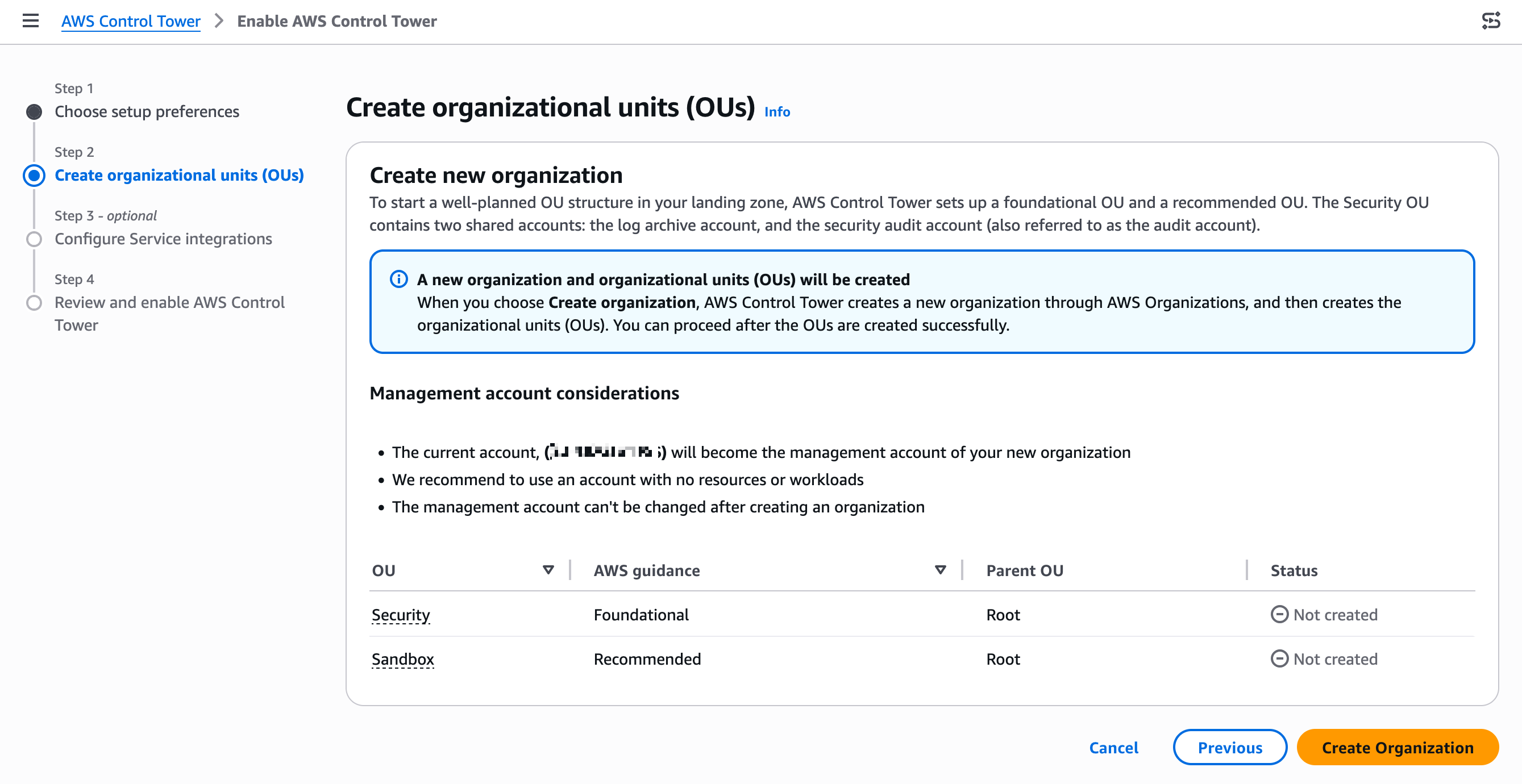
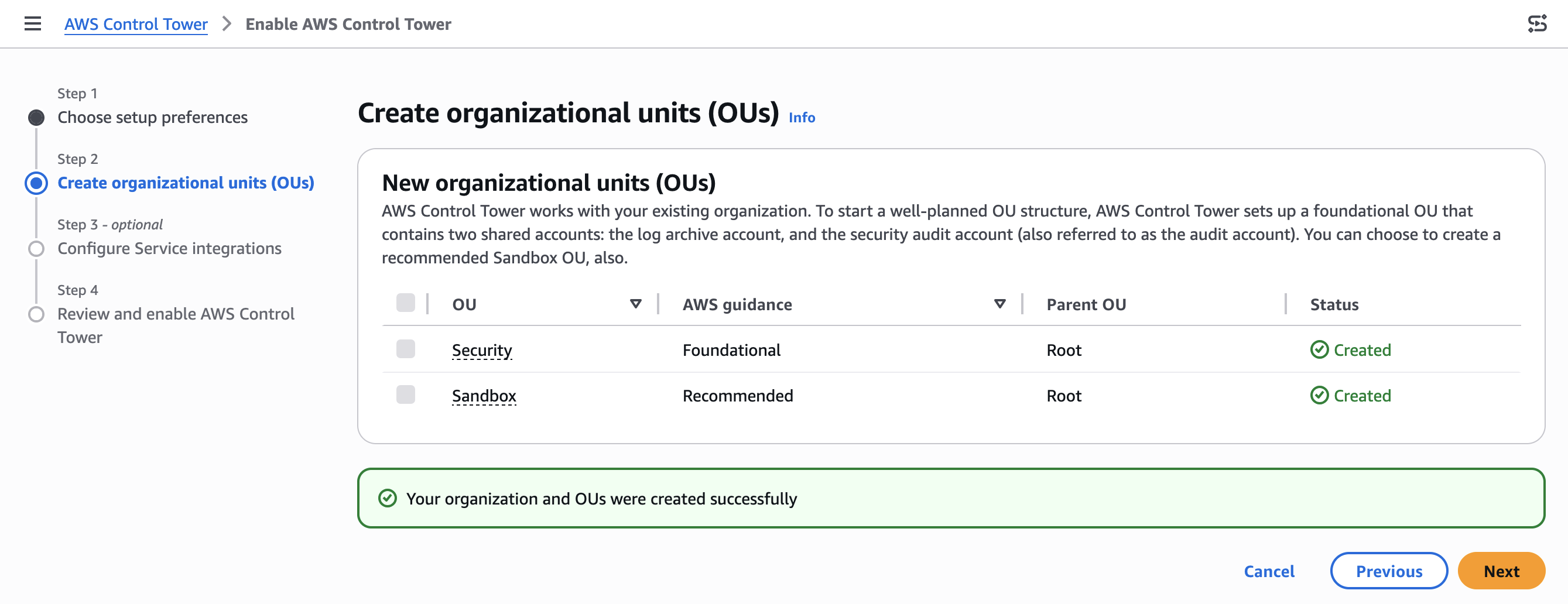
Step 2 - Create organizational units (OUs)

  • Foundational OU : Security
  • Additional OU : Production

Step 3 - Configure Service integrations

Default OU for service integrations

활성화된 서비스 통합과 관련된 모든 AWS 계정이 포함됨

새 계정을 배치할 조직 단위 선택: 예: Security

AWS Config for detective controls

AWS 리소스의 구성 변경 사항을 기록하고 규정 준수 상태를 모니터링하는 서비스

Enable/Disable: Control Tower가 모든 계정에서 AWS Config를 자동으로 활성화하여 리소스 구성 변경 사항을 추적

Aggregator account : saraheee+ctlog@gmail.com

Create new
Create account: saraheee+ctlog@gmail.com
Change account name : Aggregator account (Log Archive)

Audit 계정: 보안 및 컴플라이언스 팀이 모든 계정들에 대한 읽기 및 쓰기 액세스를 얻기 위한 제한된 계정

AWS CloudTrail Centralized logging

중앙 집중식 로깅, 조직 전체의 CloudTrail 로그를 중앙에서 관리할 계정을 지정

CloudTrail administrator: saraheee+ctaudit@gmail.com

Create New
Create account : saraheee+ctaudit@gmail.com 
Change account name: CloudTrail administrator (Audit)

Log Archive 계정: 모든 계정들의 API 작업 및 리소스 구성에 대한 로그들을 변경불가하게 보관하는 저장소

KMS key encryption

AWS Control Tower 리소스(CloudTrail 로그, Config 로그 등)를 고객 관리형 KMS 키로 암호화

다중 리전 키는 지원되지 않음

Amazon S3 bucket preferences for logs

S3 로깅 버킷과 액세스 로깅 버킷의 수명 주기 보존 기간을 나타내는 숫자를 입력

Amazon S3 bucket retention for logging

  • CloudTrail 로그, Config 로그 등이 저장되는 메인 로그 버킷
  • 기본값: 1년

Amazon S3 bucket retention for access logging

  • S3 버킷 자체의 액세스 로그를 저장하는 버킷 (로그 버킷에 대한 접근 기록)
  • 기본값: 10년

AWS IAM Identity Center account access

Control Tower에 등록된 AWS 계정에 대한 액세스 관리 방법 선택

IAM Identity Center 또는 계정 액세스 관리에 대한 사용자 지정 요구 사항이 있는 경우

AWS Backup

설정 비용은 없음, 사용량에 따라 비용이 청구됨 (Don’t enable 선택 이후 활성화 가능)

Metering, costs, and billing for AWS Backup - https://docs.aws.amazon.com/aws-backup/latest/devguide/metering-and-billing.html


728x90
728x90

'Networking > AWS' 카테고리의 다른 글

Control Tower account  (0) 2026.04.07
[Control Tower] sts:AssumeRoot (BreakGlassAssumeRoot)  (0) 2026.03.16
[AWS] CloudFormation Workshop#01 - template and stack  (0) 2025.11.20
AWS certificate  (0) 2025.11.03
[AWS] Route53 S2S VPN  (0) 2025.10.29
728x90
반응형

In the Intermediate part of the workshop, you will:

In the Advanced part of the workshop, you will:

AWS Cloud9 (CloudShell) Setup

Clone lab resources using git

git clone https://github.com/aws-samples/cfn101-workshop

Install the latest version of AWS CLI

cd cfn101-workshop/code/solutions/cloud9
chmod +x awscliv2.sh
source awscliv2.sh
aws --version
# aws-cli/2.31.34 Python/3.13.9 Linux/6.1.155-176.282.amzn2023.x86_64 exec-env/CloudShell exe/x86_64.amzn.2023

Local Development Setup

We recommend you install the AWS CloudFormation Linter . A linter 

will proactively flag basic errors in your CloudFormation templates before you deploy them.

If you are using Visual Studio Code, you should install the cfn-lint plugin.

pip install cfn-lint

Default VPC

default VPC using the Amazon VPC console

$ aws ec2 describe-vpcs --filters Name=isDefault,Values=true --query "Vpcs[].VpcId" --region us-east-1
[
    "vpc-xxxxxxxxxxxxxaa89"
]

Basics

cd cfn101-workshop/code/workspace
aws cloudformation create-stack --stack-name cfn-workshop-template-and-stack --template-body file://template-and-stack.yaml

template-and-stack.yaml file

Resources:
  S3Bucket:
    Type: AWS::S3::Bucket
    Properties:
      BucketEncryption:
        ServerSideEncryptionConfiguration:
          - ServerSideEncryptionByDefault:
              SSEAlgorithm: AES256

use the AWS CLI to create the stack - create-stack command was successfully sent, CloudFormation will return StackId

$ aws cloudformation create-stack --stack-name cfn-workshop-template-and-stack --template-body file://template-and-stack.yaml
{
    "StackId": "arn:aws:cloudformation:us-east-1:xxxxxxxx7753:stack/cfn-workshop-template-and-stack/xxxxxxxx-xxxx-xxxx-xxxx-0e672ed843db"
}

Challenge

객체가 삭제되거나 덮어쓰는 것을 방지하거나, 객체를 보관하여 이전 버전으로 복구할 수 있도록 S3 버킷에서 버전 관리를 활성화

- S3 리소스의 속성 섹션에 VersioningConfiguration 속성을 생성
- 상태를 enabled 설정
- 템플릿에서 변경된 내용을 반영하도록 스택을 업데이트

# add Properties
        VersioningConfiguration:
          Status: Enabled

스택 업데이트

$ aws cloudformation update-stack --stack-name cfn-workshop-template-and-stack --template-body file://template-and-stack.yaml
{
    "StackId": "arn:aws:cloudformation:us-east-1:xxxxxxxx7753:stack/cfn-workshop-template-and-stack/xxxxxxxx-xxxx-xxxx-xxxx-0e672ed843db"
}


728x90
728x90

'Networking > AWS' 카테고리의 다른 글

[Control Tower] sts:AssumeRoot (BreakGlassAssumeRoot)  (0) 2026.03.16
Enable AWS Control Tower  (0) 2026.02.10
AWS certificate  (0) 2025.11.03
[AWS] Route53 S2S VPN  (0) 2025.10.29
[AWS] Route53 query logging  (1) 2025.08.07
728x90
반응형

25.11.03 기준

Foundational

AWS Certified Cloud Practitioner

: CLF-C02 / 719 questions

https://www.examtopics.com/exams/amazon/aws-certified-cloud-practitioner-clf-c02/

AWS Certified AI Practitioner

: AIF-C01 / 318 questions

https://www.examtopics.com/exams/amazon/aws-certified-ai-practitioner-aif-c01/

Associate

AWS Certified Solutions Architect - Associate

: SAA-C03 / 1019 questions

https://www.examtopics.com/exams/amazon/aws-certified-solutions-architect-associate-saa-c03/

AWS Certified Machine Learning Engineer - Associate

: MLA-C01 / 145 questions

https://www.examtopics.com/exams/amazon/aws-certified-machine-learning-engineer-associate-mla-c01/

AWS Certified Developer - Associate

: DVA-C02 / 557 questions

https://www.examtopics.com/exams/amazon/aws-certified-developer-associate-dva-c02/

AWS Certified CloudOps Engineer - Associate

: SOA-C03 / 478 questions (C02 기준)

https://www.examtopics.com/exams/amazon/aws-certified-sysops-administrator-associate/

AWS Certified Data Engineer - Associate

: DEA-C01 / 261 questions

https://www.examtopics.com/exams/amazon/aws-certified-data-engineer-associate-dea-c01/

Professional

AWS Certified Solutions Architect - Professional

: SAP-C02 / 529 questions

https://www.examtopics.com/exams/amazon/aws-certified-solutions-architect-professional-sap-c02/

AWS Certified DevOps Engineer - Professional

: DOP-C02 / 390 questions

https://www.examtopics.com/exams/amazon/aws-certified-devops-engineer-professional-dop-c02/

AWS Certified Generative AI Developer - Professional[베타 시험]

: AIP-C01 / 97 questions

https://www.examtopics.com/exams/amazon/aws-certified-generative-ai-developer-professional-aip-c01/

Specialty

AWS Certified Machine Learning - Specialty (until March 31, 2026)

: MLS-C01 / 369 questions

https://www.examtopics.com/exams/amazon/aws-certified-machine-learning-specialty/

AWS Certified Security - Specialty

: SCS-C02 / 307 questions

: SCS-C03 / 62 questions

https://www.examtopics.com/exams/amazon/aws-certified-security-specialty-scs-c02/

https://www.examtopics.com/exams/amazon/aws-certified-security-specialty-scs-c03/

AWS Certified Advanced Networking - Specialty

: ANS-C01 / 272 questions

https://www.examtopics.com/exams/amazon/aws-certified-advanced-networking-specialty-ans-c01/


References: 

https://aws.amazon.com/ko/certification/

728x90
728x90

'Networking > AWS' 카테고리의 다른 글

Enable AWS Control Tower  (0) 2026.02.10
[AWS] CloudFormation Workshop#01 - template and stack  (0) 2025.11.20
[AWS] Route53 S2S VPN  (0) 2025.10.29
[AWS] Route53 query logging  (1) 2025.08.07
[AWS] ALB listener server response header on|off  (0) 2025.05.19
728x90
반응형

VPN Basics

VPN allows hosts to communicate privately over an untrusted intermediary network like internet, in encrypted from


-

AWS 측 VPC: 10.0.0.0/16

onpremise 측 VPC: 192.168.0.0/16 (172.31.0.0/16)


VGW 생성

CGW 생성 (onprem-VPC의 EC2 인스턴스 퍼블릭 IP)

Site-to-Site VPN connection 생성 (static IP prefixes: 192.168.0.0/16)


IP Sec down

- VPN connections 우측 상단 Download configuration 버튼을 클릭하여, 각 고객 게이트웨이 디바이스 제공업체 별 configuration 파일 다운로드

- Actions > Modify VPN tunel options > 터널 1 선택하여 log group 설정(로그 기록 활성화 가능)


on-prem 라우터 설정

instance 설정 >


onprem-EC2에 strongswan 설치 및 설정

sudo yum update
sudo yum install strongswan  # Amazon Linux 2023에는 strongswan 패키지가 기본 저장소에 없음
sudo yum install libreswan -y


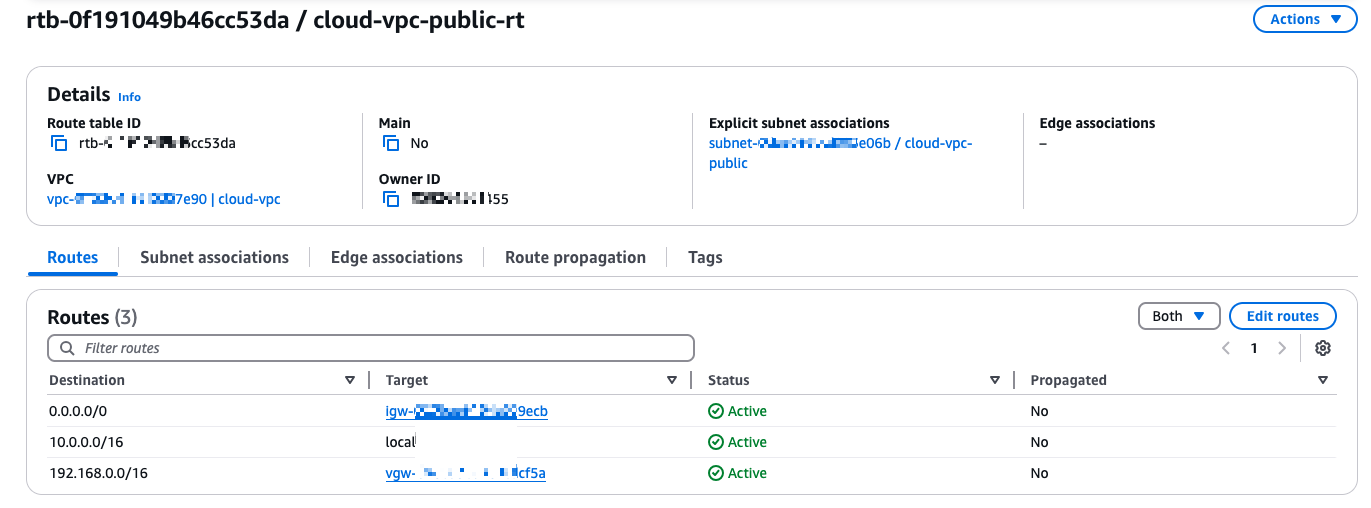
AWS-VPC 라우팅 테이블 설정

192.168.0.0/16 -> Virtual Private Gateway

Onprem-VPC 라우팅 테이블 설정

10.0.0.0/16 -> Local VPN instance


연결 테스트

# AWS-EC2에서

ping <onprem-EC2-private-IP>

# onprem-EC2에서

ping <AWS-EC2-private-IP>


-

CloudFormation Stacks > Outputs

Key
Value
Description
AppServerPrivate
192.168.2.20
Private IP of App Server
DNSServerPrivate
192.168.2.250
DNS Server IP Address on DataCenter
Router1Private
192.168.1.10
Private IP of Router1
Router1Public
3.34.31.6
Public IP of Router1


Transit gateway attachments > VPN type, IP Address: Router1Public, BGP ASN: 65016


728x90
728x90

'Networking > AWS' 카테고리의 다른 글

[AWS] CloudFormation Workshop#01 - template and stack  (0) 2025.11.20
AWS certificate  (0) 2025.11.03
[AWS] Route53 query logging  (1) 2025.08.07
[AWS] ALB listener server response header on|off  (0) 2025.05.19
[AWS] Direct Connect 설정  (0) 2025.05.19
728x90
반응형

AWS Route 53 resolver의 CreateResolverQueryLogConfig 시

query logs의 Destination을 bucket name으로 설정할 경우, 

aws route53resolver create-resolver-query-log-config --name "log-config-name" --destination-arn "arn:aws:s3:::s3-query-logging"


S3 버킷 삭제

aws s3api delete-bucket-policy --bucket s3-query-logging

Empty bucket > permanently delete


AssociateResolverQueryLogConfig API 실행

aws route53resolver associate-resolver-query-log-config --resolver-query-log-config-id "rqlc-12aaa456fxxx4519" --resource-id "vpc-0a53xxxxxxxxx2deb"


정상 생성(Active)

{
    "ResolverQueryLogConfigAssociation": {
        "Id": "rqlca-8389713dfa194521",
        "ResolverQueryLogConfigId": "rqlc-12aaa456f7394519",
        "ResourceId": "vpc-0a535fa915c062deb",
        "Status": "CREATING",
        "Error": "NONE",
        "ErrorMessage": "",
        "CreationTime": "2025-08-07T07:06:27.873745085Z"
    }
}

VPC가 타 query log config와 연결되어 있을 경우

An error occurred (InvalidRequestException) when calling the AssociateResolverQueryLogConfig operation: [RSLVR-01306] The resource is already associated with a query logging configuration that is sending query logs to the specified destination type. Trace Id: "1-689450aa-38d4c77e583b368f14ffa282"

버킷 삭제 시(Failed)

INTERNAL_SERVICE_ERROR[RSLVR-00200] Internal Service Error, trace ID: "1-6894513d-1a1dxxxxxxxxxxxxxxxx4477"


ACCESS_DENIED: Account is not authorized to perform this operation.


References: 

[1] AssociateResolverQueryLogConfig - Errors - https://docs.aws.amazon.com/ko_kr/Route53/latest/APIReference/API_route53resolver_AssociateResolverQueryLogConfig.html#API_route53resolver_AssociateResolverQueryLogConfig_Errors

728x90
728x90

'Networking > AWS' 카테고리의 다른 글

AWS certificate  (0) 2025.11.03
[AWS] Route53 S2S VPN  (0) 2025.10.29
[AWS] ALB listener server response header on|off  (0) 2025.05.19
[AWS] Direct Connect 설정  (0) 2025.05.19
[AWS] EC2 SSM Agent connection lost  (0) 2025.05.12
728x90
반응형

ALB는 대상 응답에 서버 헤더가 없는 경우에만 awselb/2.0 값을 갖는 서버 헤더 정보를 추가한다.

이 때 서버 헤더를 비활성화(enabled false)할 경우, 헤더 정보를 추가하지 않도록 설정하여 awselb/2.0과 같은 서버 정보가 노출되는 것을 방지할 수 있다.

 자동 스캐닝 도구나 공격자가 특정 서버 소프트웨어에서 발견된 취약점을 악용하는 것을 방지한다.

while true; do 
    echo "============= $(date '+%Y-%m-%d %H:%M:%S') ============="
    curl -k -I -w "time: %{time_total}s\n" https://ALB-1234567890.us-east-1.elb.amazonaws.com
    echo "====================================================="
    sleep 1
done


ALB server response header 설정(save changes) 후 적용되기까지 10초 정도 소요

- 리스너 단위 설정, Edit listener attributes

=====================================================
============= 2025-05-19 16:50:52 =============
HTTP/2 503 
server: awselb/2.0
date: Mon, 19 May 2025 07:50:53 GMT
content-type: text/html
content-length: 162

time: 0.582316s
=====================================================
============= 2025-05-19 16:50:54 =============
HTTP/2 503 
date: Mon, 19 May 2025 07:50:55 GMT
content-type: text/html
content-length: 162

time: 0.599829s
=====================================================


true: server header on

false: server header off

aws elbv2 modify-listener-attributes \
  --listener-arn ARN \
  --attributes Key="routing.http.response.server.enabled",Value=false


References:

[1] Application Load Balancer에 대한 HTTP 헤더 수정 - 헤더 비활성화 - https://docs.aws.amazon.com/ko_kr/elasticloadbalancing/latest/application/header-modification.html#disable-header
[2] AWS Application Load Balancer introduces header modification for enhanced traffic control and security - https://aws.amazon.com/about-aws/whats-new/2024/11/aws-application-load-balancer-header-modification-enhanced-traffic-control-security/
[3] Securing your web applications and optimizing their performance with AWS Application Load Balancer - https://aws.amazon.com/blogs/networking-and-content-delivery/securing-your-web-applications-and-optimizing-their-performance-with-aws-application-load-balancer/?nc1=h_ls


728x90
728x90

'Networking > AWS' 카테고리의 다른 글

[AWS] Route53 S2S VPN  (0) 2025.10.29
[AWS] Route53 query logging  (1) 2025.08.07
[AWS] Direct Connect 설정  (0) 2025.05.19
[AWS] EC2 SSM Agent connection lost  (0) 2025.05.12
BIND server 구성  (0) 2025.04.17
728x90
반응형

DX 로케이션 경유하여 AWS와 사설 네트워크를 연결

AWS Cloud -(AWS 백본)- AWS DX location - IDC


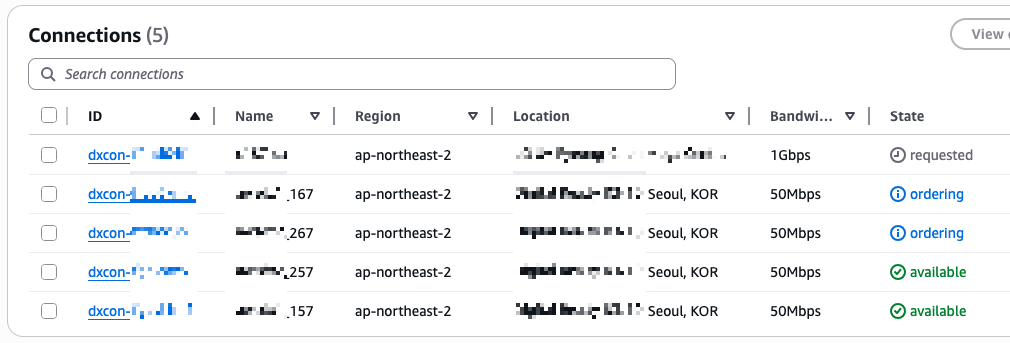
1) DX 연결

: Connections > State: ordering > Accept

- Pending available: 계정과 물리 연결이 활성화됨

AWS Cloud - AWS DX <-> onPrem 간 호스팅 연결 활성화


2) Direct Connect Gateway(DXGW) 생성

: Direct Connect gateways > Create > dxgw1, ASN 65011

- DXGW - AWS DX


3) DXGW에 VGW(VGW1, VGW2) 연결

: 생성한 GW ID 클릭(dxgw1) > Gateway associations - Associate > Gateways: VGW1, VGW2

(Allowed prefiexs를 입력하지 않으면 자동으로 VPC1과 VPC2의 CIDR 대역이 자동으로 할당됨, DXGW는 이렇게 허용된 접두사를 온프렘(고객 라우터)으로 전파(광고)) > 5~7분 대기(State: associated로 변경됨)

- AWS Cloud 내 VPC - VGW - DXGW 연결


4) Private VIF 생성 (on DX1/DX2)

: Virtual Interfaces > Create > 인터페이스 유형 선택, dx1-pri-v157, connection/DXGW/VLAN, ASN(65000)

+ Additional settings: user/Amazon router peer IP, BGP 인증키 입력 후 생성

- AWS DX <-> onPrem connect 간 VIF 생성


5) 온프렘 라우터 설정 (VLAN 인터페이스 및 BGP Peering 설정)

# 라우터 버전 정보 확인
show version
# 설정 모드 진입
config terminal # or conf t
# 명령어 입력(exec) 모드로 나오기
end


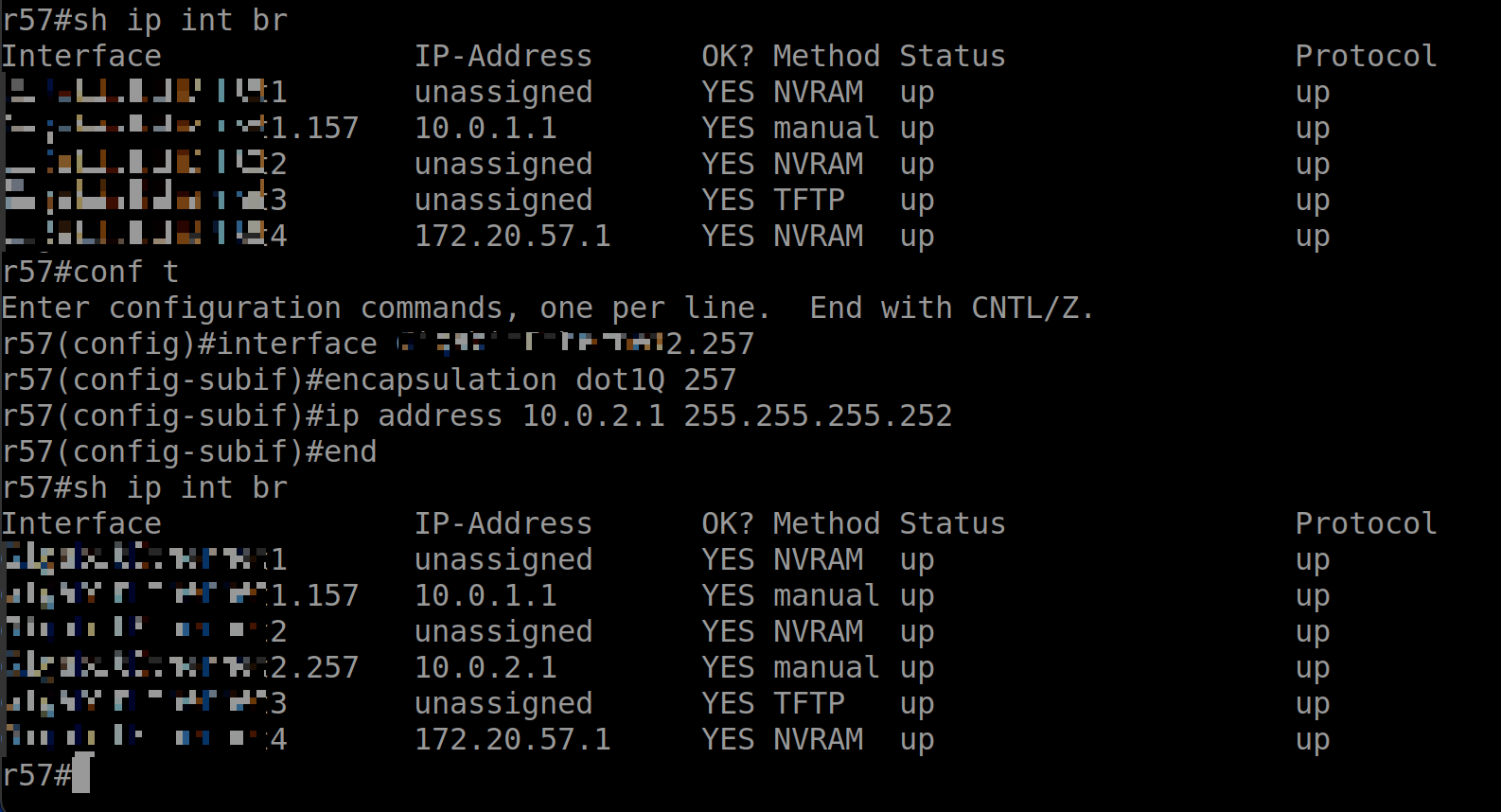
라우터 콘솔 명령 - 인터페이스 IP 설정

- dot1Q: IEEE 802.1Q 표준, 802.1Q VLAN 태깅을 사용하여 VLAN 157에 대한 캡슐화 설정

# (config)#
interface InterfaceEthernet1.157
# (config-subif)#
encapsulation dot1Q 157
ip address 10.0.1.1 255.255.255.252
end


show ip interface brief
sh ip int br


Interface              IP-Address      OK? Method Status                Protocol
InterfaceEthernet1       unassigned      YES NVRAM  up                    up   
InterfaceEthernet1.157   10.0.1.1        YES manual up                    up


AWS 라우터까지 통신 확인

#ping 10.0.1.2
Type escape sequence to abort.
Sending 5, 100-byte ICMP Echos to 10.0.1.2, timeout is 2 seconds:
!!!!!
Success rate is 100 percent (5/5), round-trip min/avg/max = 1/1/2 ms


Your router peer IP: 10.0.1.1/30

Amazon router peer IP: 10.0.1.2/30


라우터에서 BGP peering 설정

- AWS console의 VIF 정보를 확인하여 BGP 설정


# AS 번호는 네트워크를 식별하는 고유 번호
# 64512-65534는 프라이빗 AS 번호 범위

# (config)#
# BGP 라우팅 프로세스 시작, 65000은 자신의 AS(Autonomous System) 번호
router bgp 65000
# (config-router)#
# BGP 피어(neighbor) 설정, 10.0.1.2: peer router의 ip 주소, 65011: 피어의 AS 번호
neighbor 10.0.1.2 remote-as 65011
neighbor 10.0.1.2 password BGPauthPW123!
# BGP로 광고할 네트워크 설정, 자신의 네트워크를 다른 AS에 알림
network 172.20.0.0 mask 255.255.0.0
end


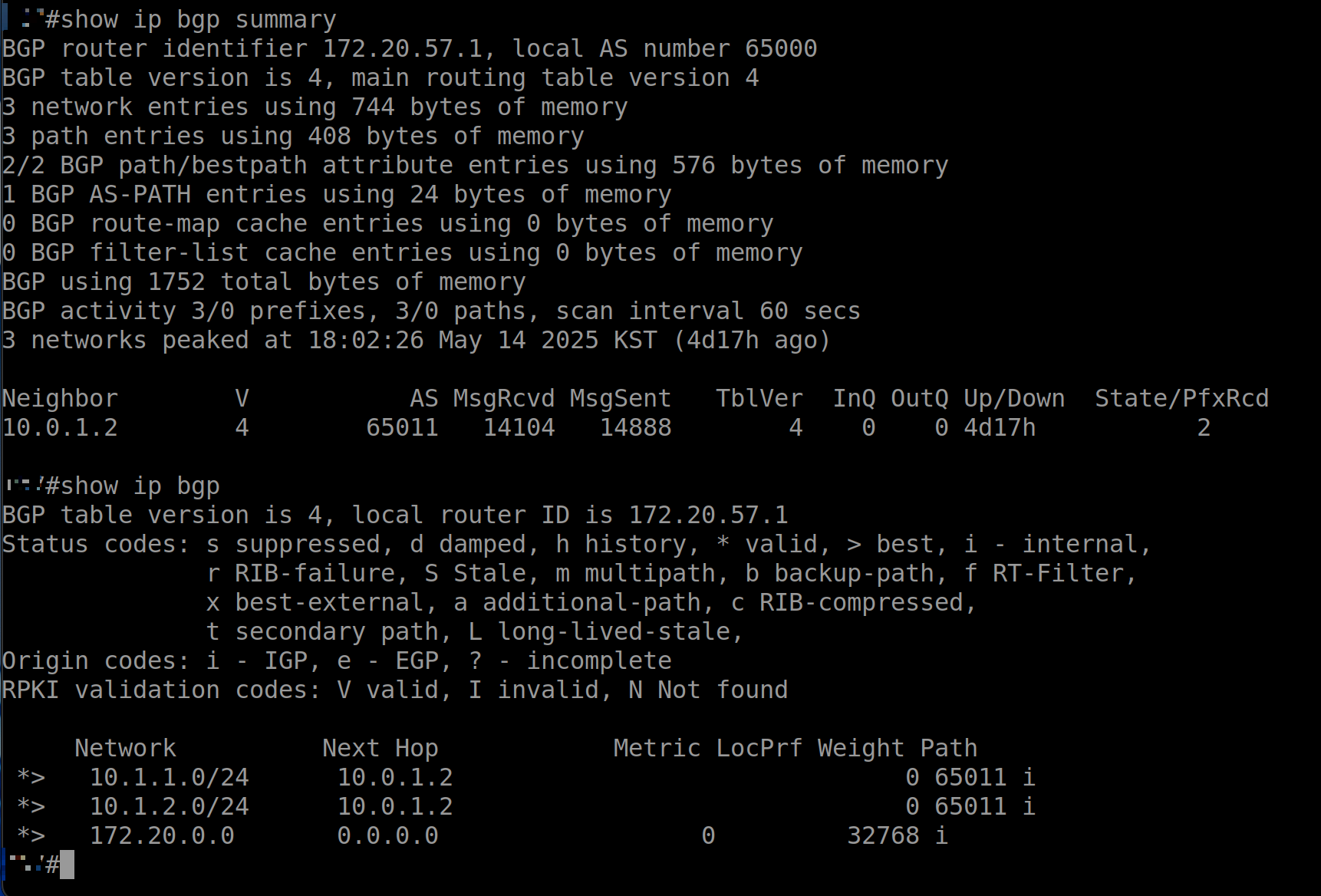
(1) show ip bgp summary

AWS BGP peer 라우터(10.0.1.2)와 Peering이 정상적으로 이루어졌는지 확인

정상인 경우 'State/PfxRcd'에 전달받은 Prefix의 개수가 표시됨

# bgp peer(neighbor) 연결 상태
show ip bgp summary
# results
BGP router identifier 172.20.57.1, local AS number 65000
BGP table version is 4, main routing table version 4
3 network entries using 744 bytes of memory
3 path entries using 408 bytes of memory
2/2 BGP path/bestpath attribute entries using 576 bytes of memory
1 BGP AS-PATH entries using 24 bytes of memory
0 BGP route-map cache entries using 0 bytes of memory
0 BGP filter-list cache entries using 0 bytes of memory
BGP using 1752 total bytes of memory
BGP activity 3/0 prefixes, 3/0 paths, scan interval 60 secs
3 networks peaked at 18:02:26 May 14 2025 KST (4d19h ago)

Neighbor        V           AS MsgRcvd MsgSent   TblVer  InQ OutQ Up/Down  State/PfxRcd
10.0.1.2        4        65011   14335   15133        4    0    0 4d19h           2


(2) show ip bgp

AWS 측 라우터(10.0.1.2)로부터 전달받은 Prefix를 확인

VGW1와 VGW2에 연결된 VPC1와 VPC2의 CIDR 대역(10.1.1.0/24, 10.1.2.0/24)이 온프렘 라우터로 전파된 것 확인

# bgp로 전달 받은 경로
show ip bgp

BGP table version is 4, local router ID is 172.20.57.1
Status codes: s suppressed, d damped, h history, * valid, > best, i - internal, 
              r RIB-failure, S Stale, m multipath, b backup-path, f RT-Filter, 
              x best-external, a additional-path, c RIB-compressed, 
              t secondary path, L long-lived-stale,
Origin codes: i - IGP, e - EGP, ? - incomplete
RPKI validation codes: V valid, I invalid, N Not found

     Network          Next Hop            Metric LocPrf Weight Path
 *>   10.1.1.0/24      10.0.1.2                               0 65011 i
 *>   10.1.2.0/24      10.0.1.2                               0 65011 i
 *>   172.20.0.0       0.0.0.0                  0         32768 i

# 라우터에서 참조하는 라우팅 경로
show ip route


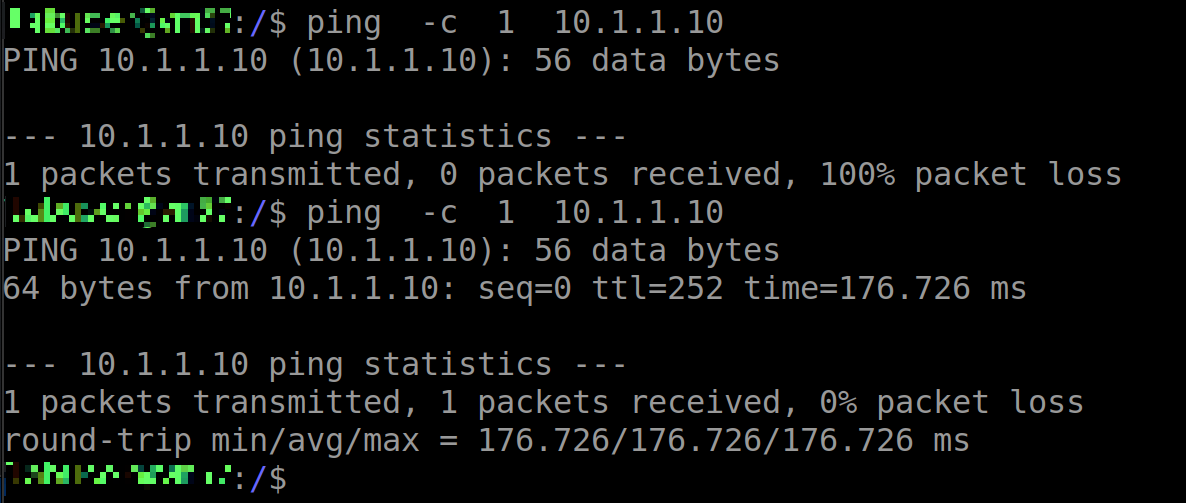
on-prem과 EC2 instance 통신 확인 (ping test)

- VPC(10.1.1.0/24) 내 EC2 인스턴스 IP 주소: 10.1.1.10


728x90
728x90

'Networking > AWS' 카테고리의 다른 글

[AWS] Route53 query logging  (1) 2025.08.07
[AWS] ALB listener server response header on|off  (0) 2025.05.19
[AWS] EC2 SSM Agent connection lost  (0) 2025.05.12
BIND server 구성  (0) 2025.04.17
[AWS] 사설 인증서 생성 및 등록  (0) 2025.04.16
728x90
반응형

SSM Agent 서비스 상태 문제

  • SSM Agent 서비스가 중지되었거나 충돌이 발생했을 수 있음
  • 다음 명령어로 확인/재시작 가능:
# Amazon Linux, RHEL의 경우
sudo systemctl status amazon-ssm-agent
sudo systemctl restart amazon-ssm-agent

# 로그 확인
sudo tail -f /var/log/amazon/ssm/amazon-ssm-agent.log

# Ubuntu의 경우
sudo service amazon-ssm-agent status
sudo service amazon-ssm-agent restart

인스턴스 리소스 문제

  • 메모리 부족이나 CPU 과부하로 인해 Agent가 제대로 작동하지 않을 수 있음
  • 시스템 리소스 사용량 확인 필요

SSM Agent 버전 문제

  • Agent 버전이 오래되었거나 업데이트 중 문제가 발생했을 수 있음
  • 최신 버전으로 재설치 시도:
sudo yum install -y amazon-ssm-agent  # Amazon Linux
sudo apt-get install amazon-ssm-agent # Ubuntu


---

System Manager

VPC 엔드포인트 사용의 대체 방법은 관리형 인스턴스에서 아웃바운드 인터넷 액세스를 허용하는 것

이 경우 관리형 인스턴스는 다음 엔드포인트에 대한 HTTPS(포트 443) 아웃바운드 트래픽도 허용해야 한다.

  • ssm.region.amazonaws.com
  • ssmmessages.region.amazonaws.com
  • ec2messages.region.amazonaws.com


References

[1] Systems Manager용 VPC 엔드포인트를 사용하여 EC2 인스턴스의 보안 개선 - https://docs.aws.amazon.com/ko_kr/systems-manager/latest/userguide/setup-create-vpc.html


Systems Manager용 VPC 엔드포인트를 사용하여 EC2 인스턴스의 보안 개선 - AWS Systems Manager

온프레미스 방화벽을 사용하고 Patch Manager를 사용하려는 경우 해당 방화벽에서 적절한 패치 기준 엔드포인트에 대한 액세스도 허용해야 합니다.

docs.aws.amazon.com


728x90
728x90
728x90
반응형

DNS 서버(BIND) 구축 방법


1. BIND 설치

- BIND (Berkeley Internet Name Domain)

# 설치
yum -y install bind bind-chroot bind-utils


2. 기본 설정 파일 수정 (/etc/named.conf)

# named.conf 수정
sudo vi /etc/named.conf

options {
        listen-on port 53 { any; };  # fixed
        listen-on-v6 port 53 { none; };  # or default (::1;)
        directory       "/var/named";
        dump-file      "/var/named/data/cache_dump.db";
        statistics-file "/var/named/data/named_stats.txt";
        memstatistics-file "/var/named/data/named_mem_stats.txt";
        allow-query     { any; };  # fixed
        recursion yes;
        
        dnssec-validation auto;
        auth-nxdomain no;  # fixed
};

요청한 도메인이 존재하지 않을 때 반환하는 DNS 코드 - no: RFC 표준 준수 (권장)


3. zone 파일 생성

# /var/named/example.com.zone 생성
sudo vi /var/named/example.com.zone

$TTL    86400
@       IN      SOA     ns1.example.com. admin.example.com. (
                        2023011001      ; Serial
                        3600            ; Refresh
                        1800            ; Retry
                        604800          ; Expire
                        86400 )         ; Minimum TTL

@       IN      NS      ns1.example.com.
@       IN      A       192.168.1.10
ns1     IN      A       192.168.1.10
www     IN      A       192.168.1.20


4. zone 설정을 named.conf에 추가

# /etc/named.conf에 추가
zone "example.com" IN {
        type master;
        file "example.com.zone";
        allow-update { none; };
};


5. 권한 및 소유권 설정

sudo chown root:named /var/named/example.com.zone
sudo chmod 640 /var/named/example.com.zone


6. 서비스 시작 및 자동 시작 설정

# 문법 체크
sudo named-checkconf
sudo named-checkzone example.com /var/named/example.com.zone
# - zone example.com/IN: loaded serial 2023011001
# - OK

# 서비스 시작
sudo systemctl start named
sudo systemctl enable named
# - reated symlink /etc/systemd/system/multi-user.target.wants/named.service → /usr/lib/systemd/system/named.service.
sudo systemctl status named


7. 방화벽 설정

    # firewalld 사용시
sudo firewall-cmd --permanent --add-port=53/tcp
sudo firewall-cmd --permanent --add-port=53/udp
sudo firewall-cmd --reload

# iptables 사용시
sudo iptables -A INPUT -p udp --dport 53 -j ACCEPT
sudo iptables -A INPUT -p tcp --dport 53 -j ACCEPT


8. 테스트

    # 로컬 테스트
dig @localhost example.com

# 특정 레코드 조회
dig www.example.com @localhost


# 결과


$ dig @localhost example.com

; <<>> DiG 9.18.33 <<>> @localhost example.com
; (1 server found)
;; global options: +cmd
;; Got answer:
;; ->>HEADER<<- opcode: QUERY, status: NOERROR, id: 45673
;; flags: qr aa rd ra; QUERY: 1, ANSWER: 1, AUTHORITY: 0, ADDITIONAL: 1

;; OPT PSEUDOSECTION:
; EDNS: version: 0, flags:; udp: 1232
; COOKIE: a2fd5717dacbb8b201000000680b4c743807764a3f2cf3a6 (good)
;; QUESTION SECTION:
;example.com.                   IN      A

;; ANSWER SECTION:
example.com.            86400   IN      A       192.168.1.10

;; Query time: 0 msec
;; SERVER: 127.0.0.1#53(localhost) (UDP)
;; WHEN: Fri Apr 25 08:48:52 UTC 2025
;; MSG SIZE  rcvd: 84


$ dig @localhost www.example.com

; <<>> DiG 9.18.33 <<>> 
http://www.example.com
 @localhost
;; global options: +cmd
;; Got answer:
;; ->>HEADER<<- opcode: QUERY, status: NOERROR, id: 38254
;; flags: qr aa rd ra; QUERY: 1, ANSWER: 1, AUTHORITY: 0, ADDITIONAL: 1

;; OPT PSEUDOSECTION:
; EDNS: version: 0, flags:; udp: 1232
; COOKIE: e731811333abbe1101000000680b4ca5b60e5eccc01d1049 (good)
;; QUESTION SECTION:
;
http://www.example.com.
 IN      A

;; ANSWER SECTION:
http://www.example.com.
 86400   IN      A       192.168.1.20

;; Query time: 0 msec
;; SERVER: 127.0.0.1#53(localhost) (UDP)
;; WHEN: Fri Apr 25 08:49:41 UTC 2025
;; MSG SIZE  rcvd: 88


728x90
728x90
728x90
반응형

1. 사설 인증서 생성 (OpenSSL 사용)

# 1. 개인키(private key) 생성
openssl genrsa -out private.key 2048

# 2. CSR(Certificate Signing Request) 생성
openssl req -new -key private.key -out csr.pem

# 3. 자체 서명된 인증서 생성 (유효기간 365일)
openssl x509 -req -days 365 -in csr.pem -signkey private.key -out certificate.crt


2. AWS Certificate Manager(ACM)에 사설 인증서 가져오기

# 1. 인증서 체인 파일 생성 (certificate.crt 내용 복사)
cat certificate.crt > chain.pem


AWS Certificate Manager console 접속

Import certificate

Certificate details

Certificate body

certificate.crt 내용 붙여넣기

 
Certificate private key
프라이빗 키: private.key 내용 붙여넣기
 
Certificate chain - optionalInfo
인증서 체인: chain.pem 내용 붙여넣기
 
Import certificate

3. ALB에 인증서 등록

AWS Console에서:

  1. EC2 > Load Balancers
  2. 대상 ALB 선택
  3. "리스너" 탭 선택
  4. HTTPS 리스너 추가 또는 수정
    • 프로토콜: HTTPS
    • 포트: 443
    • 기본 작업: 대상 그룹 선택
    • 보안 정책: ELBSecurityPolicy-2016-08 (권장)
    • 인증서: 방금 가져온 사설 인증서 선택

CLI를 이용한 ALB 인증서 등록:

# 인증서 ARN 확인
aws acm list-certificates

# ALB 리스너에 인증서 추가
aws elbv2 add-listener-certificates \
    --listener-arn [리스너-ARN] \
    --certificates CertificateArn=[인증서-ARN]
# 인증서 정보 확인
openssl x509 -in certificate.crt -text -noout

# HTTPS 연결 테스트
curl -v https://saraheee.site
 
 
728x90
728x90
728x90
반응형


1. AWS Organizations structure 생성


2. Amazon VPC IP Address Manager console

- Planning > Organization settings > choose Delegate

Your IPAM is not discovering your organiziation's resources. For IPAM to discover resources in your entire organization you must delegate an account in your organization as the IPAM administrator. You cannot delegate the organization management account as the IPAM administrator.


3. IPAM 생성


4. IPAM 풀 생성

최상위 - 리전 - 사전 프로덕션 개발 풀


5. IPAM 풀 공유

- Resource Access Manager console - Settings > Enable sharing with AWS Organizations

- Amazon VPC IP Address Manager console - (Planning) Pools > choose Name (Pool ID) > Resource sharing > Create resource share

> Create resource share

  > Select resource type: IPAM Pools

  > Principals: Allow sharing only within your organization, select principal type: Organizational unit (OU)


References:

[1] Tutorial: Create an IPAM and pools using the console - https://docs.aws.amazon.com/vpc/latest/ipam/tutorials-get-started-console.html


Tutorial: Create an IPAM and pools using the console - Amazon Virtual Private Cloud

For the purposes of this tutorial, the instructions will tell you to name IPAM resources in a particular way, create IPAM resources in specific Regions, and use specific IP address CIDR ranges for your pools. This is intended to streamline the choices avai

docs.aws.amazon.com


728x90
728x90
728x90
반응형


ALB는 수신하는 트래픽 처리를 위해 Scaling 동작을 수행하며 ALB 서비스 도메인에 대한 IP 주소가 동적으로 변경된다 [1].

1) Global Accelerator를 사용하면 고정 IP 확보는 가능하나 비용 효율적이지 않다 [2].

Global Accelerator 생성 시 기본적으로 2개의 고정 IP가 자동으로 할당된다. ALB를 엔드포인트로 추가하여 Global Accelerator의 두 고정 IP를 통해 ALB로 트래픽이 전달되도록 설정하실 수 있다.


2) ALB 앞 NLB를 사용하여 NLB의 대상으로 ALB를 연결할 수 있도록 배치하여 고정 IP를 사용하는 것과 동일한 효과를 얻을 수 있다 [3].


1), 2) 상세 내역 [4]


3) 2025-03-07 업데이트된 내역을 통해,
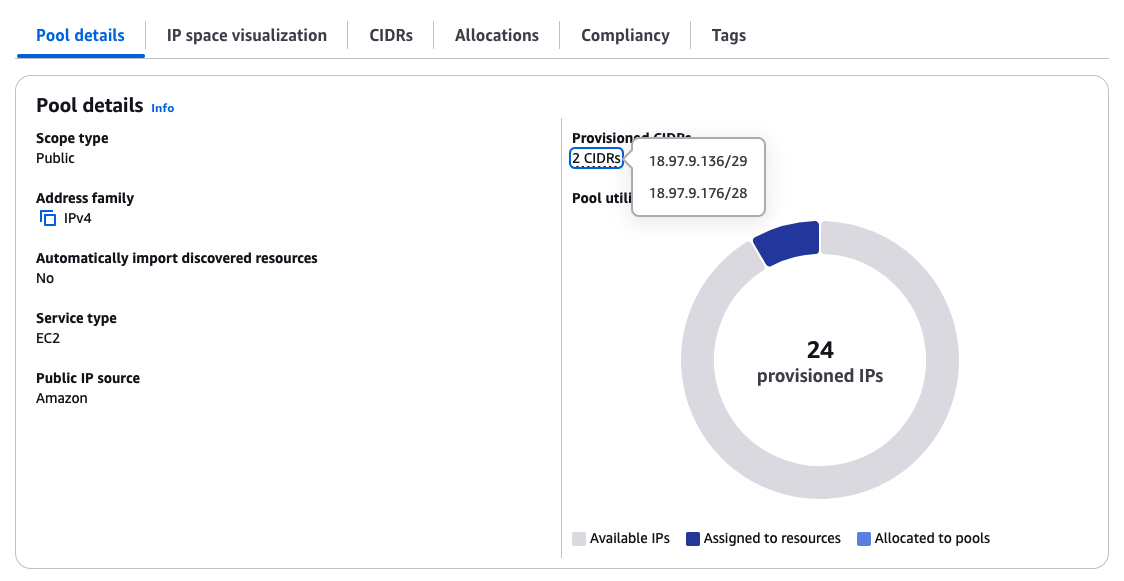
ALB가 IPAM과의 통합을 통해 ALB 노드에 IP 주소 할당을 위한 Public IPv4 주소 풀을 제공할 수 있게 되었다.
고객 소유의 BYOIPs (Bring Your Own IP addresses) 또는 Amazon에서 제공하는 인접한 IPv4 주소 블록으로 구성할 수 있는 공용 VPC IP Address Manager (IPAM) 풀을 구성할 수 있다.
이 때 ALB의 IP 주소는 IPAM 풀에서 소싱되며, 혹여 공용 IPAM 풀이 고갈되면 자동으로 AWS 관리형 IP 주소로 전환된다.

nslookup
> ipam-alb-3168xxx70.us-east-1.elb.amazonaws.com
Server:		10.148.65.xx
Address:	10.148.65.xx#53

Non-authoritative answer:
Name:	ipam-alb-3168xxx70.us-east-1.elb.amazonaws.com
Address: 18.97.9.137
Name:	ipam-alb-3168xxx70.us-east-1.elb.amazonaws.com
Address: 18.97.9.177
>


참고 사항으로, ELB 서비스가 사용하는 공인 IP는 하기 링크의 ip-ranges.json 파일에서 확인 가능하다.
us-east-1 리전에 ELB가 있는 경우, 서비스=EC2, 지역=us-east-1인 IP 주소 범위를 찾아 화이트리스트에 추가해야 한다.

(하지만 서비스가 지속적으로 성장하고 확장함에 따라 ip-ranges.json 파일도 변경될 수 있다.)

https://ip-ranges.amazonaws.com/ip-ranges.json


References:

[1] Application Load Balancers - 가용 영역 서브넷 - https://docs.aws.amazon.com/ko_kr/elasticloadbalancing/latest/application/application-load-balancers.html#availability-zones

[2] AWS Global Accelerator 구성 요소 - https://docs.aws.amazon.com/ko_kr/global-accelerator/latest/dg/introduction-components.html

[3] Network Load Balancer의 대상으로 Application Load Balancer 사용 - https://docs.aws.amazon.com/ko_kr/elasticloadbalancing/latest/network/application-load-balancer-target.html

[4] 애플리케이션 로드 밸런서(ALB)에 고정 IP 주소 설정 및 사용하기 - https://aws.amazon.com/ko/blogs/korea/using-static-ip-addresses-for-application-load-balancers/

[5] Application Load Balancer announces integration with Amazon VPC IPAM - https://aws.amazon.com/about-aws/whats-new/2025/03/application-load-balancer-integration-vpc-ipam/

[6] Blog: VPC IPAM을 사용하여 Application Load Balancer 고정 IP 사용하기 - https://zigispace.net/1320


728x90
728x90
728x90
반응형

Route53 Hybrid DNS

1. VPC 생성

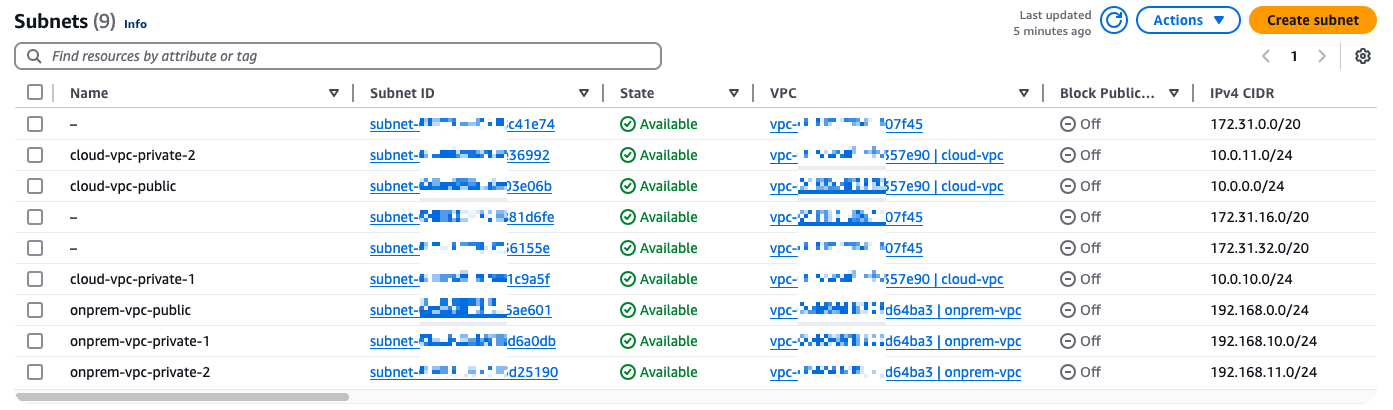
- cloud: 10.0.0.0/16

- onprem: 192.168.0.0/16

- subnets, route tables, nat gateways 생성

2. 인스턴스 생성

cloud-app-server

- sg: ssh anywhere, icmp 192.168.0.0/16

onprem-app-server

- sg: ssh 192.168.0.0/16, icmp 10.0.0.0/16

onprem-vpn-server

- sg: ssh anywhere, dns (udp) 192.168.0.0/16, icmp 192.168.0.0/16

3. VPN 설정

1) Virtual private gateway (cloud-vgw)

2) Customer gateways (onprem-cgw) - onprem-vpn-server의 public IP address (Specify the IP address for your customer gateway device's external interface.)

3) VGW - attach to VPC: cloud-vpc

4) Site-to-Site VPN connections (cloud-onprem-vpn-connection)

- Routing options: Static

- Static IP prefixes: 192.168.0.0/16 (onprem-vpn range)

5) download VPN connections configurations - Platform: Openswan

4. SSH 접속

brew install putty
putty

Auth - Credentials - keypair.pem 경로

Session - Saved Sessions

IP: onprem-vpn-server's public IP

login as: ec2-user

ssh -i "ap-south-1-keypair.pem" ec2-user@35.x.x.x
 % sudo su
sh-3.2# ssh -i "ap-south-1-keypair.pem" ec2-user@35.154.187.78
The authenticity of host '35.x.x.x (35.x.x.x)' can't be established.
ED25519 key fingerprint is SHA256:qOx9yHXTxD6xaC9BfiT/Y5/82Ml/mVZzr5hNXnw9FQ8.
This key is not known by any other names.
Are you sure you want to continue connecting (yes/no/[fingerprint])? yes
Warning: Permanently added '35.x.x.x' (ED25519) to the list of known hosts.
   ,     #_
   ~\_  ####_        Amazon Linux 2023
  ~~  \_#####\
  ~~     \###|
  ~~       \#/ ___   https://aws.amazon.com/linux/amazon-linux-2023
   ~~       V~' '->
    ~~~         /
      ~~._.   _/
         _/ _/
       _/m/'
[ec2-user@ip-192-168-0-220 ~]$
sudo yum install libreswan
sudo vi /etc/sysctl.conf

1) Open /etc/sysctl.conf and ensure that its values match the following:
   net.ipv4.ip_forward = 1
   net.ipv4.conf.default.rp_filter = 0
   net.ipv4.conf.default.accept_source_route = 0

2) Apply the changes in step 1 by executing the command 'sysctl -p'

sudo sysctl -p

3) Open /etc/ipsec.conf and look for the line below. Ensure that the # in front of the line has been removed, then save and exit the file.
    #include /etc/ipsec.d/*.conf

이미 제거된 상태로 저장됨

cat /etc/ipsec.conf

4) Create a new file at /etc/ipsec.d/aws.conf if doesn't already exist, and then open it. Append the following configuration to the end in the file:
 #leftsubnet= is the local network behind your openswan server, and you will need to replace the <LOCAL NETWORK> below with this value (don't include the brackets). If you have multiple subnets, you can use 0.0.0.0/0 instead.
 #rightsubnet= is the remote network on the other side of your VPN tunnel that you wish to have connectivity with, and you will need to replace <REMOTE NETWORK> with this value (don't include brackets).

conn Tunnel1
authby=secret
auto=start
left=%defaultroute
leftid=35.x.x.x
right=13.x.x.x
type=tunnel
ikelifetime=8h
keylife=1h
phase2alg=aes128-sha1;modp1024
ike=aes128-sha1;modp1024
auth=esp
keyingtries=%forever
keyexchange=ike
leftsubnet=<LOCAL NETWORK>
rightsubnet=<REMOTE NETWORK>
dpddelay=10
dpdtimeout=30
dpdaction=restart_by_peer

sudo vi /etc/ipsec.d/aws.conf
conn Tunnel1
        authby=secret
        auto=start
        left=%defaultroute
        leftid=35.x.x.x
        right=13.x.x.x
        type=tunnel
        ikelifetime=8h
        keylife=1h
        phase2alg=aes256-sha1;modp2048
        ike=aes256-sha1;modp2048
        keyingtries=%forever
        keyexchange=ike
        leftsubnet=192.168.0.0/16
        rightsubnet=10.0.0.0/16
        dpddelay=10
        dpdtimeout=30
        dpdaction=restart_by_peer

5) Create a new file at /etc/ipsec.d/aws.secrets if it doesn't already exist, and append this line to the file (be mindful of the spacing!):
35.x.x.x 13.x.x.x: PSK "TOC3RK--------------------IUtns"

sudo vi /etc/ipsec.d/aws.secrets

Tunnel 1 구성 완료

sudo systemctl start ipsec.service
sudo systemctl status ipsec.service

5. Route Tables 설정 (propagation)

cloud-vpc-private-rt > Route propagation > Propagation: Enable

또는 Routes 편집 (cloud-vgw)

cloud-vpc-public-rt도 동일하게 설정

6. VPN 서버의 목적지 비활성화

Instances: onprem-vpn-server > Actions - Networking - Change Source / destination check > check Stop > Save

Route tables: cloud-vpc-public-rt > 10.0.0.0/16 instance (onprem-vpn-server)

7. Cloud Instance 접속

cloud-app-server public IP

ssh -i "ap-south-1-keypair.pem" ec2-user@3.x.x.x


ping (onprem-app-server)


From Cloud EC2 instance - Ping to on-premises App server private IP

Cloud EC2 -> VGW -> VPN Tunnel 1 -> VPN server -> App server


728x90
728x90
728x90
반응형

도메인 등록을 위한 DNS 서비스를 변경하고 싶은 경우 퍼블릭 호스팅 영역의 이름 서버를 가져온다.


1) Route 53 console의 Hosted zones 내비게이션 바 클릭 > Hosted zone name 클릭

2) Hosted zone details의 Name servers 4개 저장

3) Route 53 console의 Domains - Registered domains 내비게이션 바 클릭

4) Actions - Edit name servers


5) 2)에서 저장한 name servers 입력 후 저장


[1] 퍼블릭 호스팅 영역에 대한 이름 서버 가져오기 - https://docs.aws.amazon.com/ko_kr/Route53/latest/DeveloperGuide/GetInfoAboutHostedZone.html

728x90
728x90
728x90
반응형

1. AWS VPC

VPC를 사용하면 논리적으로 격리된 가상 네트워크에서 AWS 리소스를 시작할 수 있다. 이 가상 네트워크는 AWS의 확장 가능한 인프라를 사용한다는 이점과 함께 고객의 자체 데이터 센터에서 운영하는 기존 네트워크와 유사하다.

서브넷: VPC의 IP 주소 범위, 단일 가용 영역에 상주

라우팅: 라우팅 테이블을 사용해서 서브넷 또는 게이트웨이의 네트워크 트래픽이 전달되는 위치를 결정

게이트웨이 및 엔드포인트: 게이트웨이는 VPC를 다른 네트워크에 연결, 인터넷 게이트웨이를 사용하여 VPC를 인터넷에 연결

피어링 연결: VPC 피어링 연결을 사용하여 두 VPC의 리소스 간 트래픽을 라우팅

VPC 흐름 로그: VPC의 네트워크 인터페이스로 들어오고 나가는 IP 트래픽에 대한 정보를 캡처

2. Security in VPC

보안 그룹: 리소스 수준(예: EC2 인스턴스)에서 특정 인바운드 및 아웃바운드 트래픽을 허용, 인스턴스를 시작할 때 하나 이상의 보안 그룹과 연결할 수 있다. VPC의 각 인스턴스는 서로 다른 보안 그룹 세트에 속할 수 있다.

네트워크 액세스 제어 목록(ACL): 네트워크 ACL은 서브넷 수준에서 특정 인바운드 또는 아웃바운드 트래픽을 허용하거나 거부한다.

흐름 로그: VPC의 네트워크 인터페이스에서 양방향으로 이동하는 IP 트래픽에 대한 정보를 캡처한다. VPC, 서브넷 또는 개별 네트워크 인터페이스에 대한 흐름 로그를 생성할 수 있다.

흐름 로그 데이터는 CloudWatch logs 또는 Amazon S3에 게시되며 과도하게 제한하거나 과도하게 허용하는 보안 그룹과 네트워크 ACL 규칙을 진단하는 데 도움이 된다.

트래픽 미러링: Amazon EC2 인스턴스의 탄력적 네트워크 인터페이스에서 네트워크 트래픽을 복사할 수 있다.

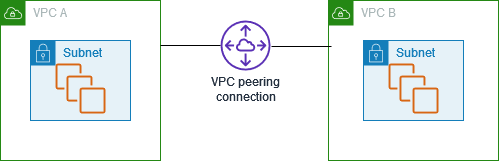
3. VPC Peering

VPC는 사용자의 AWS 계정 전용 가상 네트워크이다. AWS 클라우드에서 다른 가상 네트워크와 논리적으로 분리되어 있다.

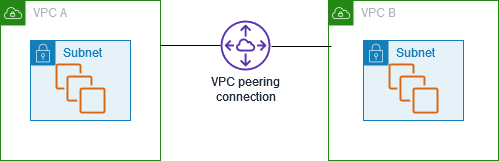
VPC 피어링 연결은 프라이빗 IPv4 주소 또는 IPv6 주소를 사용하여 두 VPC 간에 트래픽을 라우팅할 수 있도록 하기 위한 두 VPC 사이의 네트워크 연결이다.

동일한 네트워크에 속하는 경우와 같이 VPC의 인스턴스가 서로 통신할 수 있다. 사용자의 자체 VPC 또는 다른 AWS 계정의 VPC와 VPC 피어링 연결을 만들 수 있으며, VPC는 상이한 리전에 있을 수 있다.

VPC의 기존 인프라를 사용하여 VPC 피어링 연결을 생성한다. 이는 게이트웨이도, VPN 연결도 아니며 물리적 하드웨어 각각에 의존하지 않는다. 그러므로 통신 또는 대역폭 병목에 대한 단일 지점 장애가 없다.

4. VPC Flowlogs

VPC 흐름 로그는 VPC의 네트워크 인터페이스에서 전송되고 수신되는 IP 트래픽에 대한 정보를 수집할 수 있는 기능이다. 흐름 로그 데이터가 게시될 수 있는 위치는 Amazon CloudWatch Logs, Amazon S3 또는 Amazon Data Firehose이다.

흐름 로그를 생성하면 구성한 로그 그룹, 버킷 또는 전송 스트림의 흐름 로그 레코드를 검색하고 볼 수 있다.

5. VPC PrivateLink

VPC에 인터넷 게이트웨이를 추가하여 인터넷 액세스를 허용하거나 VPN 연결을 추가하여 온프레미스 네트워크 액세스를 허용할 수 있다.

VPC의 클라이언트가 프라이빗 IP 주소를 사용하여 다른 VPCs의 서비스 및 리소스에 연결할 수 있도록 AWS PrivateLink 하려면 해당 서비스 및 리소스가 VPC에서 직접 호스팅된 것처럼 사용한다.

6. NAT Instance

NAT 인스턴스는 Network Address Translation(NAT)을 제공한다. NAT 인스턴스를 사용하면 프라이빗 서브넷의 리소스가 인터넷이나 온프레미스 네트워크와 같은 VPC 외부의 대상과 통신할 수 있다. 프라이빗 서브넷의 리소스는 인터넷으로 향하는 아웃바운드 IPv4 트래픽을 시작할 수 있지만 인터넷에서 시작된 인바운드 트래픽을 수신할 수는 없다.

NAT 인스턴스는 퍼블릭 인터넷에 있어야 하며, NAT 인스턴스에는 퍼블릭 IP 주소 또는 탄력적 IP 주소가 있어야 한다.

7. NAT Gateway

NAT 게이트웨이는 NAT 서비스로, 프라이빗 서브넷의 인스턴스가 VPC 외부의 서브넷에 연결할 수 있지만 외부 서비스에서 이러한 인스턴스와의 연결을 시작할 수 없도록 NAT 게이트웨이를 사용할 수 있다.

퍼블릭 - (기본값) 퍼블릭 서브넷의 인스턴스는 퍼블릭 NAT 게이트웨이를 통해 인터넷에 연결할 수 이지만 인터넷에서 원치 않는 연결을 수신할 수 없다. 퍼블릭 서브넷에서 퍼블릭 NAT 게이트웨이를 생성하고 생성 시 탄력적 IP 주소를 NAT 게이트웨이와 연결해야 한다.

프라이빗 - 프라이빗 서브넷 인스턴스는 프라이빗 NAT 게이트웨이를 통해 다른 VPC 또는 온프레미스 네트워크에 연결할 수 있다.

8. IPv6 migration

IPv4만을 지원하는 기존 VPC와 서브넷에서 IPv4만을 사용하도록 구성된 리소스가 있으면 VPC 및 리소스에 대한 IPv6 지원을 추가할 수 있다.


References: 

1. AWS VPC - http://docs.aws.amazon.com/AmazonVPC/latest/UserGuide/VPC_Introduction.html

2. Security in VPC - http://docs.aws.amazon.com/AmazonVPC/latest/UserGuide/VPC_Security.html
3. VPC Peering - http://docs.aws.amazon.com/AmazonVPC/latest/PeeringGuide/Welcome.html
4. VPC Flowlogs - http://docs.aws.amazon.com/AmazonVPC/latest/UserGuide/flow-logs.html
5. VPC PrivateLink - http://docs.aws.amazon.com/AmazonVPC/latest/UserGuide/vpc-endpoints.html
6. NAT Instance - http://docs.aws.amazon.com/AmazonVPC/latest/UserGuide/VPC_NAT_Instance.html
7. NAT Gateway - http://docs.aws.amazon.com/AmazonVPC/latest/UserGuide/vpc-nat-gateway.html
8. IPv6 migration - http://docs.aws.amazon.com/AmazonVPC/latest/UserGuide/vpc-migrate-ipv6.html


728x90
728x90
728x90
반응형

VPC DNS resolver 우선 순위

0. DNS firewall (R53 전용 Network Firewall)


1. Route 53 Resolver 규칙
   - 명시적으로 정의된 Outbound 규칙
   - 도메인 기반 포워딩 규칙


2. Private Hosted Zone
   - VPC와 연결된 프라이빗 호스팅 영역

$ dig example.com

; <<>> DiG 9.11.4-P2-RedHat-9.11.4-26.P2.amzn2.13.9 <<>> example.com
;; global options: +cmd
;; Got answer:
;; ->>HEADER<<- opcode: QUERY, status: NOERROR, id: 63355
;; flags: qr rd ra; QUERY: 1, ANSWER: 0, AUTHORITY: 1, ADDITIONAL: 1

;; OPT PSEUDOSECTION:
; EDNS: version: 0, flags:; udp: 4096
;; QUESTION SECTION:
;saraheee.site.                 IN      A

;; AUTHORITY SECTION:
saraheee.site.          900     IN      SOA     ns-1536.awsdns-00.co.uk. awsdns-hostmaster.amazon.com. 1 7200 900 1209600 86400

;; Query time: 1 msec
;; SERVER: 192.168.0.2#53(192.168.0.2)
;; WHEN: Thu Feb 06 07:15:42 UTC 2025
;; MSG SIZE  rcvd: 129


3. Default VPC Resolver
   - VPC의 기본 .2 리졸버

$ cat /etc/resolv.conf
options timeout:2 attempts:5
; generated by /usr/sbin/dhclient-script
search anycompany.corp
nameserver 192.168.2.250
nameserver 192.168.0.2


4. Public DNS resolve 시도 (Route 53 Public Hosted Zone 포함)

$ dig example.com
; <<>> DiG 9.18.28 <<>> example.com;; global options: +cmd
;; Got answer:
;; ->>HEADER<<- opcode: QUERY, status: NOERROR, id: 6753
;; flags: qr rd ra; QUERY: 1, ANSWER: 1, AUTHORITY: 0, ADDITIONAL: 1

;; OPT PSEUDOSECTION:
; EDNS: version: 0, flags:; udp: 4096
;; QUESTION SECTION:
;saraheee.site.                 IN      A

;; ANSWER SECTION:
saraheee.site.          30      IN      A       8.8.8.8

;; Query time: 1610 msec
;; SERVER: 10.0.0.2#53(10.0.0.2) (UDP)
;; WHEN: Thu Feb 06 07:15:47 UTC 2025;; MSG SIZE  rcvd: 58


아웃바운드 엔드포인트가 구성된 Resolver 규칙이 있는 경우, 프라이빗 호스팅 영역과 동일한 VPC에 연결되어 있을 때 리졸버 규칙이 우선적으로 적용될 수 있다.

다만 Private hosted zone이 VPC 내부에서만 작동하는 DNS라, dig +trace 시 공개적인 DNS 해석 과정이 포함된 root DNS와는 독립적으로 작동한다.
 

-

규칙이 동일한 도메인 수준에 있다면, 해당 규칙의 우선 순위는 다음과 같습니다.
  1. Resolver 규칙
  2. 프라이빗 호스팅 영역
  3. 내부 규칙


References: 

[1] Route 53 프라이빗 호스팅 영역의 DNS 확인 문제를 해결하려면 어떻게 해야 하나요? - https://repost.aws/ko/knowledge-center/route-53-fix-dns-resolution-private-zone


Route 53 프라이빗 호스팅 영역 DNS 확인 문제 해결

Amazon Route 53 프라이빗 호스팅 영역의 DNS 확인 문제를 해결하고 싶습니다.

repost.aws


728x90
728x90
728x90
반응형


본인 IP 조회

curl ifconfig.me


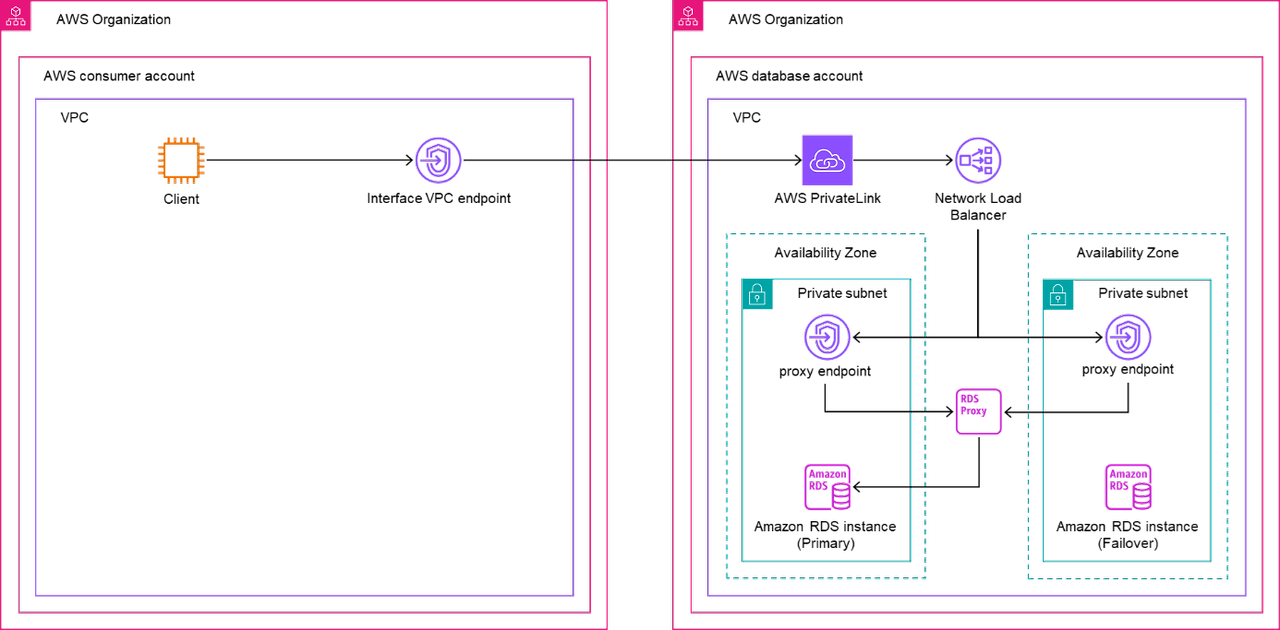
1. 데이터베이스 계정에 RDS DB 인스턴스 및 RDS 프록시 생성

2. RDS Proxy 엔드포인트에 할당된 IP 주소 식별

- dig (proxy endpoint arn) 의 Answer section

3. 데이터베이스 계정에 PrivateLink 엔드포인트 서비스 생성

1) 데이터베이스 계정에 타겟 그룹 생성

2) 데이터베이스 계정에 Network Load Balancer 생성

3) 데이터베이스 계정에 VPC 엔드포인트 서비스 생성

4. 고객 계정에서 VPC 엔드포인트 생성

5. 연결 테스트


psql -h <db-endpoint> -p <port-number> -d <db-name> -U <username> -W


psql -h nlbdb-database-ee.cluster-c78suu4aug2x.us-east-1.rds.amazonaws.com -p 5432 -d nlbdb-database-ee -U postgres


References:

[] Connect to an AWS RDS PostgreSQL database using PSQL - https://onticdani.medium.com/connect-to-an-aws-rds-postgresql-database-using-psql-750c00b5ceb2

[] Access Amazon RDS across AWS accounts using AWS PrivateLink, Network Load Balancer, and Amazon RDS Proxy - https://aws.amazon.com/ko/blogs/database/access-amazon-rds-across-aws-accounts-using-aws-privatelink-network-load-balancer-and-amazon-rds-proxy/
[] Use Amazon RDS Proxy and AWS PrivateLink to access Amazon RDS databases across AWS Organizations at American Family Insurance Group - https://aws.amazon.com/blogs/database/use-amazon-rds-proxy-and-aws-privatelink-to-access-amazon-rds-databases-across-aws-organizations-at-american-family-insurance-group/


728x90
728x90

'Networking > AWS' 카테고리의 다른 글

[AWS] VPC - Basic docs  (0) 2025.02.10
[AWS] VPC DNS resolver 우선 순위  (0) 2025.02.06
[AWS] SAA-C03#12: Route 53 (2)  (0) 2024.08.07
[AWS] SAA-C03#11: Route 53 (1)  (0) 2024.08.07
[AWS] ANS-C01#02: VPC fundamentals  (2) 2024.07.24

+ Recent posts